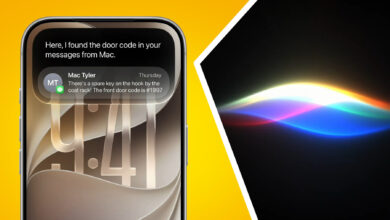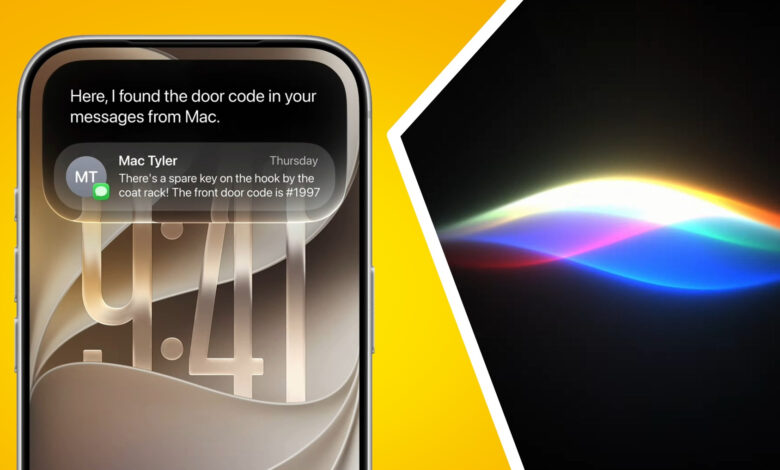
Apple’s iOS 27 is shaping up to do more than add a few new tools. The update is designed to make the iPhone feel more responsive, more personal, and far more capable across everyday tasks, with Siri taking the biggest step forward.
The assistant is now positioned at the center of the experience. It can hold more natural conversations, understand what was discussed earlier, and handle more complex requests without forcing users to repeat themselves.
Siri becomes more useful across daily tasks
Apple Intelligence gives Siri access to context stored on the device, including email, messages, photos, calendar entries, and notes. That means users can ask for things in a more natural way, such as finding an old address, a specific photo, or other personal information.
Apple is also introducing a dedicated Siri app for the first time. Conversation history can be saved, revisited, and continued across iPhone, iPad, and Mac through iCloud sync.
Siri’s role now extends beyond replies by voice or text. It can draft emails, messages, notes, and documents from simple instructions, while adjusting tone and style to match the recipient or situation.
The assistant is also better at acting across apps. A user can ask Siri to find a photo, edit it, and share it with a family group without switching between apps manually.
AI reaches deeper into photos and creativity
iOS 27 also brings visual intelligence into the Camera app. When the camera is pointed at an object, the system can provide extra information, identify places, items, or food, and even help split a restaurant bill.
One of the more notable additions is Spatial Reframing, which lets users change the perspective of a photo after it has been taken. The effect is meant to feel like moving the camera position back to the original moment.
Apple is also adding the Extend Tool, which uses AI to expand the frame of an image. That should help when a photo needs a different aspect ratio or a better composition without cropping important details.
Cleanup has been refined as well. Apple says distracting objects can now be removed more cleanly, including from complicated backgrounds where editing usually leaves obvious traces.
Image Playground also gets a new AI model that produces more realistic images. Users can generate illustrations from text prompts, change the visual style of photos, and create more personal visual content.
Personalization extends to wallpapers and Contact Poster layouts too. Users can build wallpapers from personal photos, favorite places, or frequent activities, while Contact Poster designs can now be generated automatically with AI.
Speed, search, and system behavior get a lift
Outside the AI layer, Apple says iOS 27 includes aggressive system optimization. Apps can open up to 30% faster, while recently taken photos can appear in the gallery up to 70% faster than on previous iOS generations.
AirDrop also gets a major speed boost. Apple claims transfer speed can rise by as much as 80%, especially when moving large files such as 4K video.
The Liquid Glass design introduced last year is becoming more flexible. Users can adjust the transparency level, from very clear to more colorful, depending on preference.
Network switching is also being handled more smoothly. The iPhone is now smarter about choosing the best connection when moving between Wi-Fi and cellular, which helps FaceTime calls and other online activity stay connected.
Safari, passwords, and automations are more practical
Safari gains a Notify Me feature that watches web pages automatically. Users can receive alerts when there is a price change, a stock update, or an event registration opening on a page they follow.
Tab management is also easier. Apple Intelligence can group Safari tabs automatically by topic, making it faster to return to the right page.
Apple is lowering the barrier for browser tools as well. With Describe an Extension, users can explain what they want, and Safari will create the extension automatically without coding knowledge.
Passwords has been updated to handle weak or compromised passwords with a single tap. Shortcuts also becomes easier to use, since Describe a Shortcut can build automations from everyday language.
Search is being rebuilt too. Spotlight, Photos, and Mail can now find files, photos, emails, or documents faster through natural-language queries.
Home, health, sharing, and audio also expand
Shared Albums in iCloud now works more flexibly by supporting Android and Windows users. Photos and videos shared that way can also be stored in full resolution.
Health gains tracking for perimenopause and menopause, allowing users to record symptoms and view related information about bodily changes.
For audio, AirPods now support Custom EQ so users can tune sound to their preferences. Apple also brings GymKit to iPhone for connecting with treadmills, stationary bikes, and other cardio equipment.
The Home app is getting Apple Intelligence support as well. The system can summarize security camera activity, search recordings by specific events, and support 4K streaming and recording on compatible HomeKit Secure Video cameras.
Source: inet.detik.com