When WhatsApp starts slowing down, the cause is often not the app itself but storage that has quietly filled up with photos, videos, voice notes, and documents. The problem can affect daily use and, in severe cases, trigger errors or warnings that the phone memory needs to be cleared immediately.
The good news is that users do not have to delete data blindly to make space again. WhatsApp provides built-in tools that help identify large files, repeated media, and chats that can be cleaned more selectively.
Start with WhatsApp’s storage menu
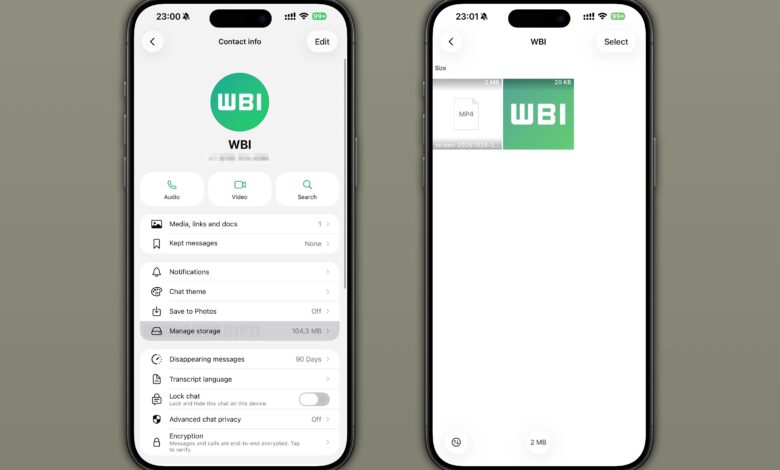
The most practical place to begin is the app’s storage settings, where WhatsApp shows which files take up the most space. Users can open the three-dot menu in the top right corner, then go to Storage and Data and select Manage Storage.
Inside that menu, WhatsApp highlights large files and frequently forwarded items, including files larger than 5 MB. It also allows sorting by newest, oldest, or largest, which makes it easier to find files worth removing without checking every chat one by one.
Media is usually the biggest culprit
Automatic downloads can quietly save incoming media to the device, especially when photos and videos are exchanged often in group chats. Over time, repeated sharing across multiple conversations can build up into a large storage burden.
WhatsApp also lets users search by category, such as photos or videos, so cleanup can be done in a more focused way. Once the files are selected, they can be deleted by pressing and holding them, then tapping the trash icon.
Chat cleanup can free up even more space
Storage problems are not limited to media files alone, because entire conversations can also occupy significant space. Users can open a chat, choose the more options menu, and tap Clear Chat to remove messages, images, videos, and documents from that conversation at once.
If needed, there is also an option to delete media from the phone gallery so that copies do not remain on the device. This step is especially useful for people who receive a high volume of content from groups or older conversations they no longer need to keep.
Check before deleting anything important
Any large cleanup should be done carefully, because files removed from WhatsApp cannot be restored later. That means users should confirm that the items are no longer needed before sending them to the trash.
If important files still matter, it is safer to back them up first. WhatsApp warns that very low device storage can also affect performance, and in some situations the app may ask users to remove files before it can work normally again.
Regular maintenance keeps the phone lighter
Cleaning WhatsApp storage should not be left until the phone is already struggling. Regular maintenance helps keep the app responsive and reduces the risk of slowdowns caused by overflowing memory.
By reviewing large files, clearing unnecessary chats, and managing media on a routine basis, users can keep their phones running more smoothly while preserving the data that still matters.