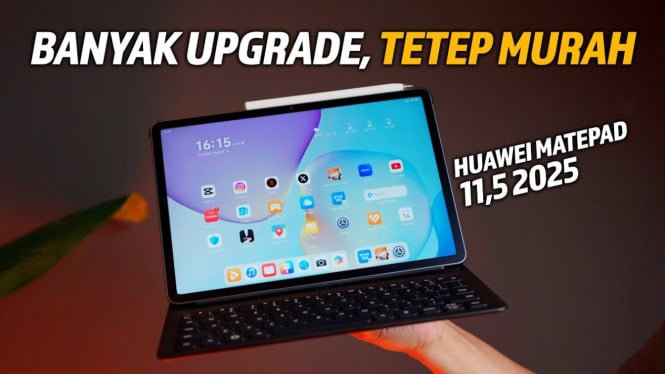
Huawei MatePad 11.5s offers a compelling alternative to laptops under $550, combining portability with productivity. Priced around $490, it comes bundled with a keyboard, M-Pencil Gen 3, and Bluetooth mouse, giving users a complete package for office and creative tasks.
The tablet addresses Google service concerns by enabling easy installation of Google apps via Gbox from App Gallery. Users can access Google Drive, Maps, and Play Store directly without complicated sideloading, making the ecosystem more accessible.
Premium Build and Lightweight Design
Despite its affordable price, the MatePad 11.5s features a plastic back cover finished to imitate premium metal. Its aluminum frame enhances durability with no noticeable flex even under strong twisting, offering solid build quality similar to flagship tablets costing much more.
Measuring just 6.35mm thick and weighing 515 grams, this tablet is thinner and lighter than many modern smartphones. The compact design ensures easy portability for professionals and students on the go without adding bulk to bags.
Advanced Paper Matte Display with Eye Care Certifications
The 11.5-inch display boasts a sharp 2800×1840 pixel resolution and adaptive refresh rates up to 144Hz for smooth scrolling. Its paper matte finish creates a natural writing feel, reducing glare for comfortable outdoor or bright environment use.
Huawei went further by securing four eye-safety certifications from TÜV Rheinland and SGS: low blue light, flicker-free, reflection-free, and low visual fatigue. These make it safe for extended use without straining the eyes, addressing a key concern for students and office users.
Compared to the $1,400 iPad Pro with anti-glare screens, the MatePad delivers similar display benefits at less than half the price, making it a highly valuable purchase for budget-conscious buyers.
Innovative Keyboard with NearLink Wireless Technology
The magnetic keyboard attaches firmly to the tablet and doubles as a protective cover. It connects via Huawei’s NearLink wireless technology, which offers six times faster data transfer than Bluetooth with half the power consumption. This reduces latency noticeably during typing and light gaming.
The keyboard feels comfortable with adequate key travel, and its built-in touchpad adds convenient cursor control. Including a free Bluetooth mouse in the package completes the laptop-replacement setup, supporting efficient Excel work and presentations without extra accessories.
M-Pencil Gen 3: Precision Stylus for Digital Creativity
Huawei’s M-Pencil Gen 3 features 10,000 levels of pressure sensitivity, surpassing competitor styluses that typically offer 4,000 to 8,000 levels. This precision helps artists create detailed strokes ranging from very thin to thick lines.
The stylus charges magnetically on the tablet’s edge, eliminating separate charging hassles, which is ideal for spontaneous drawing sessions. It comes with the exclusive GoPaint app that supports 532 layers at 2K resolution and 241 layers at 4K, outdoing popular apps like Procreate by allowing more complex, layered artwork.
Users also gain access to over 100 brush presets, 700 customizable brush settings, and the ability to import Photoshop brushes. These features enhance artistic workflow flexibility and creativity.
Unique Eyedropper and Reference Window Features
GoPaint includes a unique eyedropper tool that can select colors from a separate reference window, a feature unavailable even in premium apps like Procreate. Artists can insert guide images and sample colors directly, streamlining the creative process.
The app offers saved favorite brushes and comprehensive tutorials, making it beginner friendly while satisfying professionals. Combined with the paper matte screen’s tactile feedback and haptics, the tablet provides a natural drawing experience.
Harmony OS 4.2: Multitasking Like a Laptop
Harmony OS 4.2 allows multiple resizable app windows on screen simultaneously, mimicking laptop-style multitasking. WPS Office is included for free, offering full PC-level productivity with features like pivot tables, custom margins, and animation in presentations.
The file manager integrates cloud storage services like Google Drive and OneDrive seamlessly, supporting drag-and-drop operations without additional apps. The tablet also supports external display output for presentations or media viewing via direct cable connection.
Long-Lasting Battery for All-Day Use
Huawei equips the MatePad 11.5s with an 8800mAh battery, capable of handling intense usage through a full day on a single charge. Fast charging support minimizes downtime, enhancing mobility far beyond typical laptops that often require frequent recharging.
This battery endurance supports users working remotely or attending classes without worrying about power outlets, further reinforcing this tablet as a practical and affordable laptop replacement.
Overall, the Huawei MatePad 11.5s offers a rich feature set, premium build, and versatile accessories for less than $500. It bridges the gap between tablets and laptops effectively, making it a standout choice for productivity and creativity on a budget.