


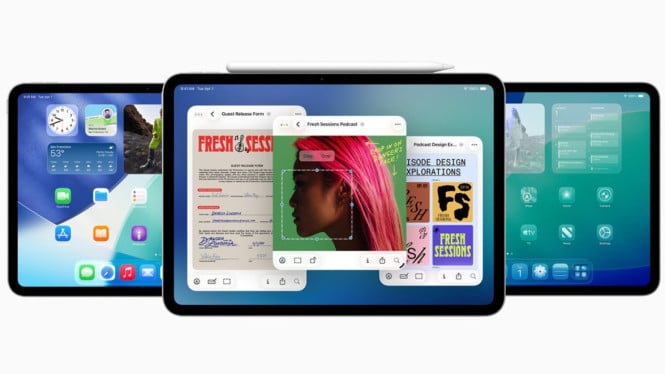
Apple’s release of iPadOS 26 marks the most significant update to the iPad’s operating system, blurring the line between tablet and laptop. The new windowing system offers flexible resize and tiling features that transform the iPad experience to closely resemble MacBook’s macOS environment.
The fresh Liquid Glass design—shared with iOS 26—brings a sleek look with transparent elements in the Control Center and Notification Center. This design update also features consistent icon themes and a revamped Settings app for easier navigation, enhancing user experience especially for newcomers.
Advanced Window Management for Mac-Like Productivity
iPadOS 26 introduces a new window management system with drag-resizable windows similar to desktop computers. Every window supports standard Mac-like controls: close, minimize, and maximize buttons neatly positioned on top for seamless cross-platform familiarity. The system automatically remembers window positions when apps close, allowing workflows to resume precisely where users left off.
The enhanced window tiling allows users to drag apps to either side of the screen, enabling automatic split-screen layouts. Users can adjust the split ratio by dragging the divider, tailoring workspace proportions to specific tasks. The iPad now supports up to 12 simultaneous apps in a grid layout for advanced multitasking scenarios, catering to professional workflows demanding high productivity.
Menu Bar Enhances Application Control
A dynamic menu bar triggered by swiping down or hovering the pointer provides quick settings relevant to the current app without leaving it. This design mirrors macOS functionality, enabling users to access app-specific configurations faster and maintain workflow momentum. The consistent interface eases the transition between Mac and iPad for those using both devices regularly.
Files App Overhaul for Superior File Management
The Files app receives major improvements, allowing direct folder access from the dock without opening the app. Customizable folder colors offer visual cues that help better organize documents and projects. Additionally, the “Open with” feature lets users select preferred apps for specific files, offering the flexibility reminiscent of macOS file handling.
Specialized Preview App for PDF and Photo Editing
Apple introduces a dedicated Preview app to handle PDFs and photos outside the Files app’s complexity. This app offers annotation, signing, and markup tools for PDFs along with basic photo editing capabilities. This addition removes the need for third-party apps, streamlining workflows and reinforcing cross-device consistency between iPad and Mac.
Refined Mouse Pointer and Background Task Management
The mouse pointer now adopts the traditional arrow shape instead of a circular form, providing higher precision needed in design and editing applications. This design choice aligns with desktop expectations and reduces adjustment time for users shifting between Mac and iPad.
Background tasks such as file downloads and media exports continue unobtrusively while users engage with other apps. Progress indicators appear in the corner, improving multitasking efficiency without interrupting active work in other applications.
Can iPadOS 26 Replace a MacBook?
Although iPadOS 26 narrows the gap with MacBook’s macOS through sophisticated window management and interface refinements, it is not yet a complete substitute. The key limitation remains app availability; professional users depend on apps optimized for iPadOS to fully leverage the device as a MacBook replacement.
In summary, iPadOS 26 delivers a monumental upgrade that makes the iPad feel strikingly like a MacBook. Its innovations in windowing, design, and multitasking cater especially to professionals seeking enhanced productivity. Yet, the final choice between iPad and MacBook depends on the user’s software ecosystem needs and workflow preferences.