Buying a secondhand iPhone is increasingly popular among gadget enthusiasts who want Apple quality without paying premium prices. However, many buyers end up disappointed after purchasing devices with poor battery condition or unauthorized repairs.
The battery is the most critical part often manipulated by dishonest sellers. Before finalizing a purchase, checking the battery health is essential to avoid becoming a victim of unfair deals from cheap used iPhones.
How to Check Battery Health on a Used iPhone


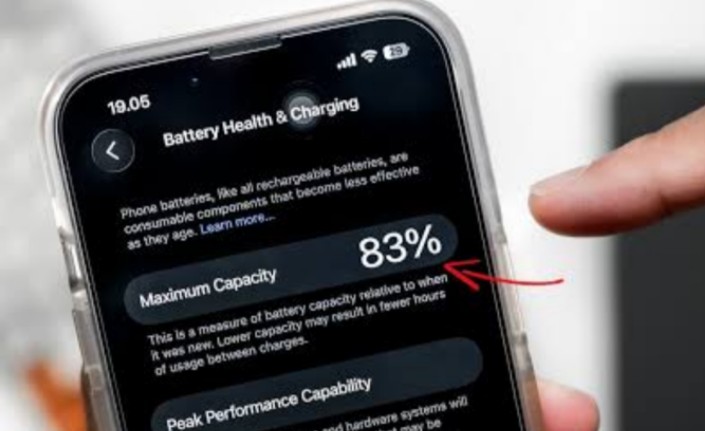
The first step is to ask the seller to open the iPhone’s Settings, then navigate to Battery > Battery Health & Charging. Here, you can see the Maximum Capacity percentage, which reflects the battery’s relative capacity compared to when new.
An ideal used iPhone should have at least 85% battery health. Devices showing 80-85% are still acceptable but may experience noticeable performance declines in the near future. If the battery health is below 80%, buyers should reconsider because the battery is weak and likely needs replacement soon.
Another important indicator is the Peak Performance Capability status. A healthy iPhone will show a message confirming it supports peak performance. Warnings like “Battery health degraded” or “Performance management applied due to unexpected shutdown” indicate significant battery problems. Such conditions can cause the iPhone to slow down, overheat, or shut off abruptly.
Watch Out for Important Battery Messages
iPhones from the XS model onwards will display “Important Battery Messages” if the battery was replaced with non-original parts. Non-official batteries might be cheaper but are often unstable and degrade faster. They can also reduce the device’s resale value and risk damage to other components.
Checking the battery cycle count is equally crucial. This number shows how many full charge cycles the battery has undergone. A cycle count between 150 and 300 is generally healthy. Counts above 500 signal the battery is approaching the end of its useful life since lithium-ion batteries have a limited number of charge cycles.
Conduct a Practical Battery Test
After reviewing these settings, perform a simple test by using the iPhone continuously for 5-10 minutes. If the battery percentage drops rapidly or the device unexpectedly shuts down despite showing remaining battery, it’s a red flag for poor battery condition.
Inspect Physical Signs of Unauthorized Repairs
Physical clues can reveal if the iPhone has been tampered with. Check for misaligned screws, loose frame edges, uneven screen fitting, or scratches near the casing. Such signs usually mean the phone was opened in unofficial repair shops. If the seller claims battery replacement, ask for proof of service from an Apple Authorized Service Provider. This ensures the replacement was done professionally using genuine parts.
Steps to Avoid Becoming a Victim When Buying a Used iPhone
- Verify battery health percentage is preferably above 85%.
- Confirm Peak Performance Capability shows no degradation warnings.
- Look for Important Battery Messages indicating the use of original parts.
- Check battery cycle count, aiming for under 500 cycles.
- Perform a quick battery drain test to observe battery stability.
- Inspect the physical condition for signs of unauthorized opening.
- Request official service proof if battery replacement is claimed.
Careful examination of the battery and physical condition helps buyers avoid scams and ensures the secondhand iPhone is reliable. While buying used devices can save money, only thorough buyers will truly benefit without facing unexpected issues.
Being cautious about battery health prevents hassles from poor performance and sudden shutdowns. In a market flooded with cheap secondhand iPhones, knowing these verification steps empowers buyers to make smarter, safer purchases.