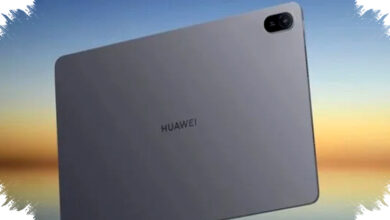
Huawei MatePad 11.5 PaperMatte remains one of the more talked-about midrange tablets in March 2026, mainly because it targets users who spend long hours reading, writing, and working on a screen. In Indonesia, the device first launched in early February 2026 and quickly drew attention for its PaperMatte display, large battery, and productivity-focused features.
The tablet sits in a segment that is getting more competitive, but Huawei has positioned it clearly as a comfortable alternative for students, hybrid workers, and digital creators. The current pricing in Indonesia starts from about $250 for the base configuration, while the higher PaperMatte variant reaches roughly $390 to $420 depending on memory and bundle offers.
Why PaperMatte is the main selling point

The headline feature of the MatePad 11.5 PaperMatte is its anti-glare display treatment, which uses nano-etching to reduce reflections and improve readability under strong light. This matters for anyone who studies in bright rooms, works near windows, or travels often and needs a screen that stays usable outdoors.
Huawei also promotes the technology as a way to reduce eye fatigue during long sessions, which makes the tablet appealing for note-taking and document review. The writing experience with a stylus is also closer to paper, so the device feels more natural for sketching, marking PDFs, or handwriting notes.
Core specifications at a glance
The MatePad 11.5 PaperMatte comes with an 11.5-inch FullView display and a resolution around 2.2K to 2.5K, listed at 2456 x 1600 pixels in the reference data. It also supports a 120Hz refresh rate, which helps scrolling feel smoother and makes handwriting input more responsive.
For performance, Huawei uses a Kirin octa-core chipset, with reported variants including Kirin T80 or Kirin 8020 depending on the model. The tablet is paired with 6GB or 8GB of RAM and storage options of 128GB or 256GB, which should be enough for school files, office apps, streaming, and light creative work.
Key specifications
- Display: 11.5-inch FullView, 2.2K–2.5K resolution
- Refresh rate: up to 120Hz
- Processor: Kirin series octa-core
- RAM: 6GB or 8GB
- Storage: 128GB or 256GB
- Battery: 10,100 mAh
- Charging: 40W fast charging
Battery and daily use
One of the strongest practical advantages of the tablet is its 10,100 mAh battery. Huawei says the battery can support up to about 14 hours of video playback, which puts it in a strong position for all-day use in class, meetings, or travel.
The 40W fast charging support also helps reduce downtime, although charging speed will still depend on conditions and the adapter used. For a tablet in this price range, the battery package is one of the reasons it stands out against thinner, more premium rivals.
Camera, audio, and connectivity
Huawei has not positioned this tablet as a camera-first device, but it still includes a 13MP rear camera and an 8MP front camera for video calls, document scanning, and quick photos. That front camera is more important than it looks, because tablet users often rely on it for online classes, remote meetings, and conference apps.
Audio is handled by quad speakers, while connectivity includes WiFi 6, Bluetooth 5.2, and USB-C. Those are solid mainstream specs, and they support the tablet’s role as a multipurpose productivity device rather than a pure media slate.
Software and productivity tools
The MatePad 11.5 PaperMatte runs on HarmonyOS, with the reference material listing versions from 3.1 to 4.3 depending on the iteration. That means Huawei continues to rely on its own software ecosystem, which is smooth in many everyday use cases but still requires buyers to think carefully about app compatibility.
For productivity, Huawei includes PC-level WPS Office 3.0, multi-window multitasking, and support for the M-Pencil Gen 3. The company also offers keyboard bundles, which help turn the tablet into a lightweight work machine for writing, editing files, and managing documents on the move.
Price update in Indonesia, March 2026
The price structure in Indonesia varies by configuration and promotional bundle, and that is important for buyers comparing deals. The official launch price was around $360, while early 2026 promotions reportedly added gifts worth about $170, mostly through keyboard and software packages.
Current Indonesia pricing
- Launch price: about $360
- Promo value: up to about $170 in bonuses
- 6GB/128GB variant: about $250 to $280
- 8GB/256GB PaperMatte variant: about $350 to $390
The reference data also notes that the 8GB/256GB PaperMatte version can reach around $390 to $420 in some listings, depending on availability and bundle selection. That range places the tablet close to other midrange Android and HarmonyOS slates, but the PaperMatte screen keeps it differentiated.
Who this tablet is best for
The MatePad 11.5 PaperMatte makes the most sense for users who value comfort and writing performance more than raw app flexibility. Students can use it for classes, notes, and reading, while office workers may appreciate the split-screen workflow and long battery life.
Creators who sketch or annotate often will also find value in the stylus support and paper-like display texture. Still, buyers should keep in mind that HarmonyOS does not fully support Google services natively, so users who depend heavily on Google apps should check their workflow before buying.
Market position in 2026
At this point in March 2026, Huawei has made the MatePad 11.5 PaperMatte a clear productivity-first tablet with a display advantage that is easy to explain and easy to notice. The combination of anti-glare screen, 120Hz refresh rate, 10,100 mAh battery, and stylus support gives it a practical identity that is different from many entertainment-focused tablets.
Its value will likely depend on how much users care about display comfort and bundled accessories, because those are the areas where Huawei adds the most appeal. For buyers looking at the Indonesian market right now, the MatePad 11.5 PaperMatte remains one of the more balanced options in the midrange tablet class, especially when the promo package lowers the effective cost of starting with the device.