


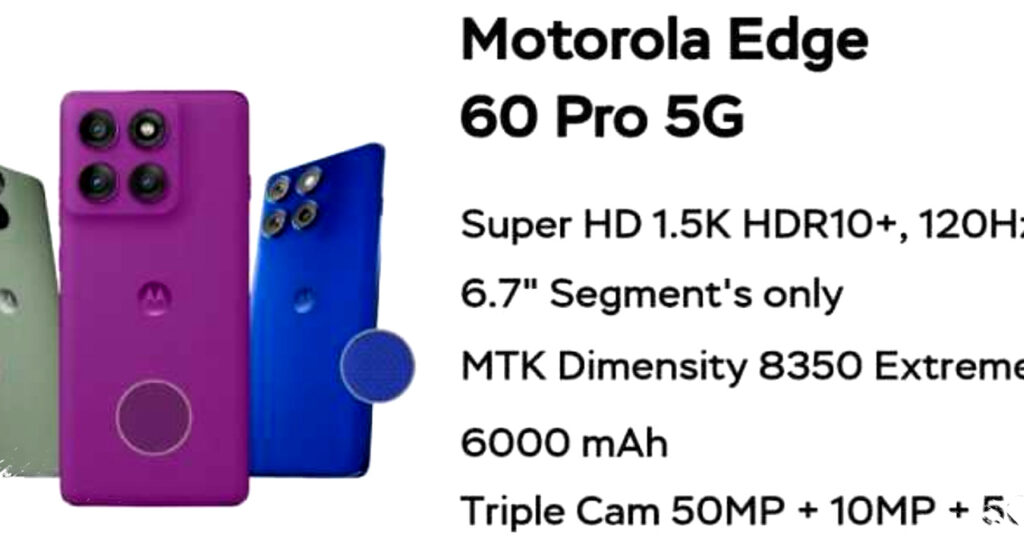
Motorola Edge 60 Pro positions itself as a serious option for users who want a fast Android phone for heavy multitasking. With a combination of up to 16GB RAM, a Dimensity 8350 Extreme chipset, and UFS 4.0 storage, the phone targets users who keep many apps open, switch tasks often, and expect stable performance.
This model also tries to stand out through its premium display, slim design, and security features that are common in high-end devices. For buyers who care about smooth daily use, gaming stability, and long-term comfort, the Edge 60 Pro offers a specification sheet that deserves attention.
Performance built for multitasking
The main headline feature of the Motorola Edge 60 Pro is its 16GB RAM configuration. That amount of memory gives the phone a strong advantage when users jump between productivity apps, social media, video apps, and browser tabs at the same time.
Motorola pairs the RAM with the MediaTek Dimensity 8350 Extreme chipset and UFS 4.0 storage. In practical terms, this setup is designed to reduce loading delays, keep app switching fluid, and support demanding tasks without forcing the system to slow down too quickly.
The phone also benefits from the speed gains of modern storage. UFS 4.0 usually helps apps install faster, files move quicker, and large games open with less waiting, which matters for users who want the device to feel responsive throughout the day.
A setup like this also makes the phone more relevant for mobile gaming. While real-world performance still depends on software optimization and thermal management, the hardware foundation points to a device that should handle graphically intense titles more confidently than standard mid-range phones.
Display and visual experience
Motorola gives the Edge 60 Pro a 6.7-inch P-OLED display with a resolution of 1220 x 2712 pixels. The panel supports a 120Hz refresh rate, HDR10+, and up to 1.07 billion colors, which should produce smooth motion and rich color output for streaming, gaming, and general use.
The higher refresh rate is especially useful for users who scroll often or play fast-moving games. It makes the interface feel more fluid and can improve the sense of speed when navigating menus or switching between tasks.
Brightness also matters for daily usability, and this screen is designed to remain comfortable outdoors. Motorola adds Corning Gorilla Glass protection, which helps defend the display from scratches and minor wear during normal use.
Design that stays slim and light
The Edge 60 Pro uses a premium body with a thickness of around 8.2 mm and a weight of 186 grams. That makes it relatively slim for a phone with a large battery-class design approach and a powerful hardware package.
Its lighter feel should help users who hold the phone for long periods, whether for work, video calls, or extended gaming sessions. A device that stays manageable in the hand often feels more practical in daily use than one that simply looks impressive on paper.
Premium design is not only about style here. The slim build and balanced weight support easier handling, which becomes important when a phone also carries a large, high-refresh-rate display and advanced internal hardware.
Security features for everyday protection
Motorola also puts attention on security. The Edge 60 Pro includes an in-display fingerprint sensor for quick unlocking, and it also supports AI-based facial recognition for convenient access.
For users who store private messages, work documents, or financial apps on their phones, these options add a useful layer of convenience. They also make the device more flexible for different usage habits, since some users prefer fingerprint access while others rely on face unlock.
Another notable addition is ThinkShield for Mobile. Motorola positions this software-based protection system as background defense against threats such as malware and phishing, while helping protect user data integrity.
Key specifications at a glance
| Feature | Motorola Edge 60 Pro |
|---|---|
| Chipset | MediaTek Dimensity 8350 Extreme |
| RAM | Up to 16GB |
| Storage | UFS 4.0 |
| Display | 6.7-inch P-OLED |
| Resolution | 1220 x 2712 pixels |
| Refresh rate | 120Hz |
| HDR support | HDR10+ |
| Color support | 1.07 billion colors |
| Body thickness | About 8.2 mm |
| Weight | 186 grams |
| Security | In-display fingerprint, AI face unlock, ThinkShield for Mobile |
Who this phone is best for
The Motorola Edge 60 Pro makes the most sense for users who prioritize smooth performance over brand hype. It fits people who often multitask, use several apps at once, or want a phone that feels quick for both work and entertainment.
It also suits users looking for a display that feels modern and premium. The 120Hz P-OLED panel should appeal to anyone who watches a lot of video content or wants a more responsive touch experience in daily navigation.
For mobile gamers, the combination of a powerful chipset, large RAM, and fast storage creates a promising foundation. While software tuning will decide the final gaming experience, the hardware clearly aims at stable performance under heavier loads.
Security-conscious buyers may also find value here. The mix of biometric access and ThinkShield software gives the device a more mature package for people who care about privacy, not just speed.
What stands out most
The strongest selling point of the Motorola Edge 60 Pro is balance. It does not rely on one flashy feature alone, because it combines memory, chipset power, storage speed, display quality, and security in one package.
That approach matters in a crowded smartphone market. Many devices can offer a good screen or a fast processor, but fewer manage to combine both with a lightweight build and practical security tools.
For users who want a phone ready for multitasking, the 16GB RAM configuration is the most obvious attraction. Paired with the Dimensity 8350 Extreme and UFS 4.0, it gives the Edge 60 Pro a clear identity as a performance-focused smartphone built for demanding everyday use.
The Motorola Edge 60 Pro therefore enters the market as a device that looks well prepared for users who need speed, comfort, and stability in one handset, while its display and security extras further strengthen its position as a serious contender in the upper segment.