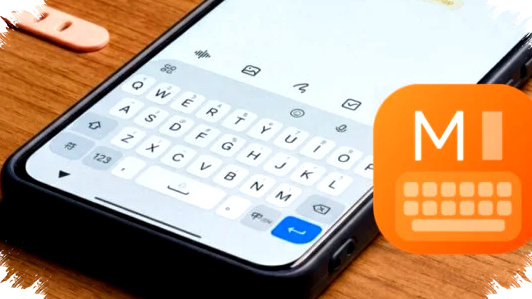
Xiaomi has rolled out a major update for its default keyboard app on HyperOS, and the change is more than a visual refresh. The new System IME update adds AI-powered tools, a redesigned layout, and typing features that aim to make everyday communication faster and more efficient.
The update first appeared in China, but Xiaomi users on Global devices can also install the APK version manually. Early reports indicate that version 1.0.3 runs stably on Global ROM devices, giving users a preview of what may become a wider HyperOS keyboard experience later.
What changes in the new HyperOS keyboard update


The most visible shift comes from Xiaomi’s HyperOS 4 design language, which gives the keyboard a cleaner and more rounded appearance. The company has moved toward a bubble-style visual layout that looks more modern and feels more ergonomic on mobile screens.
This redesign also improves button separation, which can help reduce typing mistakes on smaller displays. Xiaomi further adds an optional Frosted Blur effect in advanced settings, giving the keyboard a softer background finish that matches the HyperOS visual style.
AI tools now sit inside the keyboard
The biggest headline feature is the direct integration of artificial intelligence into the keyboard itself. Users can access an Ask AI field from the toolbar, allowing them to search, ask questions, or generate help without leaving the app they are using.
That approach matters because it cuts down on app switching, which is often a barrier to productivity on smartphones. For many users, the keyboard becomes not just an input tool but also a quick-access assistant for everyday tasks.
AI Translate is another key addition, and Xiaomi says it responds more intelligently than before with real-time language detection. As text is typed, the keyboard can translate content more fluidly and with better contextual accuracy, which supports users who frequently communicate across languages.
Context-aware suggestions aim to save time
Xiaomi is also pushing the keyboard beyond simple text entry with contextual suggestions. The system can analyze what a user is writing and then recommend relevant actions based on the topic of the conversation.
For example, if the keyboard detects a complex discussion, it may suggest creating a mind map or offering other response tools that fit the context. This type of feature reflects a broader industry move toward smart input systems that anticipate what users might need next.
A closer look at the new productivity features
The update introduces several functions that target power users, office tasks, and multilingual communication. These are the most notable additions in the current version:
- Ask AI directly from the keyboard toolbar for quick assistance.
- AI Translate with real-time language detection for faster multilingual typing.
- Contextual action suggestions based on the content of the conversation.
- Editor Mode for precise cursor navigation and text selection.
- Numpad layout designed like a physical calculator for faster number entry.
- Separate controls for typing sound and haptic intensity.
- Optional Frosted Blur effect for a more premium visual look.
The combination of these features shows Xiaomi is treating the keyboard as a productivity hub. That is a stronger position than the traditional role of a keyboard as only a typing interface.
Editor Mode brings more precision to text editing
One of the most practical additions is Editor Mode, which changes the keyboard into a navigation panel. Instead of only showing letters and symbols, the interface includes arrow-style controls for moving the cursor and selecting text more accurately.
This can be helpful when editing long messages, documents, or form fields on a phone. Mobile users often struggle with precise cursor placement, so a dedicated mode for navigation may save time and reduce frustration.
Numpad layout makes number input easier
Xiaomi has also redesigned the numeric entry experience with a Numpad layout that looks and works more like a real calculator. Rather than using a standard top-row number strip, the keyboard presents a dedicated number pad with mathematical operators.
That design is useful for users who regularly enter prices, calculations, or spreadsheet data on a phone. It can speed up input and feel more familiar for anyone used to desktop-style numeric pads.
How the update improves typing feel
Beyond AI and layout changes, Xiaomi has refined the tactile response of the keyboard. The new version lets users separate typing sound settings from vibration strength, which gives them more control over the feedback they want while typing.
A dedicated slider for haptic intensity also makes manual adjustment easier. That matters for users who prefer a softer tap sensation, as well as those who want stronger feedback for more confident typing.
Why the APK matters for Global users
Although the update was launched for the Chinese market, the APK release has drawn attention from Global Xiaomi users. According to the reference details, version 1.0.3 has shown stable performance on Xiaomi devices running Global ROM, which makes early testing more accessible.
That does not mean every feature will behave exactly the same on all devices, but the report suggests Xiaomi has not restricted the build to China-only hardware behavior. For users who like trying new software before a wider rollout, this update is a notable preview of HyperOS’s direction.
What users should know before installing
Before sideloading any APK, users typically need to check device compatibility and download sources carefully. They should also understand that features tied to Chinese cloud services or regional settings may behave differently outside China.
Still, the current stability report is encouraging for Xiaomi fans who want to explore the new keyboard design early. If Xiaomi later expands the release more broadly, the update could become one of the most practical HyperOS refinements because it affects a feature people use every day.
Why this update stands out in Xiaomi’s software strategy
Keyboard updates often receive less attention than camera or chipset news, but they can have a larger effect on daily use. Xiaomi’s move shows that software refinement is becoming a bigger part of the HyperOS identity, especially as AI tools become standard across mobile ecosystems.
By blending AI translation, contextual help, and faster editing tools into the keyboard, Xiaomi is targeting speed and convenience at the point of input. That makes the update more than a cosmetic change, because it shifts the keyboard into a smarter interface for communication, writing, and quick task handling.