With remote work and hybrid classes still shaping daily routines in 2026, many people are asking the same question: should they replace a laptop with a tablet? The answer is now much more realistic than it was a few years ago, because mid-range tablets have become powerful enough for office work, note-taking, document editing, light design, and online meetings.
In the $300 to $400 range, buyers can already find tablets with 144Hz displays, AI tools, large batteries, and keyboard or stylus support. For workers and students who value portability, these devices can reduce the weight of a daily bag without sacrificing too much productivity.
Why a tablet can replace a laptop for many tasks


A modern tablet is no longer just a media device. It can handle email, cloud documents, video calls, presentations, note-taking, and browsing with ease, especially when paired with a keyboard and stylus.
The key difference is workflow. A laptop still feels better for heavy typing, coding, or advanced creative work, but a tablet is more flexible for mobility, quick access, and long battery life. For students and office users who spend most of their time in browser-based apps and productivity tools, the gap has narrowed sharply.
6 best mid-range tablets for April 2026
- Samsung Galaxy Tab S10 Lite
Samsung keeps its reputation for stable software and a mature ecosystem. The 10.9-inch display with a 90Hz refresh rate offers smooth scrolling, while the included S Pen adds direct value for note-taking and annotation.
The tablet uses the Exynos 1380 chipset, 6GB of RAM, and 128GB of storage that can be expanded up to 2TB. It is priced at about $318 for the Wi-Fi model and around $350 for the 5G version.
- Lenovo Motopad 60 Pro
This model is built for users who want a large screen and strong multitasking performance. It carries a 12.7-inch 3K display with a 144Hz refresh rate, which makes it attractive for split-screen work and long reading sessions.
Lenovo pairs it with the Dimensity 8300 chipset, 8GB of LPDDR5X RAM, 256GB of UFS 4.0 storage, and a 10,200 mAh battery. The bundled Motopen Pro is also a useful bonus, especially for students and digital note-takers. The price sits at roughly $365.
- Huawei MatePad 11.5-inch 2026 Edition
Huawei targets users who want a laptop-like writing experience in a tablet body. Its WPS Office 3.0 PC-Level support makes typing and document editing feel closer to a desktop workflow.
The package is especially strong because it includes the M-Pencil Gen 3 and a Smart Keyboard. Huawei also uses a Nano-Etching display to reduce glare during long hours of work, while the 10,100 mAh battery supports 40W charging. The price is around $372.
- POCO Pad X1
POCO continues its strategy of pushing high specifications at a competitive price. This tablet uses the Snapdragon 7+ Gen 3, which makes it the fastest performer on this list for processing-heavy tasks.
It also brings a 3.2K 144Hz display, 8GB of RAM, and 512GB of UFS 4.0 storage, which is generous for the class. Google Gemini integration adds AI features for quick document summaries and transcription. The tablet costs about $353, although the stylus and keyboard are sold separately.
- Xiaomi Pad 7
Xiaomi offers one of the most balanced tablet packages in this segment. The device is only 6.18 mm thin, yet it still uses a metal body that feels solid and premium.
It runs Snapdragon 7+ Gen 3, comes with 8GB of RAM, and uses an 8,850 mAh battery. The 800-nit display brightness helps usability in bright rooms, while HyperOS 2 connects well with Xiaomi’s AI ecosystem and Google Gemini. The price is about $340.
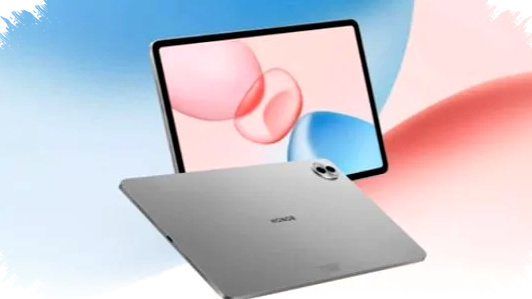
- Honor Pad 10
Honor focuses on comfort, especially for users who stare at screens for many hours. Its AI Comfort feature aims to reduce eye fatigue, making it a practical choice for reading, meetings, and study sessions.
The tablet also includes six speakers, which can improve online class audio and video conferences. Inside, it uses the Snapdragon 7 Gen 3, 8GB of RAM, and a 10,100 mAh battery. It is priced at roughly $346.
Quick comparison for work and study
| Tablet | Main strength | Display | Chipset | Approx. price |
|---|---|---|---|---|
| Samsung Galaxy Tab S10 Lite | Stable software, S Pen included | 10.9-inch 90Hz | Exynos 1380 | $318 |
| Lenovo Motopad 60 Pro | Big screen, fast multitasking | 12.7-inch 3K 144Hz | Dimensity 8300 | $365 |
| Huawei MatePad 11.5" 2026 | Ready-to-use bundle, PC-like typing | 11.5-inch class | Efficiency-focused | $372 |
| POCO Pad X1 | Fastest performance, large storage | 3.2K 144Hz | Snapdragon 7+ Gen 3 | $353 |
| Xiaomi Pad 7 | Balanced design and AI features | Bright high-res panel | Snapdragon 7+ Gen 3 | $340 |
| Honor Pad 10 | Eye comfort and strong audio | Large display | Snapdragon 7 Gen 3 | $346 |
Which tablet fits which user
If you want the safest choice for long-term use, Samsung remains the most reliable option because of its ecosystem and included S Pen. Students who need a larger canvas for notes and split-screen study should look closely at the Lenovo Motopad 60 Pro.
For buyers who want a laptop-style package without extra spending on accessories, the Huawei MatePad 11.5-inch 2026 Edition stands out. If raw speed matters most, the POCO Pad X1 offers the strongest hardware on paper, while Xiaomi Pad 7 gives a balanced mix of design, power, and software integration.
Honor Pad 10 is the most comfortable option for long reading sessions and online meetings, especially if eye strain is a concern. For many people in April 2026, the best tablet is no longer the one with the biggest specs alone, but the one that matches their real daily workflow.