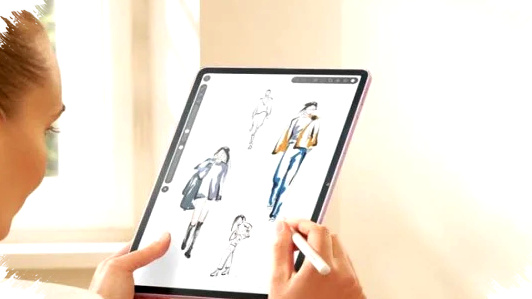
Digital drawing has become more demanding in 2026, especially for creators who need precision, speed, and comfort in one device. The best drawing tablets now do more than display artwork; they help users sketch, illustrate, edit, and multitask with fewer limitations.
That shift matters because many artists no longer want a heavy professional setup just to produce clean linework or detailed concept art. A good tablet with a responsive stylus can now deliver a workflow that feels close to paper while staying practical for travel, study, and daily creative work.
Why drawing tablets matter more in 2026

The digital art market keeps expanding as more creators work across social media, branding, animation, and content production. In that environment, a drawing tablet is not only a lifestyle device but also a productivity tool that affects speed and output quality.
Recent improvements in stylus sensitivity, display response, and palm rejection have made the drawing experience more natural. Pressure levels and low-latency input now help artists control line thickness and shading with better accuracy, which reduces friction in the creative process.
What to look for before buying
A tablet for drawing should not be chosen only by brand popularity. The most useful devices usually balance display quality, stylus precision, software support, battery life, and ergonomics.
Here are the main factors that matter most in practice:
- Pressure sensitivity and tilt support for more natural strokes.
- Screen responsiveness and low input latency for smoother line control.
- Stylus quality, especially if the pen is included in the box.
- App ecosystem, because professional drawing apps improve workflow.
- Processing power, which helps when editing large files or multitasking.
Top recommendations for 2026
One of the strongest all-round options remains the iPad 10th Gen paired with the Apple Pencil. This combination is still widely favored because the tablet delivers strong performance and the stylus offers very accurate input for sketching and illustration.
The iPad also benefits from a large selection of professional creative apps, which makes it suitable for both beginners and experienced artists. For many users, the biggest advantage is consistency, because the drawing response feels predictable and refined across most workflows.
The Samsung Galaxy Tab S9 FE with S Pen is another compelling choice, especially for users who want a stylus included in the package. Its S Pen support makes it practical for illustration and graphic design, while the device’s multitasking features help creators move between references, notes, and drawing apps more easily.
Samsung also gives users a flexible Android environment, which can be useful for those who prefer file management and app switching. For productivity-focused creators, that flexibility often matters as much as pen accuracy.
The Xiaomi Pad 6 with stylus support stands out for buyers who want strong performance at a more competitive price. It targets users who need a capable creative tablet without paying premium flagship pricing, which makes it attractive for students, freelance illustrators, and first-time digital artists.
Its sharp display also improves the drawing experience because cleaner visuals can help artists evaluate edges, contrast, and proportions more accurately. In the budget-to-midrange segment, that combination remains one of the more balanced options.
The Huawei MatePad 11 with M-Pencil continues to appeal to creators who value precision and a premium feel. Its design looks polished, and its stylus interaction is built for drawing tasks that require control and comfort over long sessions.
This model is often considered by users who want a smooth creative workflow and who do not rely heavily on the same app ecosystem as iPadOS or standard Android tablets. For some creators, that trade-off is acceptable when the drawing experience itself feels strong.
Simple comparison of the main options
| Tablet | Stylus | Main strength | Best for |
|---|---|---|---|
| iPad 10th Gen | Apple Pencil | Strong app support and accurate drawing | Professionals and serious hobbyists |
| Galaxy Tab S9 FE | S Pen | Stylus included and multitasking features | Students and versatile creators |
| Xiaomi Pad 6 | Stylus support | Value for money and solid display | Budget-conscious users |
| Huawei MatePad 11 | M-Pencil | Premium feel and precise input | Users who prioritize drawing comfort |
How these tablets improve accuracy
The biggest reason these devices remain relevant in 2026 is that they reduce the gap between hand movement and digital output. When the stylus tracks well and the panel reacts quickly, artists can produce cleaner lines, more controlled shading, and better detail work.
That matters not only for illustration but also for UI design, note-taking, and storyboarding. The same pen accuracy that helps a concept artist sketch a character can also help a designer annotate layouts or a student mark visual references.
Who should choose which tablet
For users who want the safest premium choice, the iPad 10th Gen remains the most straightforward recommendation. Its combination of strong performance, broad app availability, and highly precise stylus support makes it a dependable pick.
For users who want the stylus included and need a tablet that can handle both work and entertainment, the Galaxy Tab S9 FE is easier to justify. For users with tighter budgets, the Xiaomi Pad 6 offers a strong blend of speed and display quality, while the Huawei MatePad 11 is better suited to those who prefer a refined drawing feel.
Why 2026 is a better year for digital creatives
The current generation of drawing tablets shows that creative tools are becoming more accessible without losing quality. Devices that once sat only in professional studios now reach students, hobbyists, and independent creators with far more competitive pricing and better included accessories.
That trend also reflects how drawing tablets are now expected to support a wider range of tasks, from rough sketching to polished artwork and content editing. With better pen accuracy, responsive panels, and stronger hardware, creators can work longer and more comfortably without needing a full desktop setup.