Losing an Android phone does not always mean the device is gone for good. With a Gmail account and Google’s Find My Device service, the phone can often be tracked, secured, or even erased before personal data is misused.
The most important requirement is access to the Google account that is still signed in on the missing phone. The device also needs an internet connection, location services must be active, and Find My Device has to be available on the phone.
When those conditions are met, Google can show the phone’s position on a map in real time. If the phone is offline or powered down, the system cannot show live tracking and will only display the last known location.
How tracking usually starts
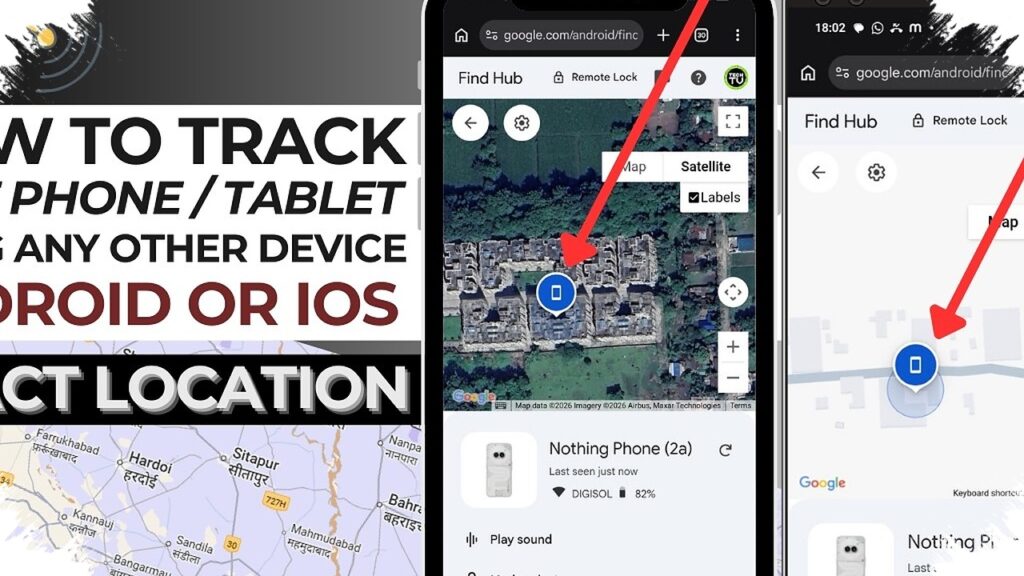
The easiest route is often through a browser on a PC or laptop. Users can open google.com/android/find and sign in with the same Gmail account that is linked to the lost phone.
If more than one device is connected to the account, the correct phone can be selected from the list. After that, Google attempts to locate the device on the map and present its current position.
This browser method is widely used because a larger screen makes it easier to read the map and identify the point shown. It is also practical when the phone has to be checked quickly from another device.
Using another phone instead
Tracking is still possible even without a laptop or computer. The Find My Device app can be installed on another Android phone from the Play Store.
On a borrowed device, users can choose the guest sign-in option so the Google account does not stay stored permanently on someone else’s phone. After logging in with the correct Gmail and password, the map view appears in the app.
That alternative can be useful when time matters and access to a computer is not available. It gives users a fast way to check whether the missing phone is still moving or whether it last connected in a known area.
Three remote actions that matter most
Google’s tool is not limited to location tracking. It also offers three emergency actions that can help reduce risk if the phone is lost in a public place or left nearby.
The first is Play Sound. This makes the phone ring at full volume for five minutes, even if it was previously on silent or vibrate, and it is especially useful when the device may be close by in a house, car, or office.
The second is Secure Device. This option lets the owner lock the phone remotely and display a message on the lock screen together with a contact number.
The third is Erase Device. It is the final step when the phone appears unlikely to return and the risk of data misuse is high.
Once the erase action is carried out, all data on the phone is deleted permanently, including photos, contacts, and apps. After that, Find My Device can no longer be used to track the device.
What happens if the phone is off
A common question is whether a dead phone can still be tracked through Gmail. The answer is that real-time location is not available if the phone is completely off.
Even so, Google may still show the last seen location before the battery died or the device lost power. That information can help narrow down the search area and provide an early clue.
Preparation can make a difference
Several preventive steps can make a missing phone easier to recover. Keeping GPS enabled is one of the most important, even if it uses more battery.
Regular backups also matter because they reduce the chance of losing valuable information. Services such as Google Photos and Google Drive can help keep copies of photos and documents safe.
The IMEI number should also be written down and stored securely. It can be checked by dialing *#06#, and it is often needed if the loss must be reported to the police.
Above all, Gmail login details must be protected carefully. That account is the main key for checking the device’s location, locking it remotely, and wiping its data if necessary.