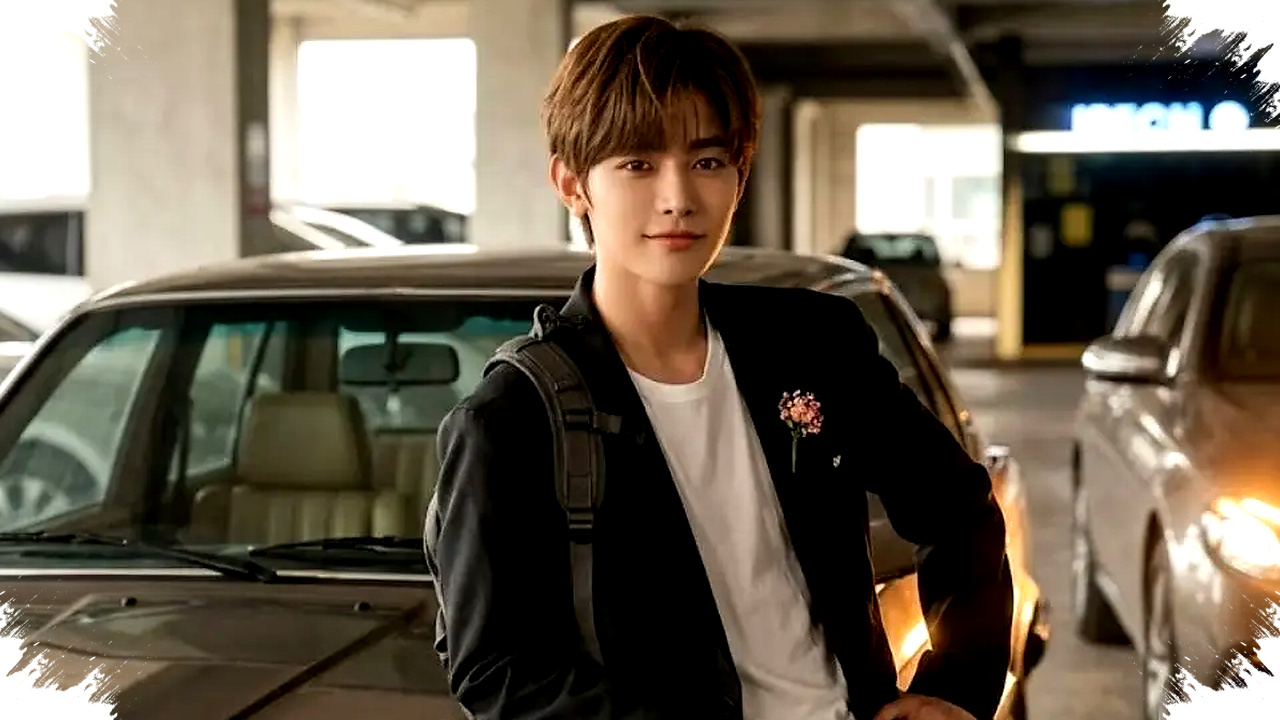
The rise of AI photo editing has changed how people create visual content for social media. One of the most noticeable trends is the use of Gemini AI prompts to turn simple parking lot photos into cinematic, realistic, and aesthetically stronger images.
This style works because parking areas already offer strong visual elements such as concrete textures, car reflections, neon-like lights, and natural shadows. When the prompt is written with detail and balance, Gemini AI can enhance these elements without making the image look artificial.
Why parking lot edits are getting attention


Parking lots often look ordinary in real life, but they can become visually striking in the right composition. The combination of low light, sharp lines, and reflective surfaces creates an urban mood that feels modern and relatable.
This is one reason the style is popular among digital creators. It gives a professional-looking result without requiring an expensive location or advanced manual editing skills.
A strong Gemini AI prompt can help preserve the original face, posture, and expression while improving the lighting and atmosphere. That balance matters because many AI-generated edits fail when they replace natural details with overly smooth or unrealistic faces.
What makes a parking lot photo look cinematic
Cinematic edits usually depend on three elements. These are lighting, depth, and realism.
Lighting sets the mood, depth gives the image dimension, and realism keeps the photo believable. In parking lot edits, soft light sources from vehicles or overhead lamps often create a dramatic effect that feels close to movie stills.
Reflections also play an important role. A wet floor, a car body, or even a polished hood can add visual interest and make the scene feel more layered.
According to the source material, the best results come from prompts that do not remove natural traits from the original photo. Instead, they strengthen details such as facial sharpness, shadows, and subtle glow effects.
How to write a better Gemini AI prompt
A useful prompt should describe the scene clearly and focus on the final mood. It should also include instructions that help the AI keep the photo realistic.
The structure below can help users build a stronger prompt for parking lot edits.
| Prompt Element | What It Should Do |
|---|---|
| Lighting | Add soft, natural, or dramatic light |
| Subject pose | Keep it relaxed, confident, and natural |
| Facial detail | Make the face sharp but realistic |
| Background | Add parking lot textures, cars, or shadows |
| Mood | Create a cinematic, urban, or editorial feel |
| Realism | Avoid excessive filters or overprocessed skin |
This structure is useful because AI tools respond better to specific and balanced instructions. If the prompt is too vague, the result can look random or flat.
Five prompt ideas for esthetic parking lot edits
-
Soft cinematic look with car light
“Enhance the lighting in this parking lot scene with a soft glow from a nearby car light. Keep the subject leaning naturally on the car hood with a relaxed and confident pose. Sharpen the face slightly while preserving realistic skin texture and add subtle shadows around the feet for depth.” -
Urban night atmosphere
“Transform this photo into a moody parking lot portrait with dramatic night lighting. Add reflections from nearby vehicles, deepen the background shadows, and keep the subject expression natural and calm. Make the image feel like a cinematic street scene while maintaining realistic details.” -
Warm editorial style
“Edit this image with warm parking lot lighting and balanced contrast. Place the subject in a natural stance near a parked car, with soft highlights on the face and gentle shadow layers behind the body. Keep the result realistic, clean, and suitable for a fashion editorial look.” -
Rainy reflective scene
“Create a cinematic parking lot photo with wet ground reflections and soft artificial lights. Keep the subject standing near the car with a composed expression, and preserve original facial features. Add realistic reflections, subtle mist, and deep contrast without making the image look synthetic.” - Minimal realistic enhancement
“Improve this parking lot photo by making the lighting clearer, the shadows softer, and the subject more visually defined. Keep all facial details authentic, enhance the background texture, and create a natural urban aesthetic with a calm cinematic tone.”
Why realism matters in AI photo editing
Realism separates a believable AI edit from a heavily processed image. In photo-based content, audiences quickly notice when a face looks too smooth, a pose feels unnatural, or the background does not match the lighting.
That is why the source highlights the importance of keeping the original expression alive. A realistic face and natural body posture help the final image feel like a genuine photo rather than a full synthetic render.
This approach also improves audience trust. Social media users tend to engage more with images that feel polished but still human.
Practical tips for stronger results
Several simple choices can improve the quality of a Gemini AI edit. First, use a clear source photo with good composition and visible facial detail.
Second, describe the exact lighting mood in the prompt. Words like soft glow, dramatic shadow, reflective surface, and warm lamp light can guide the AI toward a stronger visual style.
Third, avoid instructions that are too broad. Phrases such as “make it cool” or “make it aesthetic” are less useful than specific directions about posture, background, and lighting balance.
Fourth, keep the edits believable. The most effective parking lot images usually combine subtle enhancement with strong atmosphere, not extreme transformation.
Why this trend fits Google Discover content
Parking lot edits using Gemini AI have strong visual appeal, which fits the type of content that often performs well in Discover. The trend combines accessible technology, practical editing tips, and a style that looks polished on mobile screens.
It also connects with a broad audience. Casual users, content creators, and photography fans can all understand the appeal of turning an ordinary place into a cinematic portrait with simple prompt-based editing.
As AI tools continue to improve, prompt quality will remain the main factor that shapes the final image. Users who focus on realism, lighting, and natural expression are more likely to produce parking lot edits that feel authentic, dramatic, and visually memorable.