A slow Android phone does not always need to be replaced. Many older devices can still feel much more responsive when a few built-in settings are adjusted and unnecessary background load is reduced.
The most common complaints are familiar: apps take too long to open, social feeds stutter while scrolling, and even light games start to lag. Those problems often appear at the same time because several system burdens build up together rather than from age alone.
What usually slows the phone down
On older smartphones, performance drops are often linked to a combination of cache buildup, full storage, and apps that keep running in the background. On devices with limited RAM, the effect becomes even more noticeable when too many visual elements stay active at once.
System animations, multiple widgets, and live wallpapers can make a phone feel slower even when it is not running heavy apps. For devices with small memory capacity, these features add extra work every time the user opens a menu or switches screens.
Simple storage habits still matter
One of the easiest ways to ease the load is clearing app cache regularly. This reduces temporary files that accumulate over time and helps keep internal storage from filling up too quickly.
A crowded internal memory often has a direct impact on speed. That is why keeping storage space more open remains an important step for making an older Android phone stay stable and usable.
Background apps can drain performance quietly
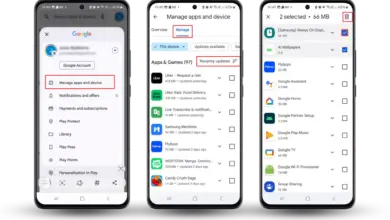
Another effective step is disabling apps that are rarely used. Apps left active can continue to consume RAM and processor resources even when they are not being opened.
Automatic background updates can also go unnoticed while still using system resources. The fewer processes that run at the same time, the lighter the workload on an older phone becomes.
Visual effects can create extra pressure
Display elements play a bigger role on limited hardware than many users expect. Reducing active widgets on the home screen can help because the system does not need to keep loading so many items at once.
Live wallpapers are also better avoided when a device already feels laggy. A static wallpaper is lighter and can make the phone respond faster to touch and navigation.
Observers of mobile devices also note that heavier system animations often make older phones feel sluggish. On a phone with small RAM, attractive effects can become an extra burden during everyday use.
Lighter apps and occasional restarts help
Some social media users have started choosing lighter modes in the apps they use. That approach helps reduce lag on older phones because the app places less pressure on the device during daily use.
This habit also reflects growing attention to storage health on smartphones. The broader trend in mobile technology is toward more efficient memory use so performance stays stable for longer.
A regular restart is another simple step that is often overlooked. It refreshes the system and stops processes that are no longer needed after long periods of use.
Battery condition still affects how fast the phone feels
Battery health can also influence overall performance. When a battery has degraded, the smartphone may feel weaker, especially during multitasking.
For that reason, speeding up an old Android phone does not depend on cleaning apps or anti-lag tools alone. Built-in optimization, better memory management, limits on background activity, and less visual load still remain the most practical ways to keep an older device comfortable to use.
-
-

-

-