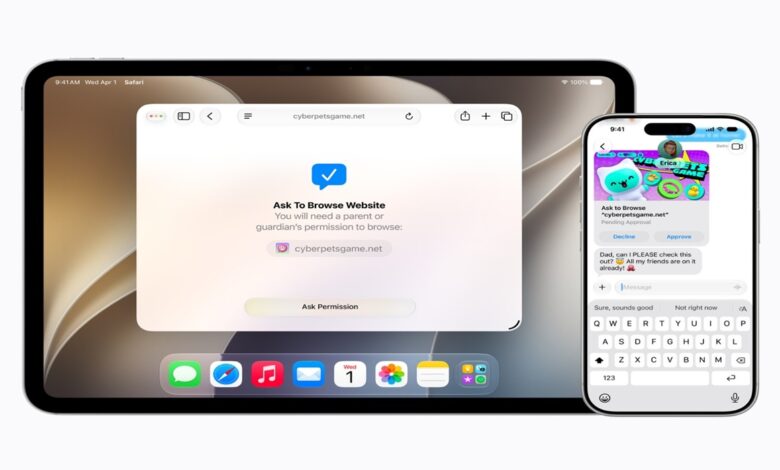
Apple is expanding parental oversight across its ecosystem with a new feature called Ask to Browse. The tool gives parents more control over which websites children can open in Safari, adding another layer of approval to everyday web access on Apple devices.
The feature is part of a broader child safety update announced at WWDC 2026 and will arrive on iOS 27, iPadOS 27, and macOS 27. Apple is framing the change as part of a wider effort to make it easier for families to manage content, contacts, and screen time in one place.
Safari access gets a new approval layer
Ask to Browse extends a control model that already existed for some app downloads. Instead of focusing only on installed apps, Apple is now applying a similar approval step to new websites in Safari.
When the feature is active, a child must ask for permission before opening a webpage that has not been accessed before. The change applies across iPhone, iPad, and Mac, which means the browsing restriction follows children across Apple’s main devices.
That shift makes Safari supervision more direct. Parents are no longer limited to approving what gets installed on a device, because web access itself now becomes part of the permission flow.
Communication controls are also tightening
Apple is also widening parental oversight over who children can reach. The company is extending controls to contacts in iMessage, FaceTime, and phone calls, with children able to be required to request approval before connecting with new contacts.
This approach places communication checks alongside app and web restrictions. In practice, it makes family settings cover not only what children use, but also who they can interact with inside Apple’s ecosystem.
The result is a more complete supervision model. Contact approval becomes another gate that parents can manage, rather than leaving messaging and calling separate from the rest of the child safety tools.
Content detection now goes beyond nudity
Apple’s Communication Safety feature is also being expanded. It previously focused on detecting nudity, but now it can also identify and block graphic violence or gore in images and videos that are shared.
That update broadens the type of content Apple is targeting. The emphasis is no longer limited to sexual material, since visually disturbing violent content is now included in the protections as well.
For Apple, the goal is to make safety part of daily device use. The company is positioning these protections as background safeguards that work without removing the core functions of the device.
Screen Time gets more flexible
Apple is also redesigning Screen Time to give parents a clearer view of how devices are used. Through Time Allowances, limits can be set more flexibly for categories such as entertainment, games, and social media.
A daily schedule can also define which apps stay available during specific hours. That makes it easier for families to maintain routines, including situations where certain apps should remain off-limits during school time.
The updated structure is designed to give parents more control without relying on a single rigid limit. Instead, Apple is offering tools that adapt to different daily needs while still keeping usage under supervision.
Developers are included in the safety plan
Apple is not limiting the changes to system settings alone. The company is also offering tools for developers so that apps can be built with stronger child protection features from the start.
Using APIs such as SensitiveContentAnalysis and PermissionKit, developers can prevent inappropriate content from appearing and require parental approval when a new contact is added inside an app. That makes app design part of the safety system, not just the device settings.
The broader message is that child safety in Apple’s ecosystem depends on more than one layer. Device controls, communication checks, content detection, and developer tools are all being tied together to make children’s digital use safer across everyday apps and services.
Source: mediaindonesia.com