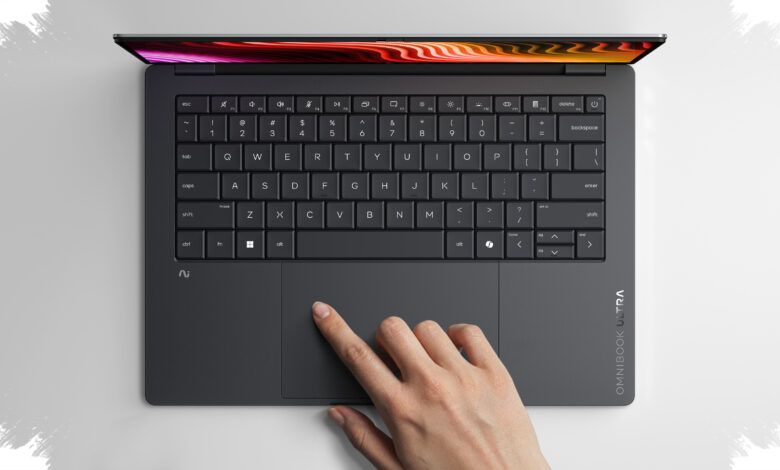
HP OmniBook Ultra 14 stands out in a crowded premium laptop market for one simple reason: it combines portability, speed, and endurance in a way that is still rare on Windows machines. It is not trying to copy the MacBook Air or mimic every rival ultrabook, but to offer a polished work laptop with a clear priority on daily practicality.
That practical focus matters because the market is still dealing with a RAM shortage, making well-rounded premium notebooks harder to recommend with confidence. In that setting, the OmniBook Ultra 14 becomes an easy name to consider for users who want a serious productivity machine without carrying unnecessary weight.
Thin, light, and more solid than it looks
The laptop is available in three colors, and the Stone Blue version is the most distinctive. HP also splits the hardware by color, with Stone Blue using Qualcomm Snapdragon silicon, while Eclipse Gray and Silk Sand ship with Intel hardware.
Its dimensions reinforce the ultrabook idea. The chassis measures 10.7 mm at its thickest point and tapers to 7.3 mm, while the weight comes in just under three pounds.
Despite that slim profile, the machine does not feel fragile. The recycled aluminum chassis gives it a firm and durable impression, which helps it feel dependable whether it is carried in a bag or used all day on a desk.
Input hardware built for long sessions
HP’s latticeless keyboard is one of the machine’s more thoughtful design choices. The spacing feels clean, and the typing experience is comfortable enough for extended work sessions.
The keys press quietly but still provide clear feedback, avoiding the soft feel that often hurts productivity laptops. Beneath the keyboard sits a haptic waterfall touchpad that blends neatly into the body and responds quickly to gestures.
OLED display quality is excellent, but reflections are a problem
The OmniBook Ultra 14 uses a 3K OLED touchscreen that delivers the kind of visual quality usually associated with creator-focused laptops. It covers the full DCI-P3 color gamut and is claimed to have Delta E below 1, which points to strong color accuracy.
For indoor use, the display is one of the strongest parts of the package. The contrast is deep, colors look lively, and the overall presentation is excellent for both work and visual content.
The weakness is its glossy finish, which makes reflections highly noticeable in bright environments. That limits usability outdoors and is the main compromise of an otherwise impressive panel.
Performance is fast, then shows its limits under sustained pressure
The review unit came with a Snapdragon X2 Elite chipset and 64GB of RAM, a combination that delivers brisk real-world responsiveness. Multitasking feels smooth, whether the laptop is opening many tabs, editing photos, writing, or switching between apps.
Short-burst benchmark results also support that impression. In Geekbench 6, the laptop even outperformed the M5 MacBook Pro in CPU testing.
Sustained workloads tell a different story. In Cinebench 2024, the machine started at 156 in single-core and 1212 in multicore, then dropped to 131 and 690 during longer sessions as heat increased.
That decline does not make the laptop slow in ordinary use, but it does show that the system leans toward efficiency and thermal management when the workload stays heavy for too long. For most everyday users, that trade-off is unlikely to matter much.
| Test | Initial Score | Longer Session Score |
|---|---|---|
| Cinebench 2024 Single-Core | 156 | 131 |
| Cinebench 2024 Multi-Core | 1212 | 690 |
Battery life is the most convincing part of the story
Battery endurance is where the OmniBook Ultra 14 makes its strongest case. In testing, the laptop lasted nearly 24 hours on a single charge, which is an exceptional result for a premium Windows laptop.
That figure sits just behind the HP OmniBook 3, which reached 28 hours, but it still places the Ultra 14 among the best performers in its class. For professionals who move between meetings, offices, or workspaces, that kind of runtime removes a major point of concern.
Price and variants widen its appeal
Pricing starts at around $1,200 for the base Intel Core configuration, and HP offers multiple choices for processor, storage, memory, and display. That flexibility makes the laptop easier to tailor to different budgets and work needs.
The reviewed configuration sits at around $2,910, which is steep but matched by the machine’s strong performance, premium build, and excellent battery life. For buyers who want a polished Windows ultrabook that feels ready for serious work from the start, the OmniBook Ultra 14 makes a persuasive case.