


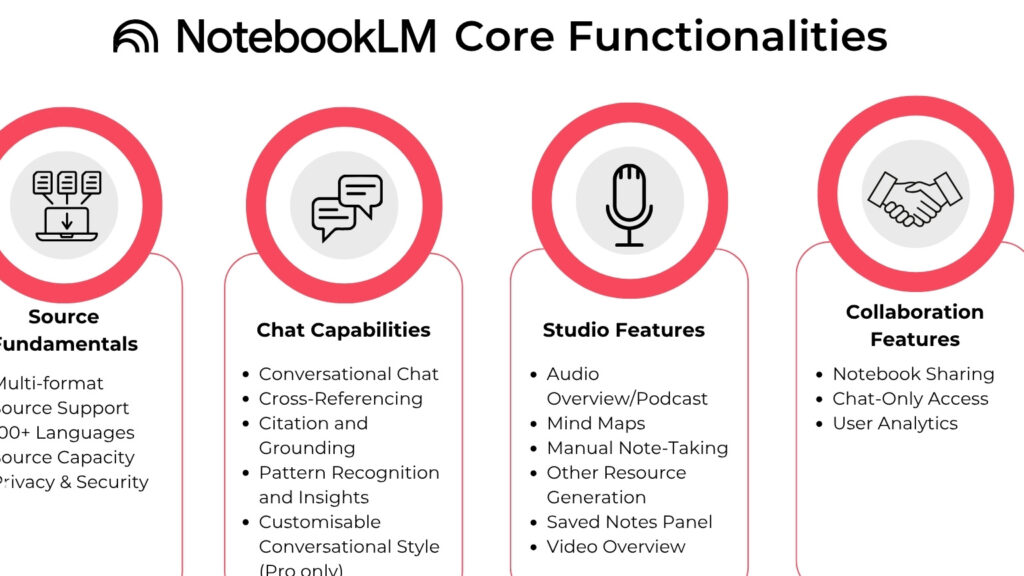
NotebookLM has become more than a note-taking tool for people who handle research, document review, and collaborative workflows. In practical use, it helps users bring PDFs, Google Drive files, and web content into one notebook, reducing the time spent jumping between tabs and chasing scattered references.
Google’s AI-focused workspace approach has made this kind of centralized workflow more valuable, especially for teams that need faster access to source-based answers. Skill Leap AI also points to NotebookLM’s integration with Google Gemini as a major productivity upgrade, with support for both quick insights and deeper research when the task demands more precision.
Why NotebookLM saves time in real workflows
The biggest gain comes from consolidating sources before analysis begins. When all relevant materials sit in one notebook, users can compare information faster, keep context intact, and avoid duplicate files or repeated searches across folders.
This also improves collaboration because the same notebook can hold the same reference set for multiple contributors. In research-heavy projects, that shared structure makes it easier to maintain consistency and reduce confusion about which version of a source is current.
1. Put every source into one notebook
A single notebook works best when the topic pulls from multiple documents, web pages, or reports. Keeping them together helps the system trace context more accurately and gives users a cleaner starting point for analysis.
That simple move often cuts the friction that slows down early-stage research. Instead of rebuilding context from scratch each time, the notebook becomes a live workspace for the entire project.
2. Match the research mode to the task
NotebookLM offers different research styles for different workloads. Fast Research is useful when the goal is a quick overview, while Deep Research fits more complex topics that need broader checking and stronger detail.
This distinction matters because workflow speed depends on matching the tool to the job. A short briefing may only need a fast scan, but reports, proposals, and analysis pieces usually benefit from a deeper pass.
3. Filter sources before the noise builds up
Large topics can create information overload very quickly. Filtering sources early helps keep the notebook focused on materials that are directly relevant and more likely to improve the quality of the output.
That approach supports stronger research discipline as well. The fewer irrelevant sources included, the easier it becomes to find patterns, verify facts, and keep answers aligned with the task.
4. Ask questions about a specific source
One of the most practical habits is querying a particular document instead of the full notebook. That usually produces more precise answers because the system stays anchored to one source rather than blending everything together.
The result is faster fact extraction, especially when a user only needs one figure, one definition, or one passage. It also makes it easier to reuse the answer later without opening the original document again.
5. Turn answers into notes and new sources
NotebookLM becomes more useful when AI responses are saved and repurposed. Important findings can be converted into notes, then shaped into fresh sources for the next stage of the project.
That creates a chain of reusable material instead of isolated answers. Draft ideas, citations, and summaries stay inside the workflow and can support presentations, briefs, or follow-up research.
6. Use charts and diagrams for complex material
When the source material is dense, visual formats can reduce friction. Charts, diagrams, and infographics help turn complicated findings into something easier for teams, clients, or readers to understand quickly.
This is particularly useful when the audience does not want a long text explanation. A clear visual can communicate structure and relationships faster than a page of prose.
7. Organize ideas with a mind map
Mind maps work well for subjects that branch into many subtopics. They help users see how points connect, where arguments fit, and where gaps still need attention.
That matters in both solo and team settings. A shared visual framework can reduce misunderstanding and keep everyone aligned on the same outline before deeper writing begins.
8. Use audio overviews for faster learning
Audio overviews add flexibility for people who want to absorb information while multitasking. Skill Leap AI highlights this feature as a useful way to get short summaries, longer discussions, and multi-angle explanations in a format that is easier to consume on the move.
For busy users, that can speed up review cycles significantly. The ability to pause and continue the discussion with follow-up questions also makes the learning process more interactive.
9. Try video summaries when visuals matter
Video summaries are useful when the same research needs a more engaging format. The feature can help transform a written notebook into a presentation-friendly output that is easier to share and faster to understand.
That is especially relevant for educators, analysts, and content teams. A visual summary often works better when the audience needs the main points in a short, accessible format.
10. Adjust personalization and sharing controls carefully
Workflow speed should not come at the expense of control. NotebookLM allows users to adjust summary style, notebook presentation, and AI response tone so the output fits a formal, concise, or more detailed working style.
Sharing settings also matter because collaboration can expose sensitive material if access is not managed carefully. Email sharing, public links, and view or edit permissions should be set with attention to both efficiency and document security.
Here is a simple view of the most practical shortcuts inside NotebookLM:
| Trick | Main Benefit |
|---|---|
| Combine all sources in one notebook | Faster context building |
| Choose Fast or Deep Research | Better task matching |
| Filter sources early | Less noise |
| Ask source-specific questions | More precise answers |
| Save answers as notes | Reusable workflow output |
| Use charts and diagrams | Easier communication |
| Build mind maps | Clearer structure |
| Listen to audio overviews | Flexible learning |
| Create video summaries | Stronger visual delivery |
| Set sharing and personalization | Safer collaboration |
Used well, NotebookLM works as more than a note app. It can serve as a research hub, a summarization engine, a visual explanation tool, and a collaboration space that keeps complex work moving with less friction and a more organized structure.