


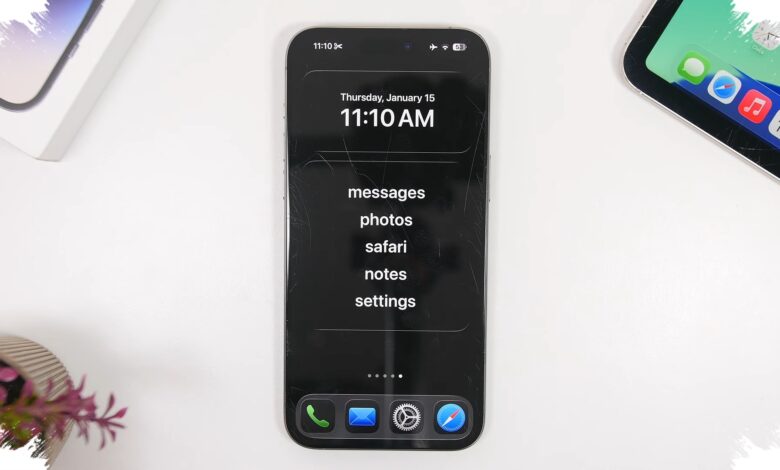
An older iPhone can be turned into a far simpler device with one built-in Apple feature. For parents who want a first phone for a child without opening the door to social media and games, the option is unusually practical.
The feature is called Assistive Access, a mode Apple introduced in iOS 17 to help users with cognitive disabilities. Once it is enabled, the iPhone interface is stripped down dramatically, leaving a home screen with large icons and only a limited set of apps.
Why it feels like a minimalist phone
Assistive Access removes many of the elements that usually make an iPhone feel crowded and distracting. Notifications and more complex features no longer appear in the same way as they do on standard iOS, so the device becomes more focused on basic use.
It also limits how users interact with incoming content. Web links received in text messages cannot be opened directly, which makes accidental internet access less likely.
| Feature | Effect in Assistive Access | Main Benefit |
|---|---|---|
| Home screen | Large icons and limited apps | Easier to use |
| Web links in messages | Cannot be opened directly | Reduces accidental internet access |
| iOS interface | Fully simplified | Fewer distractions |
Who benefits most from it
According to www.vietnam.vn, the mode is useful for families preparing a child’s first phone so it can be used only for basic communication. At the same time, adults looking for a kind of phone detox can use it to stay connected without getting pulled into entertainment apps.
For core needs, the apps that can be kept include Calls, Messages, Maps, and Camera. That combination still allows the iPhone to handle calls, texting, navigation, and photos without carrying over the distractions of a modern smartphone.
How it is turned on
Assistive Access is available only on devices running iOS 17 or later. That means iPhone XR and newer models support the feature.
The setup begins by selecting Set Up Assistive Access and then Continue, followed by adding allowed apps through the blue plus icon. Users can also choose the Grid interface if they want oversized icons that are easier to navigate.
The final step is setting a four-digit PIN to lock the device in Assistive Access mode. To return to the normal iOS view, that code must be entered first.
With app restrictions and most unnecessary features removed, an iPhone can work like a minimalist phone without losing modern conveniences such as GPS, photography, and communication. For owners of older iPhones, it offers a low-cost way to reduce smartphone dependence without buying a new device.