


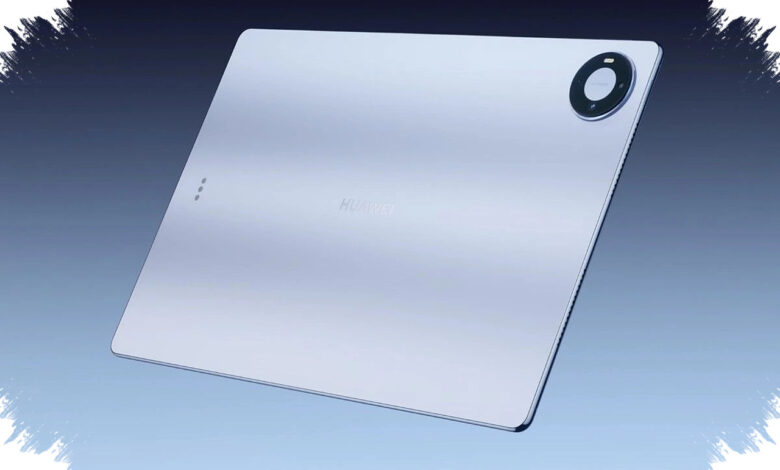
Huawei MatePad Pro Max 2026 arrives with a message that is hard to ignore: a large 13-inch tablet can still feel unusually light in daily use. At 4.7 mm thick and 499 grams in weight, it is built for users who move between meetings, desks, and travel bags without wanting a heavy device in hand.
That thin design is the main attraction, but it is also where the most noticeable compromises begin. Huawei has focused on portability and a clean visual experience, while accepting limits that keep the device from fully replacing a laptop.
A tablet built to disappear into a bag
Huawei calls the structure the Cloud Falcon Architecture, and the device also carries TÜV Rheinland certification for bend resistance. In practice, the tablet is still described as solid despite its extreme slimness, while the Flow Back blue finish adds a premium look to the hardware.
The absence of a 3.5 mm headphone jack is one of the clearest sacrifices. In its place, Huawei uses six HUAWEI SOUND speakers, which are said to deliver respectable bass, clear vocals, and a strong overall experience for films and podcasts.
| Key Aspect | Detail | Notes |
|---|---|---|
| Thickness | 4.7 mm | Extremely thin for a 13-inch tablet |
| Weight | 499 grams | Much lighter than many flagship rivals |
| Audio | 6 HUAWEI SOUND speakers | No 3.5 mm headphone jack |
Large OLED display with a clean front
The display is another major selling point. The 13.2-inch flexible OLED panel avoids both a notch and a punch-hole, giving the screen a full, uninterrupted appearance.
Its 3K resolution of 3000 x 2000 and 144Hz refresh rate are designed to keep text sharp and motion smooth. Huawei also offers a glossy OLED version and a PaperMatte Edition that uses nano-etched glass to reduce reflections and create a paper-like feel for stylus use.
The PaperMatte panel is less punchy than the glossy version for media viewing, but it is easier to use near windows and more comfortable for note-taking. Huawei’s claimed 1600-nit peak brightness is tied to specific HDR scenarios, so everyday visibility remains strong without being framed as extreme outdoor performance.
Productivity is strong, but still not laptop-level
Huawei positions the tablet around multitasking, keyboard use, and stylus input. Users can run three apps side by side, such as a browser for research, HUAWEI Notes for writing, and a gallery app for visual reference.
The system is reported to remain stable in everyday use, but external display support is limited to simple mirroring rather than desktop-style extension. That keeps the experience practical, yet still clearly short of a full notebook workflow.
The M-Pencil Pro is sold separately, but it becomes especially relevant with the PaperMatte Edition. GoPaint is also highlighted for natural brush strokes, non-rigid ink effects, and smart color suggestions based on the image being worked on.
HUAWEI Notes adds AI handwriting beautification, which can clean up handwritten notes without turning them into something overly mechanical. For users who write quickly during meetings or classes, that feature gives the tablet one of its most useful everyday advantages.
| Productivity Feature | Function | Remark |
|---|---|---|
| Multi-window | Runs 3 apps at once | Stable for research and note-taking |
| M-Pencil Pro | Stylus input | Feels most natural on PaperMatte Edition |
| GoPaint | Drawing and sketching | Brush behavior and color tools feel mature |
| HUAWEI Notes | AI handwriting beautification | Makes handwritten notes look cleaner |
Performance and battery are tuned for practical use
For the international model, Huawei uses the Kirin T93 Pro chip with up to 16GB of RAM. It is well suited to notes, video playback, and office apps, but it starts to show limits in heavy video rendering or games such as Honkai: Star Rail.
Thermal behavior is handled through dual-layer VC cooling, and the tablet may warm up around the upper-middle section under load. Even so, the report says it does not become excessively hot or suffer major throttling.
Battery life is rated for up to 14.5 hours of local video playback. In mixed use with Wi-Fi, 50% brightness, two hours of video calls, three hours of documents, and one hour of gaming, endurance was around 10 hours.
The tablet also supports 40W reverse wired charging, which can be useful when a phone runs low on power. That turns the MatePad Pro Max 2026 into a more flexible companion device for people who work on the move.
Not a full laptop replacement
The biggest limitation is the keyboard experience. Huawei’s Glide keyboard has short travel and a flat design without a cantilever hinge, which makes lap use and sofa use less comfortable than on some competing premium tablets.
On a desk, the layout remains workable, but users expecting laptop-like angle flexibility similar to Surface or iPad Pro may find the stand design restrictive. At £999.99 in the UK, the MatePad Pro Max sits firmly in flagship territory, and its audience is specific rather than universal.
It is aimed at buyers who want a large display, strong speakers, natural stylus input, and a tablet that is easy to carry everywhere. In that role, Huawei MatePad Pro Max 2026 stands out by making a big device feel unusually light, even if the trade-offs prevent it from becoming a true laptop substitute.