


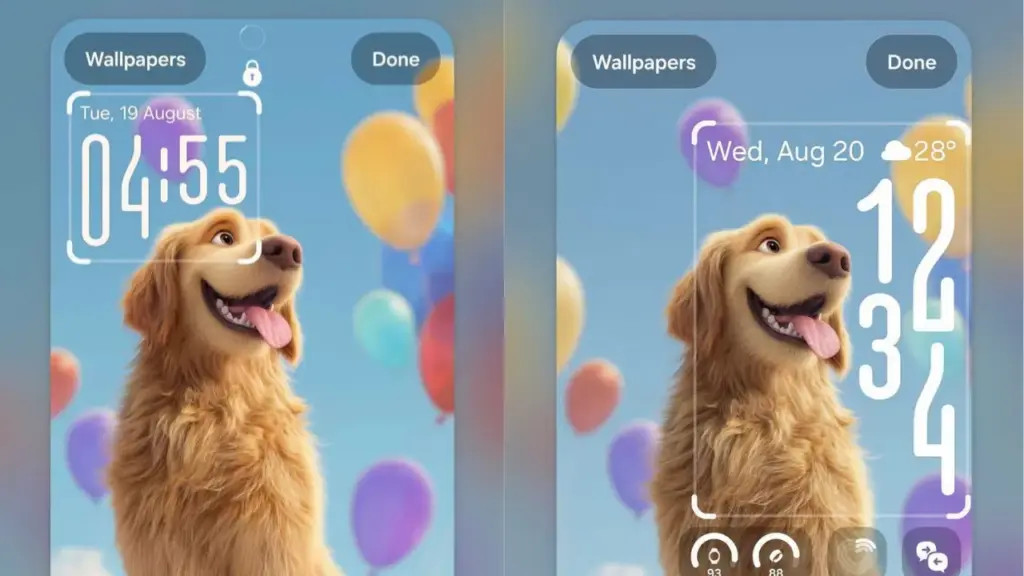
Samsung has rolled out an update for its Clock app as part of the One UI 8.5 release, introducing a fresh look and smarter features. This update aims to enhance the user experience by offering a cleaner interface combined with practical improvements.
The Clock app now adopts a minimalistic design that makes viewing time elements easier at a glance. Users will notice smoother navigation across tabs such as Alarm, Stopwatch, and Timer, aligning well with One UI 8.5’s overall sleek appearance.
Minimalistic Design and Intuitive Navigation
The redesigned interface features simplified visuals that reduce clutter while enhancing readability. Samsung has focused on seamless transitions between the app’s main functions, making it more intuitive for users to switch tasks quickly.
This updated aesthetic complements the broader design language of One UI 8.5, which emphasizes cohesion and ease of use across the system. By prioritizing clarity and simplicity, Samsung ensures the Clock app fits naturally into daily routines without confusion.
Introduction of the Adaptive Clock Feature
One of the standout additions in this update is the "Adaptive Clock." This new feature dynamically adjusts the clock display on the lock screen according to the user’s selected wallpaper. It intelligently avoids visual conflicts by repositioning or resizing elements to keep the clock clearly visible.
Such personalization enhances the lock screen’s visual appeal while maintaining functionality. Samsung’s innovation here reflects a growing trend toward smarter interfaces that respond to users’ preferences and environments.
Enhanced Timer Functionality
Besides aesthetic improvements, Samsung has upgraded key functionalities inside the Clock app. Users can now save timer presets, simplifying repetitive timing tasks such as cooking or workouts. This reduces the need to manually set durations repeatedly.
By providing convenience through customizable timer settings, the update increases the app’s practical value. It transforms the Clock from a mere time-displaying tool into a more adaptable assistant for everyday activities.
Summary of Key Updates
- Cleaner, minimalistic interface for better readability
- Smoother navigation among Alarm, Stopwatch, and Timer tabs
- Adaptive Clock feature that adjusts lock screen clock based on wallpaper
- Ability to save timer presets for commonly used durations
Samsung’s update to the Clock app on One UI 8.5 demonstrates the company’s commitment to improving both form and function in its software ecosystem. Users can expect a more harmonious and personalized experience, making time management simpler and visually appealing on their devices.