


Digital scams have grown increasingly sophisticated, making it harder to distinguish them from legitimate messages. Older adults and less tech-savvy users remain the most vulnerable, often unable to verify the authenticity of suspicious communications.
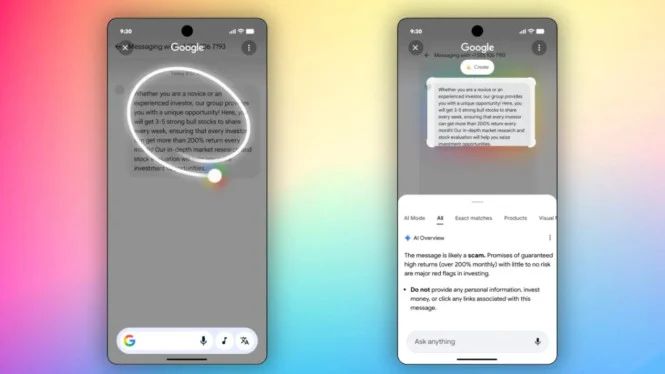
Google now offers a fast and practical solution with its new feature, Circle to Search, which instantly detects scam messages on your device screen. Originally developed for visual searches and translations, the tool has evolved to analyze text with AI, identifying potential fraud within seconds.
What Is Circle to Search and What Can It Do Now?
Circle to Search debuted in early 2024 through a collaboration between Google and Samsung. Initially, it allowed users to search visual content by circling text or objects on the screen without switching apps. The feature now functions as a comprehensive digital assistant capable of:
- Identifying plants, products, and other objects visually.
- Translating foreign text automatically.
- Converting foreign currency values.
- Detecting scam messages in texts and chats.
This latest update transforms Circle to Search into a proactive security tool that shields users from digital threats in everyday use.
How Does Scam Detection Work?
Google combines generative AI with an extensive scam pattern database to analyze circled texts. When a user selects a suspicious message, the system:
- Extracts the text within the circled area.
- Examines sentence structure and common scam phrases like “You’ve won a prize!” or “Click now or your account will be blocked.”
- Checks embedded links against Google Safe Browsing’s blacklist.
- Displays a summary in Google Search with labels such as “Likely safe” or “Potential scam.”
The AI summary explains why the message raises suspicion—such as urging immediate action, requesting personal data, or linking to untrusted domains—helping users make informed decisions.
Steps to Use Circle to Search Scam Detection
The feature works smoothly even for beginners:
-
Activate Circle to Search
- Ensure your device runs Android 12+ or the latest Google app on iOS.
- It’s available on Samsung Galaxy S24, Pixel 8, and other supported models.
-
Circle the Suspicious Message
- Open the message in apps like SMS, WhatsApp, Telegram, or Instagram DM.
- Long-press the Home button or use gesture navigation.
- Drag your finger to circle the suspicious text.
- Review AI Analysis
- Google opens a search panel with an AI summary.
- If flagged, you’ll see alerts like “This message shows typical scam traits: requesting personal data and using time pressure.”
- You can also report the message to improve Google’s scam database.
Alternative for Unsupported Devices: Google Lens
Users lacking Circle to Search support can employ Google Lens for scam detection:
- Screenshot the suspicious message.
- Open the Google app and tap the Google Lens icon.
- Upload the screenshot.
- Google Lens analyzes the text and flags scams if detected.
Though slightly slower, this method still helps raise scam awareness and digital literacy.
Why This Feature Matters
The Ministry of Communication and Informatics of Indonesia reported a 67% increase in digital scams within the last year. Over 40% of victims are aged 50 and above, commonly targeted via SMS or WhatsApp mimicking official institutions.
Google’s scam detection feature integrates digital literacy into daily device use, offering simple, clear feedback that educates users on recognizing red flags.
Who Benefits the Most?
- Older adults frequently targeted by fake prize or bill messages.
- Seniors active on WhatsApp but less tech-savvy.
- Students and remote workers receiving fake login links via email or chat.
- Average users with little knowledge of verifying bank messages.
Families can use this tool as an educational aid during gatherings by demonstrating how to circle suspicious texts for automatic AI warnings.
Limitations to Keep in Mind
Despite its sophistication, AI detection is not foolproof:
- New scams or regional dialects may escape detection.
- Hidden links or images are not analyzed.
Users should remain vigilant by never sharing OTPs, PINs, or confidential data. Google emphasizes that this feature is a supplementary safety layer, not a substitute for personal caution.
By embedding scam detection into Circle to Search, Google leverages AI to protect users beyond entertainment and productivity. This innovation stands as a frontline defender against the rising tide of digital fraud globally. Next time you see a suspicious “Congratulations! You won an iPhone 16!” message, just circle it and let Google’s AI alert you—no need to click first.