


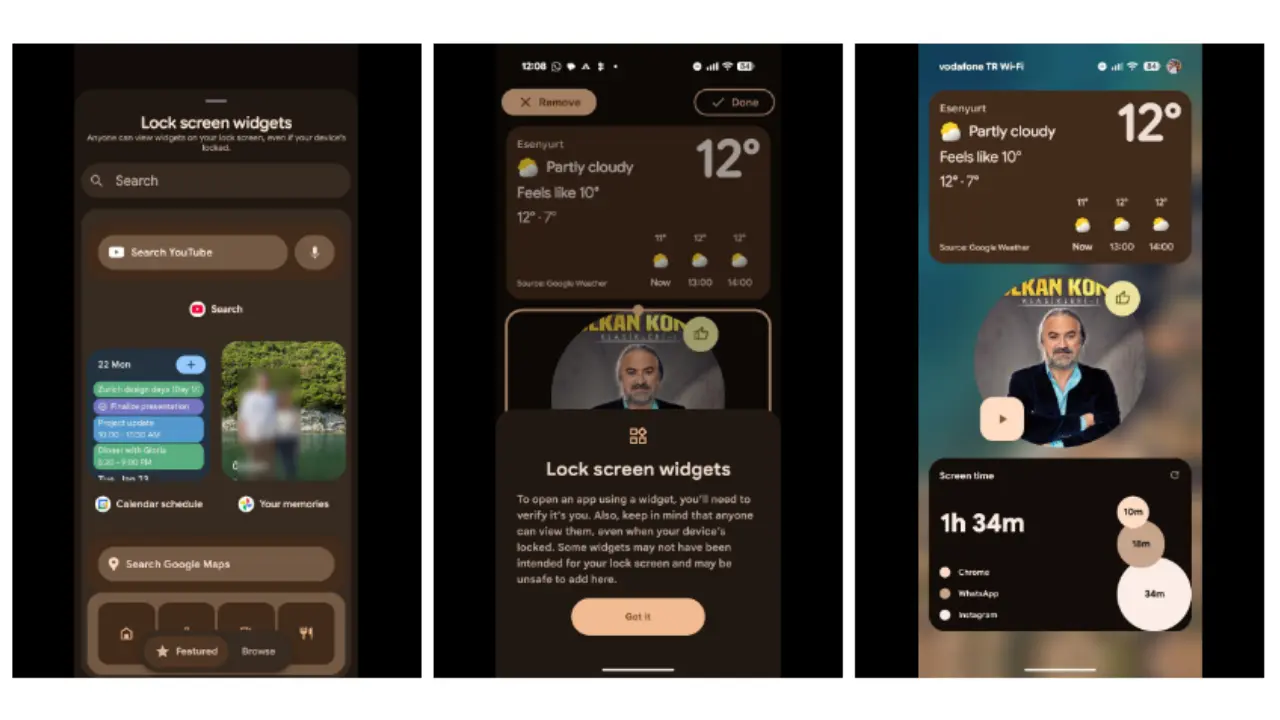
Xiaomi is poised to introduce lock screen widgets in its upcoming HyperOS 4 update, capitalizing on changes brought by Android 16. Google has officially reinstated support for lock screen widgets in Android 16 after removing them since Android 5.0 Lollipop, opening new possibilities for smartphone makers.
Historically, Xiaomi has avoided native lock screen widget support in favor of a controlled design focused on security, battery efficiency, and consistency. Previous MIUI versions disabled Google’s native lock screen widgets even during their initial availability in Android 4.2 Jelly Bean. Instead, Xiaomi relied on custom lock screen elements integrated directly into the system interface.
Xiaomi’s Lock Screen Widget History
Android 4.2 introduced native lock screen widgets, allowing users to add third-party app widgets for quick access. However, MIUI V5 chose not to implement this feature and replaced it with its own lock screen solution. As a result, Xiaomi users could not enjoy the same widget flexibility found in devices like the Nexus series.
When Google removed lock screen widget support entirely in Android 5.0, Xiaomi shifted focus toward enhancing lock screen notifications, clock displays, weather, and other visual information. This approach persisted through MIUI’s transition to HyperOS. Early HyperOS versions kept lock screen info limited to system-controlled elements, such as clocks and weather, without third-party widget support.
Android 16 Revives Lock Screen Widgets
Android 16 marked the return of lock screen widgets, but with a stronger emphasis on security and privacy. The new system implements layered protections that restrict sensitive data exposure while the device is locked. This architecture aligns well with HyperOS’s security and performance priorities.
Xiaomi has already participated in Android 16’s development program for its flagship models, signaling intent to adopt new features. HyperOS 4 could integrate lock screen widgets using a selective approach, prioritizing system-level widgets and Xiaomi’s proprietary services instead of allowing unrestricted widget placement.
Predicted widget categories include weather updates, calendar events, smart home controls, and vehicle integration—all designed to complement HyperOS’s visual identity. This controlled rollout seeks to blend convenience with design consistency and device security.
Strategic Importance of Lock Screen Widgets in HyperOS 4
The introduction of lock screen widgets supports Xiaomi’s broader “Human × Car × Home” ecosystem strategy. As Xiaomi expands its interconnected device ecosystem, having quick access to information and controls on the lock screen becomes crucial. Widgets would provide a functional gateway to smart home devices and automotive features without unlocking the phone.
This functional aspect moves beyond aesthetics, aiming to solidify cross-device integration within HyperOS. Moreover, the feature fulfills long-standing user demand for lock screen widget support that was previously unavailable under MIUI and early HyperOS systems.
Summary of Lock Screen Widget Evolution and Expectations
- Android 4.2: Native lock screen widgets introduced but disabled by Xiaomi in MIUI V5.
- Android 5.0: Google removes lock screen widgets entirely; Xiaomi focuses on system-controlled lock screen elements.
- HyperOS 1 & 2: Limited lock screen info with no third-party widget support, emphasizing security and battery life.
- Android 16: Lock screen widgets return with improved security architecture.
- HyperOS 4 (upcoming): Expected to adopt lock screen widgets in a controlled, integrated manner focused on Xiaomi’s ecosystem.
Xiaomi’s move to embrace Android 16’s lock screen widgets in HyperOS 4 marks a significant and natural evolution. It balances new flexibility with the brand’s established principles of security and UI consistency. Users eager for enhanced lock screen functionality may soon benefit from these changes, which promise to merge convenience with a well-curated experience.