


Sand Raiders of Sophie has arrived on PC with a broad desert world, immersive exploration, and striking dynamic lighting. That visual ambition also means some systems can struggle, with stuttering and frame-rate drops becoming a real concern in certain setups.
The good news is that smoother play does not require a dramatic sacrifice in image quality. With the right display and graphics settings, the game can strike a more practical balance between visual detail and performance on both high-end and budget PCs.
Why the game can feel demanding
Even though the game only asks for 11GB of storage, its hardware demands are not especially light. The minimum specification includes an Intel Core i5 8th-gen or AMD Ryzen 5 2000-series CPU, 16GB of RAM, and a GTX 1650, Radeon RX 570, or Intel Arc A380.
The minimum setup also calls for Windows 10 64-bit, DirectX 11, and a broadband internet connection. While no official target performance is listed for that tier, the configuration is still enough to suggest 1080p play on Low to Medium settings at roughly 30 to 60 FPS.
| Spec Tier | CPU | GPU | RAM |
|---|---|---|---|
| Minimum | Intel Core i5 8th-gen / AMD Ryzen 5 2000-series | GTX 1650 / Radeon RX 570 / Intel Arc A380 | 16GB |
| Recommended | Intel Core i5 13th-gen / AMD Ryzen 5 7000-series | RTX 3080 / Radeon RX 6800 XT | 32GB |
The recommended specification climbs sharply. It lists an Intel Core i5 13th-gen or AMD Ryzen 5 7000-series processor, 32GB of RAM, and either an RTX 3080 or Radeon RX 6800 XT with 10GB to 16GB of VRAM.
For that tier, the operating system requirement is Windows 11 64-bit, alongside DirectX 11 and 11GB of free space. The expected outcome is not stated officially, but the hardware mix points toward 1440p gameplay on High settings with stable 60 FPS in most situations.
Settings for high-end PCs
On systems that meet or exceed the recommended tier, the default presentation should already be manageable. Even so, a more deliberate setup can improve efficiency without stripping away the look of the game.
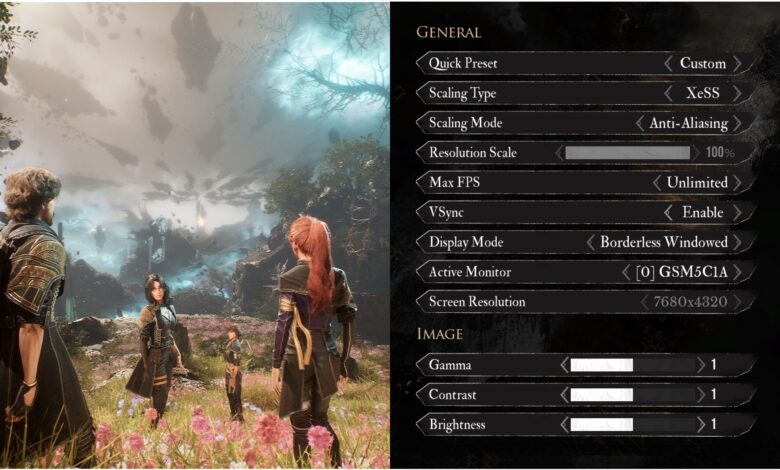
In the display menu, the suggested choices are the primary monitor, Windowed Borderless mode, 2560 x 1440 resolution, V-Sync Off, and a frame-rate limit of 300 or Unlimited. Anti-aliasing is best handled through DLSS, with render resolution set to Native and field of view at 110.
For graphics quality, Geometry, Texture, Materials, Shadow, Shadow Refresh Frequency, Contact Shadows, Sky, Volumetric Fog, SSAO, SSGI, and Post Processing Quality are recommended at High. Parallax Occlusion Mapping should be disabled, Render Distance set to 100, and Motion Blur turned off.
Bloom, Grain, Chromatic Aberration, and Vignette can remain enabled, with Color Filters left on Default. This configuration is reported to keep frame rates above 120 FPS on a system built around a Ryzen 7 5700X or better.
When performance dips during large fights or busy areas, the quickest response is to lean on an upscaler. That approach can deliver an immediate boost with only a relatively small loss in image quality.
Settings for budget PCs
For machines near the minimum requirement, stability should take priority over visual richness. The goal is to keep the game responsive during exploration and combat, even if several quality options need to be reduced.
The display setup should use the primary monitor, Windowed Borderless mode, 1920 x 1080 resolution, V-Sync Off, and a 60 FPS limit. Anti-aliasing can rely on DLSS, FSR, or XeSS, with render resolution set to Performance 0.50x or Balanced 0.58x and field of view at 90.
Almost every major graphics option should be moved to Low, including Geometry, Texture, Materials, Sky, Volumetric Fog, SSAO, SSGI, and Post Processing Quality. Render Distance should also be reduced to 60.
Several effects are better switched off entirely to reduce GPU load. That list includes Parallax Occlusion Mapping, Shadow, Contact Shadows, Motion Blur, Bloom, Grain, Chromatic Aberration, and Vignette, while Shadow Refresh Frequency should remain on Low.
This setup is aimed at hardware such as the GTX 1650 or RX 570. It is designed to limit stuttering during exploration and combat, although occasional frame-rate drops can still appear in crowded multiplayer encounters or during large-scale Trampler battles.
Because the game is in Early Access, further optimization is still expected in future updates. That means today’s best settings may evolve as new patches change how the game performs on PC.