


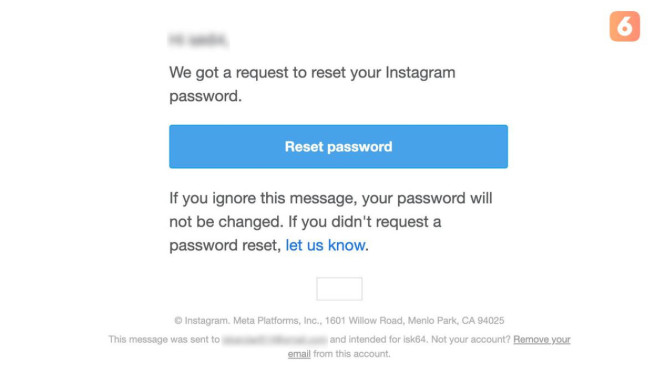
Millions of Instagram users have reported receiving sudden and unsolicited password reset emails. These mass emails appear to request users to reset their passwords despite no such requests being made by the recipients.
This alarming trend coincides with concerns about a large-scale data scraping incident from late 2024. Security experts urge caution as this situation could be exploited in sophisticated phishing attacks.
Background of the Password Reset Email Surge
Cybersecurity firm Malwarebytes reported a data scraping event involving approximately 17.5 million Instagram profiles. Hackers allegedly collected sensitive user information such as usernames, email addresses, phone numbers, and shipping addresses. This stolen data is suspected to have prompted the numerous unsolicited password reset emails.
Users targeted by these emails might receive messages that look authentic, often mimicking official Instagram communications. The malicious intent is to lure users into clicking harmful links, potentially compromising their accounts.
Data Compromised in the Incident
The stolen data reportedly includes:
- Instagram usernames
- Registered email addresses
- Phone numbers linked to Instagram accounts
- Physical shipping addresses
Malwarebytes warned that such personal data enhances the effectiveness of targeted phishing campaigns. Attackers could leverage these details to impersonate Instagram notifications and trick users more convincingly.
How to Protect Your Instagram Account From Phishing Attacks
Despite reassurances from Meta, the parent company of Instagram, experts recommend that users take active steps to safeguard their accounts. Here are key protective measures:
-
Ignore Suspicious Reset Password Emails
Do not click on any links if you have not requested a password reset. Ignoring the message ensures your account password remains unchanged. -
Verify the Email Sender Domain
Official emails from Instagram will come from @mail.instagram.com. Any email from other domains should be treated as suspicious and possibly fraudulent. -
Enable Two-Factor Authentication (2FA)
Activating 2FA adds an extra layer of security. Even if attackers know your password, 2FA can prevent unauthorized access by requiring a secondary verification step. - Regularly Change Your Password via Official App
If concerned about your account security, change your password immediately through Instagram’s official app or website only. Avoid using links in emails for this action.
Meta’s Official Statement and User Reassurance
Meta has publicly addressed this issue to calm user concerns. A spokesperson clarified that Instagram’s systems were not breached and that user accounts remain secure.
“We have fixed a glitch that allowed external parties to trigger password reset emails for some Instagram users,” the spokesperson explained. They emphasized that receiving a reset password email alone does not mean an account has been hacked.
Furthermore, Meta suggested that many of these emails may result from human errors, such as incorrectly typed email addresses or usernames during login attempts.
What Users Should Keep in Mind
The rise in reset password emails is a serious cybersecurity warning but not definitive proof of account compromise. Users should remain vigilant, verify email authenticity, and adopt recommended security practices.
Taking proactive measures such as ignoring suspicious emails, verifying sender domains, enabling 2FA, and changing passwords regularly will enhance account safety. Meta’s prompt response to resolve the vulnerability also demonstrates their commitment to platform security.
Maintaining awareness is essential as cyber threats evolve. The Instagram user community is encouraged to stay informed and cautious to mitigate risks linked to phishing and unauthorized access attempts.