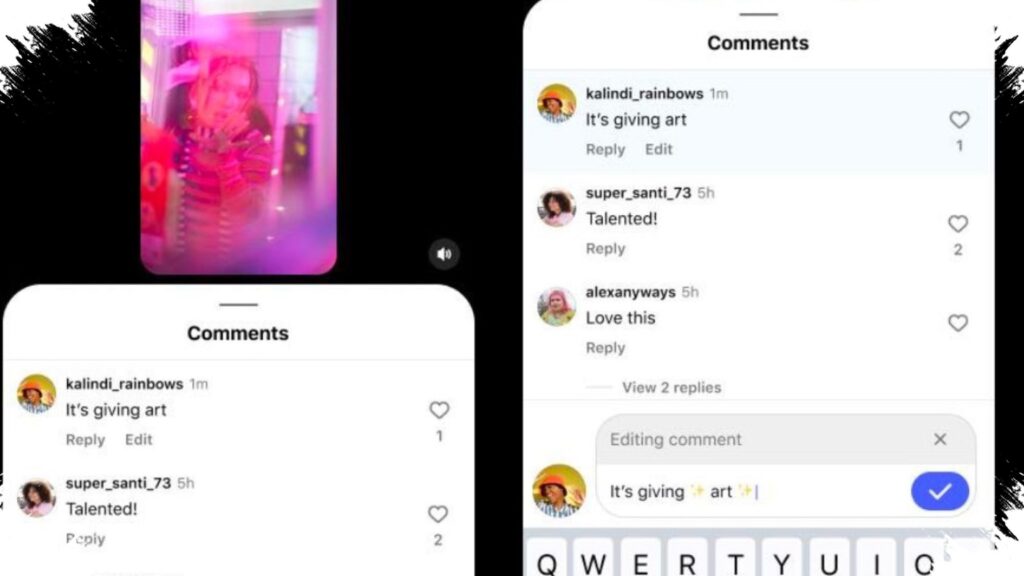
Instagram has finally rolled out comment editing, giving users a way to fix typos, adjust tone, or clean up rushed replies without deleting and reposting. The feature is being released globally and is positioned as a small but practical update for one of the platform’s busiest interaction spaces.
The catch is simple: comments can only be edited within 15 minutes after posting, and Instagram does not show an edit history. That means the update is useful for quick corrections, but it does not work as a permanent revision tool for older comments.
How the new edit feature works
Once a comment is published, users can tap their own comment and select “Edit” to change the text. The comment can be revised multiple times during the 15-minute window, which makes the process flexible enough for fast corrections.
After the update is saved, Instagram adds an “Edited” label to the comment. That marker lets other users know the content has been changed, even though the platform does not display what the original version said.
What the 15-minute limit means
The time limit is the most important restriction in this update. After 15 minutes pass, the edit option disappears, so users cannot return to older comments and rewrite them later.
- Open a comment already posted on Instagram.
- Tap your own comment.
- Select “Edit.”
- Make the changes needed.
- Save before the 15-minute window ends.
This design keeps the feature focused on immediate cleanup rather than full comment revision. It is especially useful for fixing spelling mistakes, correcting grammar, or adjusting a message that was sent too quickly.
No edit history changes the experience
Instagram’s decision not to include edit history sets it apart from some other platforms. On services that show revision logs, users can compare the old and new versions of a comment.
Here, that trail does not exist, which keeps the system simpler but also limits transparency. For everyday users, the absence of a history may feel convenient, while for public conversations it may raise questions about how much context should remain visible after a comment is changed.
Why this matters for active users
Comment sections on social media move fast, and mistakes are common when people respond in the moment. A misspelled word, an unclear phrase, or a reply sent too quickly can now be corrected without removing the conversation thread entirely.
That matters for creators, brands, community managers, and users who frequently interact in high-traffic posts. The ability to revise a comment briefly can help keep discussions cleaner while preserving the flow of the conversation.
The feature may also encourage less impulsive posting. Knowing there is a short window to correct a comment can give users time to rethink wording before the 15 minutes expire.
Why some users still may not see it yet
Instagram is rolling out the feature gradually, so not every account will receive it at the same time. Users who do not see the “Edit” option are likely dealing with a staged launch rather than a problem with their account.
Updating the app through Google Play Store or the App Store is the first step to checking availability. In the reference report, the edit option appears alongside tools such as “Reply” and “See translation” once the newest version is installed.
How Instagram compares with other platforms
Comment editing is not new in the broader social media landscape, but it is still a meaningful addition for Instagram because comments are central to engagement on the app. A feature like this can affect how users communicate under posts from creators, media outlets, brands, and public figures.
Recent reporting also noted that Instagram Plus is under development, which has sparked curiosity about whether more practical tools may later become tied to premium services. For now, the comment edit update stands as a useful everyday improvement that directly addresses one of the most common frustrations in social posting.
As the global rollout continues, the main question for users is not whether the feature is helpful, but how widely and quickly Instagram will make it available across accounts and devices.