


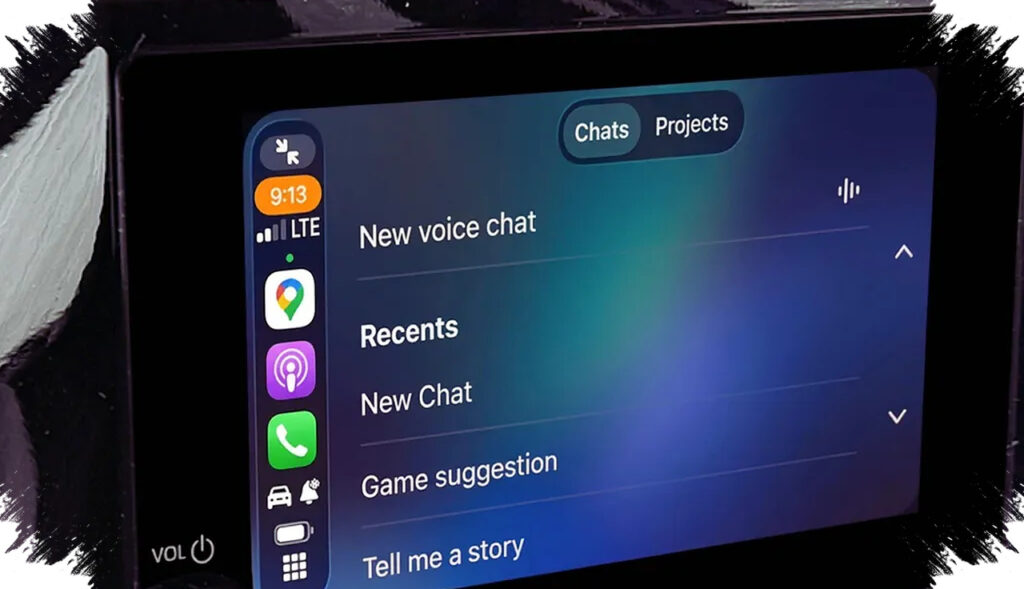
ChatGPT Voice Mode is now available on Apple CarPlay, giving drivers a faster way to talk to AI without typing on a phone screen. The feature is designed for hands-free interaction, which can make short tasks easier to handle while on the road.
The setup is simple, but it depends on a few requirements. An updated iPhone, the latest ChatGPT app, and a CarPlay-compatible vehicle are all needed before the voice feature will appear.
What needs to be ready before activation
The first requirement is an iPhone running the latest iOS version for better compatibility with app updates. The second is the ChatGPT app itself, which must also be updated to a version that supports Voice Mode.
The third requirement is a car that supports Apple CarPlay, either through a cable or wireless connection. If the connection is unstable, the voice session can lag or cut off during use.
How to activate ChatGPT Voice Mode in Apple CarPlay
The activation process does not require advanced settings or a lengthy setup. Users only need to open ChatGPT on the CarPlay display and start a voice session manually.
- Connect the iPhone to Apple CarPlay in the vehicle.
- Open the ChatGPT app from the CarPlay screen.
- Select “New Voice Chat.”
- Wait until the indicator shows the AI is ready to listen.
- Speak naturally and begin the conversation.
Once the session starts, ChatGPT replies by voice, allowing users to continue conversations without touching the phone. That makes the feature practical for quick questions, short explanations, or simple planning while driving.
A useful feature, but not a car control tool
A common misunderstanding is that ChatGPT in CarPlay works like a built-in vehicle assistant. In reality, it functions as a conversational AI, not a system that controls the car.
That means it cannot adjust air conditioning, change music, or make phone calls through the vehicle’s native controls. It is focused on information, ideas, and quick verbal assistance rather than direct access to car functions.
Another important limit is that it does not support a wake phrase like “Hey Siri.” Users still need to open the app manually on the CarPlay screen before starting the voice session.
Where this feature is most helpful
ChatGPT Voice Mode is most valuable for tasks that need fast answers without typing. It can help during long drives, traffic pauses, or travel moments when the driver wants to stay productive without shifting attention away from the road.
| Need | Example use |
|---|---|
| Fast ideas | Brainstorming content or presentation angles |
| Learning | Practicing a foreign language |
| Short information | Getting a quick explanation on a topic |
| Practical guidance | Asking for instant how-to tips |
Used this way, the feature acts like an on-demand conversation partner. It can help turn travel time into a more productive window, as long as the driver keeps attention on road safety.
Why the feature matters for everyday drivers
The arrival of ChatGPT in Apple CarPlay reflects a wider shift in how AI is entering daily routines. Even a simple voice interface can improve convenience for users who want access to useful answers without opening apps manually on a phone.
Voice interaction also feels more natural than typing in a moving vehicle. For frequent travelers, this hidden productivity feature may become one of the more practical uses of generative AI inside a modern car cabin.
The key is to use it for short, low-distraction conversations, such as quick research, ideas, or language practice. That approach keeps the experience useful while preserving the focus needed for safe driving.