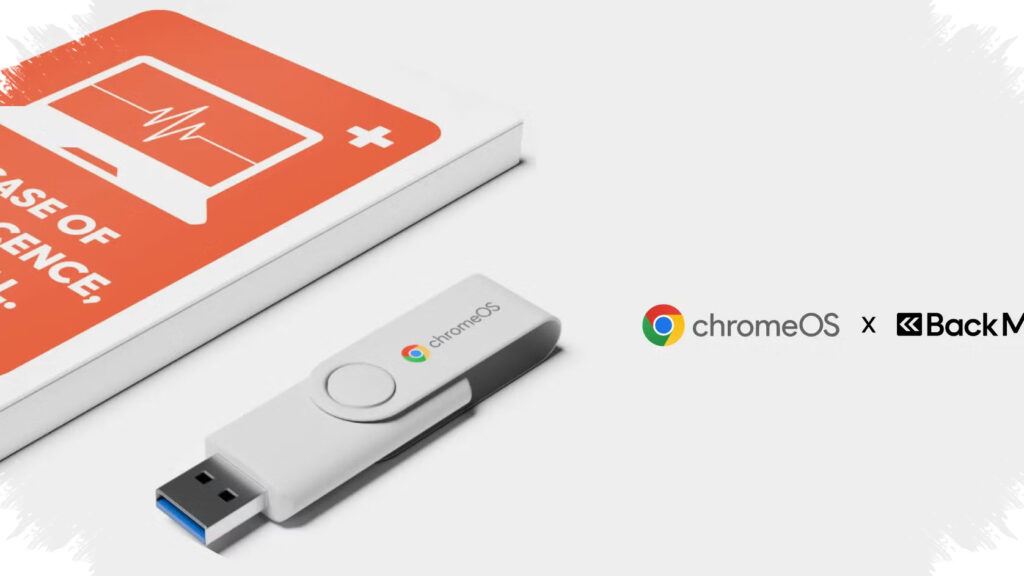
Google has introduced the ChromeOS Flex USB Kit, a low-cost flash drive that makes it easier to install ChromeOS Flex on older laptops and Macs. Priced at $3, or about $51, this small device is designed to give aging hardware a practical second life without requiring a full new computer purchase.
The move highlights Google’s broader push to make ChromeOS Flex more accessible for users who still have functional devices that struggle with modern operating systems. By packaging the installer on a ready-to-use USB drive, Google lowers the technical barrier for people who want a lighter, faster, and simpler system for everyday tasks.
What ChromeOS Flex USB Kit Does
ChromeOS Flex USB Kit is essentially an installation flash drive that contains the tools needed to set up ChromeOS Flex on older PCs or Macs. Google sells it in partnership with Back Market, a company known for refurbished electronics and circular tech products.
In its official blog post, Google described the system as “fast, secure, and free,” pointing to its role as a lightweight operating system for devices that no longer perform well under heavier software. The USB format matters because it removes one of the biggest problems for non-technical users: creating a bootable installer from scratch.
ChromeOS Flex itself is built for basic computing needs, including web browsing, email, document editing, and other light productivity tasks. Google says it is aimed at older hardware, including Windows PCs and MacBooks made around 2010 or earlier, where the original operating system may have become too slow for daily use.
Why Older Laptops Can Become Useful Again
Many older laptops still work properly at the hardware level, but their software demands have become too heavy. ChromeOS Flex aims to solve that problem by replacing resource-intensive systems with something much lighter and more cloud-oriented.
For users who only need a machine for streaming, browsing, schoolwork, or office documents, the system can make a noticeable difference in responsiveness. The USB kit also makes it easier to test the platform before deciding whether a laptop is worth keeping in service.
A simple way to understand the appeal is this:
- It reduces installation complexity.
- It brings a lighter operating system to old hardware.
- It fits everyday tasks that do not need much power.
- It can delay the need to buy a replacement laptop.
- It supports old Windows PCs and Macs.
What Users Should Keep in Mind
ChromeOS Flex is not the same as ChromeOS on a Chromebook, and that difference matters. The Flex version does not support Android apps from the Play Store, and Linux support is limited compared with Google’s dedicated Chromebook software.
This means the system works best as a practical refresh option, not as a full replacement for a modern laptop experience. It can restore usefulness to older machines, but it does not turn them into premium devices with all the features found on official Chromebooks.
That trade-off is important for setting realistic expectations. ChromeOS Flex is meant to extend device life, not to deliver the full hardware-software integration that Google designs into Chromebook products.
ChromeOS on Chromebook vs ChromeOS Flex
| Aspect | ChromeOS on Chromebook | ChromeOS Flex |
|---|---|---|
| Target devices | Official Chromebooks | Older PCs and Macs |
| Hardware integration | High | Broad and generic |
| Android app support | Yes | No |
| Linux support | More complete | Limited |
| System character | Stable and feature-rich | Lightweight and simple |
The table shows why ChromeOS Flex appeals to owners of older hardware. It offers broad compatibility and an easier path to installation, even if it comes with fewer features than the Chromebook version.
Why the USB Kit Matters for Adoption
Google previously relied on a more technical installation flow through its official website. The new USB kit makes the process feel more direct, especially for users who may not be comfortable preparing installation media manually.
Google also provides installation guidance and video tutorials to help users through the setup process. That support suggests a clear goal: expand ChromeOS Flex beyond tech-savvy users and into a wider audience looking for an easy, low-cost way to reuse old devices.
For households, schools, or small offices with aging laptops, the combination of a $3 installer and a lightweight operating system can be compelling. It offers a budget-friendly way to turn dormant devices into useful machines for daily tasks, while also fitting Google’s push toward a more flexible ChromeOS ecosystem.