Galaxy Watch owners are reporting a sudden drop in battery life, and many of the complaints point to Google Play Services as the likely cause. The issue has surfaced across multiple models, including the Galaxy Watch 7, Galaxy Watch 6 Classic, Galaxy Watch 8 Classic, and Galaxy Watch Ultra.
The reports matter because the drain is not tied only to a visible system update on the watch. Some users say battery life worsened even when they had not installed a new update manually, which suggests a background change, a server-side adjustment, or another software component may be involved.
Battery Drain Reports Span Several Galaxy Watch Models
The complaints first gained traction in user communities, where owners described a sharp decline in endurance without changing how they use their watches. One widely shared report on Reddit came from a Galaxy Watch Ultra owner who said, “My ultra was going strong for 4 days without AOD. Now barely 2 days. Play service is draining like crazy.”
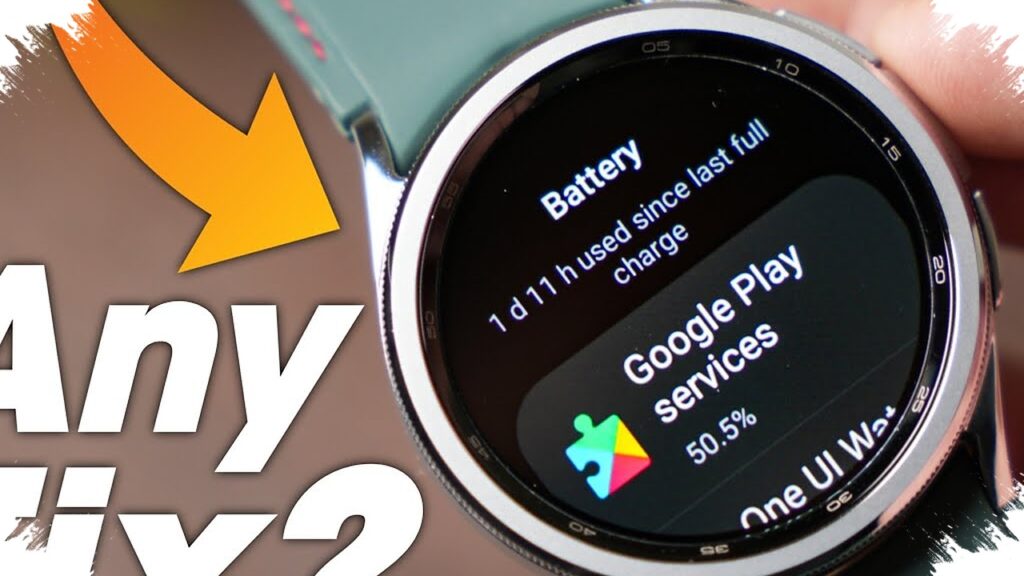
That same pattern has appeared in comments from Galaxy Watch 7 users, some of whom said Google Play Services accounted for more than 10% of total battery usage. On a wearable device, that figure is unusually high because core system services normally run in the background with limited power impact.
Another pattern that has stood out is the sudden nature of the drain. Several users said their battery health seemed normal before the issue began, then dropped fast over a short period of time.
Why Google Play Services Is Under Suspicion
Google Play Services plays a central role in the Android ecosystem, including on Wear OS devices. It handles account sync, notifications, location features, security functions, and communication between apps and the operating system.
Because the service updates automatically, changes can happen without obvious user action. That has led many owners to suspect that the problem may not be limited to watch firmware, and could instead involve a background update or a server-side change affecting performance.
The suspicion also grows because the issue appears on more than one model. When the same battery drain shows up across different devices, users often look for a shared software cause rather than a hardware defect isolated to a single watch.
What Users Are Reporting
The most common complaints follow a similar pattern, and they point to abnormal background power use. These are the main symptoms being discussed across community reports:
| Reported symptom | What users say |
|---|---|
| Faster battery loss | The watch drains much more quickly than before |
| High Play Services usage | Google Play Services appears near the top of battery stats |
| Temporary relief after restart | Rebooting helps, but only for a short time |
| Not limited to manual updates | Some users report the issue even without installing a new update |
That combination suggests the problem may not be locked to one software version. It also makes troubleshooting more difficult because the drain can appear after different triggers, or even without any obvious trigger at all.
Steps Some Users Are Trying
Until Samsung or Google issues a formal explanation, affected owners are trying basic fixes that may ease the drain. These steps are not guaranteed, but some users say they have helped at least temporarily.
- Clear the cache for Google Play Services.
- Clear storage for Google Play Services.
- Restart the Galaxy Watch to reset background processes.
- Perform a full reset only if the problem continues.
A cache clear can remove temporary files that may be causing conflicts. Clearing storage is more aggressive and may help if a corrupted configuration is involved, while a full reset remains the last resort because it removes settings and requires setting the device up again.
After each step, users should check battery statistics again to see whether Google Play Services still sits unusually high in the usage breakdown. If it does, the issue may be deeper than a standard app-level glitch.
Samsung and Google Have Not Confirmed a Cause
At this stage, there is still no official explanation from Samsung or Google. That leaves affected users in a difficult position, especially because the suspected source is a Google-managed service running on Samsung hardware.
Any real fix will likely require coordination between both companies. Samsung controls the watch software integration, while Google manages Play Services, which is a core part of Wear OS and the broader Android platform.
For now, Galaxy Watch owners facing rapid battery loss are watching for a software patch or backend correction. If the drain is tied to Google Play Services, the most effective solution will likely come through an update rather than changes to day-to-day usage habits.