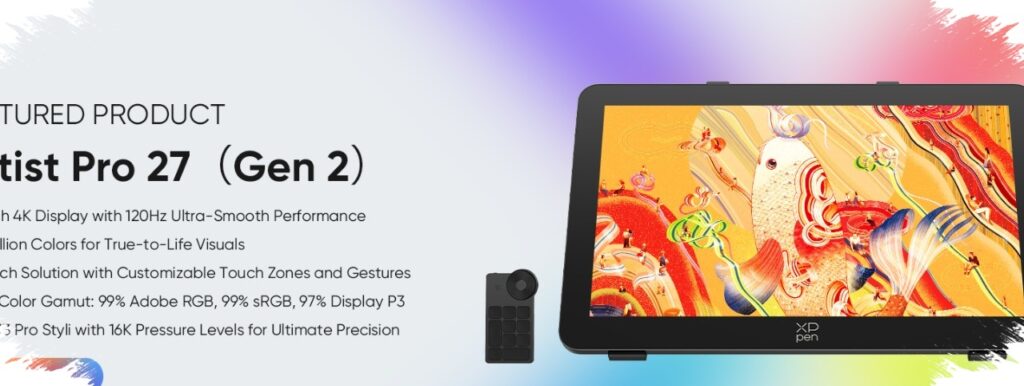
A 27-inch pen display is not designed to be subtle, and XPPen’s Artist Pro 27 Gen 2 makes that clear from the start. It is aimed at creators who need more room than a 12-inch or 16-inch tablet can offer, while also expecting 4K detail, fast movement, and dependable color handling.
That ambition comes with a practical condition: this is a display for a workspace that can support it. The size, weight, and cable setup all point to a serious desk environment rather than a compact or temporary setup.
Large-format work for demanding creative tasks
The Artist Pro 27 Gen 2 uses a 27-inch IPS panel with a 3840 x 2160 resolution. Its pixel density reaches 163 PPI, which helps keep fine details sharp when working on illustration or photo editing.
XPPen also positions the display as a color-focused tool. It covers 99 percent Adobe RGB, 99 percent sRGB, and 97 percent DCI-P3, making it suitable for creative workflows that rely on accurate color reproduction. Each unit is said to be factory-calibrated in the Adobe RGB color space.
In testing cited by the source article, a review sample recorded an average Delta E of 0.97 with a maximum deviation of 3.0. That result suggests the panel arrives with strong color accuracy for immediate use, rather than requiring extensive adjustment first.
120Hz changes the drawing feel
One of the clearest advantages here is the 120Hz refresh rate. Compared with a 60Hz display, it makes brush movement look smoother, canvas navigation feel more responsive, and long sessions easier on the eyes.
The source report also notes that fast strokes and large canvas movements feel more natural on this screen. Stutter and ghosting were described as minimal, which supports a less mechanical and more fluid drawing experience.
The surface also plays an important role. XPPen uses a nano-etched anti-glare glass layer with an anti-fingerprint coating, reducing reflections while helping the panel stay cleaner during long creative sessions.
Stylus response built for control
The display ships with the X3 Pro Smart Chip Stylus, which supports 16,384 pressure levels. That wide pressure range allows for subtle strokes as well as heavier marks, giving artists more control over line variation and shading.
A second pen, the X3 Pro Slim Stylus, is included in the package as well. It weighs around 10 grams, lighter than a standard 16-gram pen, which may be more comfortable during longer work sessions.
The Slim Stylus also has a removable side button. That allows a cleaner pen feel for users who do not want extra controls on the body, while functions can still be customized through XPPen’s driver software.
Connectivity is broad, but not without limits
For video input, the Artist Pro 27 Gen 2 offers full-size DisplayPort, HDMI, and USB-C with display signal support. It also includes a 3.5 mm audio jack for basic sound output.
Even so, the port selection has a few important constraints. There is no built-in USB-A port, so users who want to connect a mouse dongle or flash drive will need an external hub.
USB-C has another limitation at 4K 120Hz. According to the source testing, that connection runs with YCbCr 4:2:2 chroma subsampling rather than full RGB, which is why DisplayPort or HDMI remains the better choice for the best signal quality.
USB-C also does not support power delivery for laptops. In practice, that means it works mainly as a display connection rather than a single-cable solution for both image and power.
Desk space matters as much as specifications
At around 7 kg, this display is not built for light or cramped desks. Its footprint and weight require a stable work surface, especially for users who plan to rely on it as a primary creative tool.
The included stand offers 11 tilt positions and uses a heavy, stable base. When the screen is pressed with a stylus, it stays steady and does not feel easy to shift.
Portrait orientation is possible, but it is not especially convenient because the panel must be removed and mounted again. A more flexible setup is available through the 100 x 100 mm VESA mount on the back, which allows use with a monitor arm or third-party stand.
For creators who want a wide, accurate, and smooth drawing surface, the Artist Pro 27 Gen 2 delivers a convincing case. It suits studio setups where desk space, stability, and connectivity can support a large pen display without compromise.