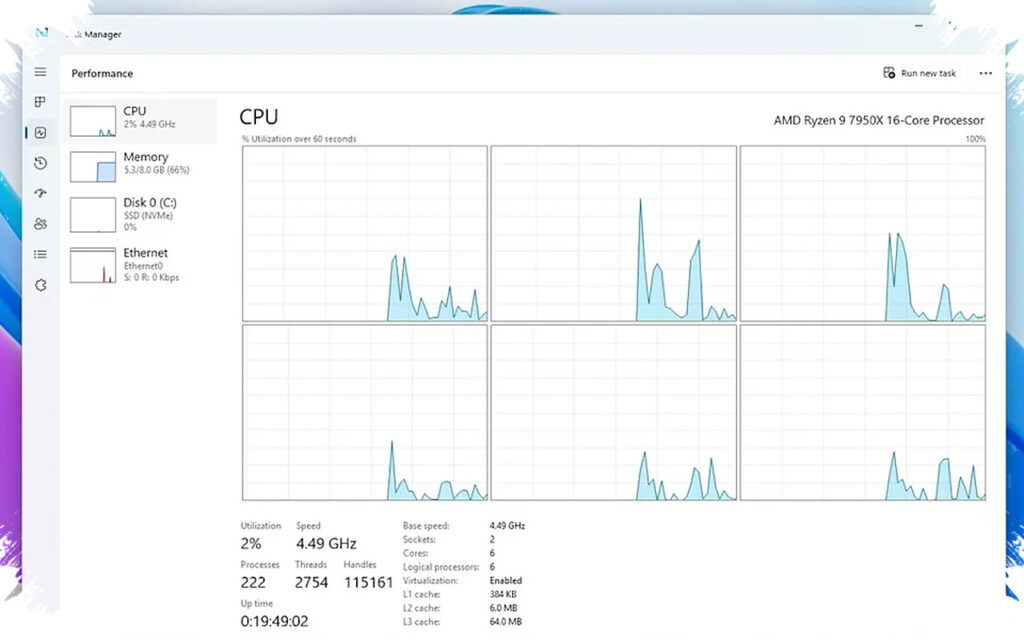
Windows 11 is getting a subtle speed boost that is designed to make everyday interactions feel faster without keeping the system in a high-performance state all the time. Microsoft is testing a Low Latency Profile that briefly pushes the CPU harder only when the system detects short, user-driven tasks such as opening menus, launching apps, or switching windows.
Fast responses without a constant performance mode
The feature is part of Microsoft’s Windows K2 initiative and focuses on trimming the brief delays that users notice most. When an interaction is detected, the processor can be raised to maximum level, or close to it, for roughly one to three seconds before returning to normal behavior.
That approach is meant to improve the feel of the system during quick actions rather than during long, heavy workloads. In practical terms, Windows 11 is trying to react faster at the exact moment a user needs it, instead of staying aggressively tuned all the time.
Microsoft has not explained every technical detail publicly, which is why the feature has drawn attention among Windows watchers. Even so, the direction is clear: the company wants the interface to feel more immediate when users open Start, launch programs, or move between applications.
What the system is trying to speed up
The Low Latency Profile is aimed at interactive tasks, including opening the Start menu, launching software, switching apps, and processing user input. Microsoft is also testing it on standard third-party traditional apps, not just built-in software such as Outlook and Microsoft Edge.
The feature does not add a new workload type. Instead, it changes how Windows prioritizes and schedules tasks that already exist once short interactions are detected.
That means the biggest impact is expected in interface responsiveness. The effect is less about sustained performance gains and more about reducing the small pauses that make a system feel sluggish.
Promised gains, but only for short bursts
Microsoft’s internal testing suggests the improvement can be substantial in the right moments. Application launch time is said to improve by up to 40 percent, while interface actions such as Start menu or context menu opening may see gains of as much as 70 percent.
Those numbers are tied to brief interaction windows, not long sessions of intensive work. The CPU boost is temporary by design, which helps Windows avoid turning every small task into a full performance event.
Battery and thermal impact are expected to stay limited because the higher clock behavior only lasts a short time. That makes the approach different from a permanent performance mode on a laptop or tablet.
Why the change may be hard to notice directly
Windows 11 already includes other performance-related behavior, including SysMain, formerly known as Superfetch. That service loads frequently used apps into memory to help speed up launch and response times.
Because of that, the improvement users experience may come from several optimizations working together. It will not always be easy to isolate the effect of Low Latency Profile on its own.
The feature is also designed to work quietly in the background. There is no visible “Turn on Low Latency Profile” switch in Power, Power Options, Settings, or Control Panel.
Where users may notice it most
The biggest benefit is expected on older or lower-end devices. Those systems tend to show more hesitation when opening interfaces, launching apps, or handling short bursts of activity.
On newer PCs with fast SSDs, ample memory, and stronger processors, the effect may be less dramatic. In those systems, the profile is more likely to make interactions feel smoother than to produce a striking speed jump.
A short CPU spike may be visible in Task Manager’s Performance tab when the Start menu, File Explorer, or Notification Center opens. Still, that kind of spike is not proof by itself, since other background services and system processes can produce similar behavior.
Microsoft is expected to roll the feature out through the June 2026 update for Windows 11 version 25H2 and 24H2, and it is already present in current Windows Insider builds. Some criticism describes the approach as a patch for performance issues, but Microsoft presents it as a common industry practice for improving responsiveness.