Email remains one of the easiest entry points for cybercriminals because inboxes often contain personal data, login credentials, and financial information. Phishing attacks exploit that trust by posing as legitimate senders and pushing recipients to reveal sensitive details without hesitation.
The danger grows because phishing tactics continue to evolve, which means basic caution alone is no longer enough. Safer email habits need to be consistent so privacy stays protected and the risk of fraud is reduced from the start.
Spot suspicious messages before they do damage
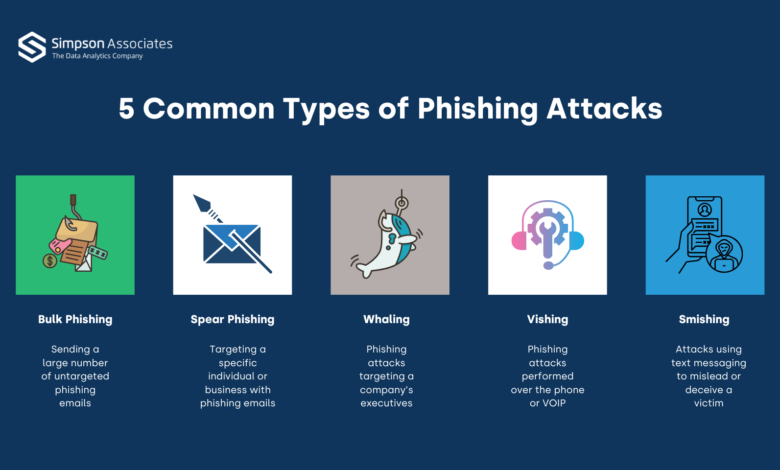
The first defense is learning how to recognize the warning signs of phishing. Common red flags include sender addresses that do not use a legitimate domain, generic greetings, urgent requests for personal information, spelling or grammar mistakes, and suspicious links or attachments.
That simple check often determines whether a message is safe to open or the beginning of a data leak. The sooner an unusual detail is noticed, the smaller the chance that an account falls into the wrong hands.
Do not click links or open attachments carelessly
Unfamiliar emails should not be clicked immediately, especially when they contain attachments or links designed to trigger curiosity. Files with extensions such as .exe, .zip, or .scr can install malware on a device.
A safer approach is to visit the destination website directly by typing the address into the browser. This helps confirm authenticity without relying on a link sent by someone else.
Strengthen access with strong passwords and 2FA
A strong password remains a basic layer of email defense. A mix of uppercase and lowercase letters, numbers, and symbols makes an account harder to break into.
Two-factor authentication, or 2FA, adds another barrier when a password has already been exposed. Even if attackers obtain the password, login is still blocked by the second verification step.
Use spam filters and manage suspicious senders
Most email providers already offer spam filters that detect harmful messages and move them to the junk folder. Users can also block suspicious senders manually so similar messages stop arriving.
The spam folder still needs to be checked regularly. That matters because legitimate emails can sometimes be misplaced by the filtering system.
Keep devices updated
Outdated software is more vulnerable to phishing and malware. For that reason, the operating system, browser, and antivirus tools need regular updates to close security gaps.
Advanced anti-malware tools can also scan email in real time. That feature helps detect dangerous links and attachments before they are opened.
Avoid sending sensitive data by email
Important information such as ID card photos, banking data, passwords, and health records should not be sent through email. Messages requesting personal data also should not be trusted automatically.
If something feels uncertain, contact the relevant institution directly to confirm the request. That verification step is safer than replying to a message whose origin is still unclear.
Report suspicious messages immediately
Email suspected of phishing should be reported through the provider’s “Report phishing” option. If the message reaches a work inbox, the IT department should be informed right away.
Reporting helps service providers and organizations identify threats that are already circulating. That makes similar attacks easier to block before they reach other victims.