


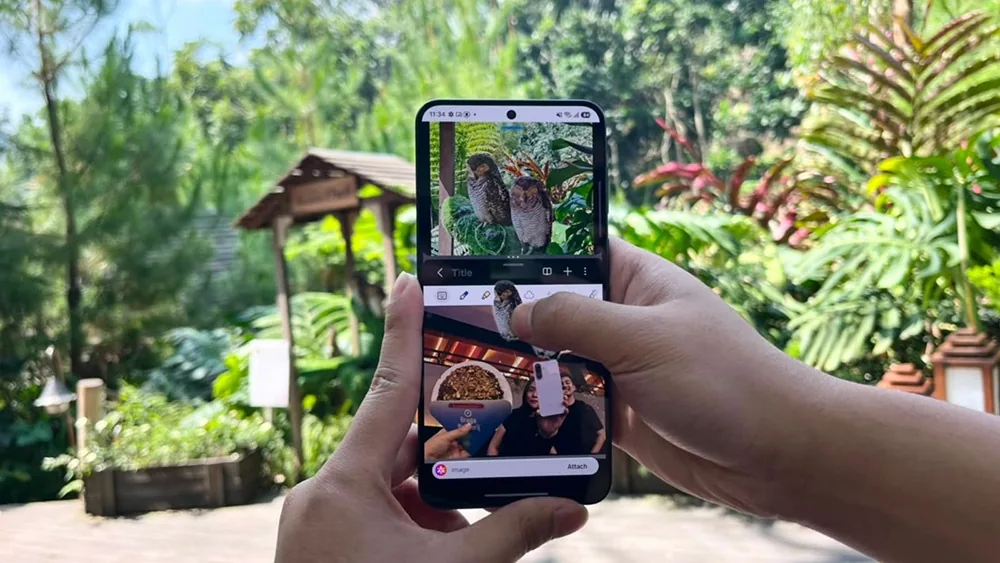
Samsung is pushing the Galaxy A57 5G as a phone built for a generation that travels and posts at the same time. With Multi Window and Drag & Drop in One UI 8.5, the device is designed to help young creators move from capturing moments to publishing them without breaking their workflow.
The appeal is clear in a social media era where travel is no longer just about the trip itself. For many Gen Z users, the value of a smartphone now lies in how well it can support real-time storytelling, quick editing, and visual presentation from one screen.
Two apps, one practical workflow
Multi Window lets two applications run side by side, which makes the phone feel more like a compact creative desk than a standard handset. A user can keep the camera open on one side while viewing notes or a script in Samsung Notes on the other.
That setup is useful in fast-moving settings such as tourist spots or event venues. Instead of jumping back and forth between apps, the user can keep the work process structured and save time while creating content on the move.
Samsung says the approach is aimed at the needs of a growing content creator segment. Annisa Maulina, MX Product Marketing Senior Manager Samsung Electronics Indonesia, said the company built the experience around the digital lifestyle of younger users and integrated One UI 8.5 with Multi Window and Drag & Drop to make productivity feel more intuitive.
Building a digital scrapbook directly on the phone
Drag & Drop adds another layer of convenience for anyone assembling a digital scrapbook. Images, text, and visual elements can be moved from one app to another with a simple gesture.
That makes it possible to build a more personal travel story without relying on third-party apps. Stickers, trip notes, and selected photos can be arranged into a carousel-style format that has become popular on social platforms.
Samsung also outlines a straightforward process for users who want to make that kind of content. They can open Multi Window through Edge Panel, launch Gallery and Samsung Notes together, then pick photos from a trip, such as landscapes, food, or special moments.
From there, Image Clipper can separate the subject from the background automatically. The clipped object can then be moved into Notes through Drag & Drop, arranged with text and stickers, and saved as an image ready to upload.
Performance and display support the creative push
The multitasking experience is backed by a newer Exynos chipset built for efficiency and high performance. Samsung says the chip is intended to keep editing, image processing, and app switching responsive while managing power use effectively.
The display is also tuned for content creation. The Galaxy A57 5G comes with a 6.7-inch FHD+ Super AMOLED+ screen, a 120Hz refresh rate, and Vision Booster with peak brightness reaching 1,900 nits for clearer visibility outdoors.
Memory and storage options include 8/128GB, 8/256GB, and 12/256GB variants. The color choices are Awesome Gray, Awesome Navy, Awesome Icy Blue, and Awesome Lilac.
Launch promotions add extra pressure on rivals
Samsung is also backing the phone with launch offers during the 1–17 June 2026 period. The promotions include cashback of up to Rp2.2 million, total benefits of up to Rp5.7 million, trade-in support of up to Rp3.5 million, free administration and processing fees, and down payment schemes starting from 0%.
With its multitasking tools, display, and editing-friendly workflow, the Galaxy A57 5G is positioned as a device for younger users who want to create and share travel content more efficiently. In that context, the phone’s strongest selling point is not just its camera experience, but how much it can do on a single screen.