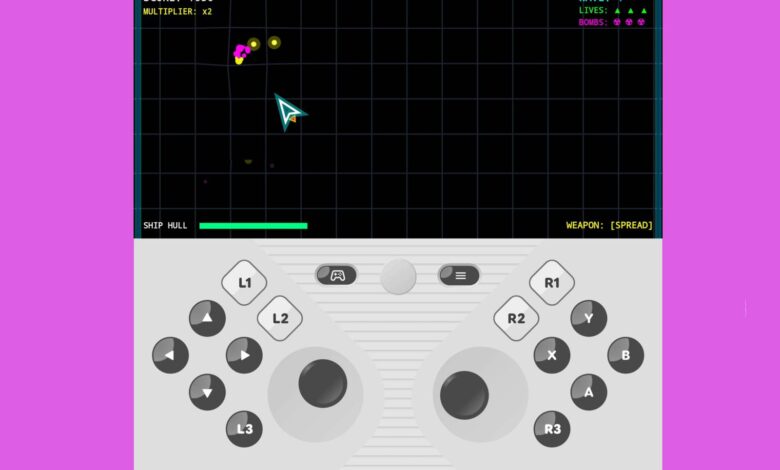
Google is showing how Android 17 could solve one of the most annoying problems on foldable phones: comfortable gaming on a wide inner display. Instead of forcing players to stretch their thumbs across a large screen, the system splits the panel into two sections, with the game on top and a dedicated virtual gamepad below.
The design targets a familiar ergonomic weakness in foldables. Their large inner screens are excellent for immersion, but the broad, almost square shape often makes touch controls awkward to reach and tiring to use for long sessions.
A system-level controller, not a simple overlay
According to Google’s preview shared through Mishaal Rahman, Android Community Engagement Manager, on Reddit, the feature goes beyond a basic on-screen button layout. Android 17 embeds a configurable virtual gamepad at the system level through the Android Open Source Project.
That approach matters because it does not depend on third-party mapping tools or game-specific split-screen designs. Instead, the operating system can present the foldable as if a physical controller were attached.
Game above, controls below
In this mode, the inner display uses a 50:50 split. The upper half stays clear for gameplay, while the lower half becomes a full control surface.
Google’s layout includes two thumbsticks, a D-pad, A, B, X, and Y buttons, a Start button, and three layers of shoulder input with L1/L2/L3 and R1/R2/R3 support. The goal is to keep the action visible while giving players controller-style input that is easier to reach.
Built for games that already support controllers
The virtual gamepad works by simulating hardware button presses at the system level. That means games with standard controller support can recognize the setup natively, rather than treating it as ordinary touch input.
This is a major shift for foldable gaming. Users have often had to rely on third-party key-mapping apps or wait for developers to create custom layouts for specific devices.
When neither option existed, touch controls were usually scaled awkwardly to the inner screen. The extra space on a foldable then went to waste instead of improving the experience.
Settings can be adjusted to fit different hands
Google is also letting players tune the layout. A controller icon on the overlay opens customization options, allowing changes to match hand size and play style.
If the default “Twin stick, Inline” layout feels too tight, users can switch to “Twin stick, Staggered.” That option adjusts the position of the left thumbstick, D-pad, and shoulder buttons to make reaching them more comfortable.
The gamepad itself can be resized to small, medium, or large, and users can choose between light and dark themes. Haptic feedback is included as well, adding vibration that mimics the feel of pressing physical buttons.
Flexible enough to disappear when needed
The virtual controller is not mandatory for every game. Titles designed entirely around touch input can hide it with the “Hide Gamepad” option, leaving the full inner display available for gameplay.
Users can also disable it completely from the main system settings. Android 17 is designed to step aside automatically when a real controller is connected through Bluetooth or USB-C, so the virtual overlay does not interfere.
Because the feature lives inside AOSP, device makers can adopt the base code and adjust it for their own foldable dimensions. If Google keeps the rollout on track, the gaming mode could arrive more widely in the months ahead with the final release of Android 17.