


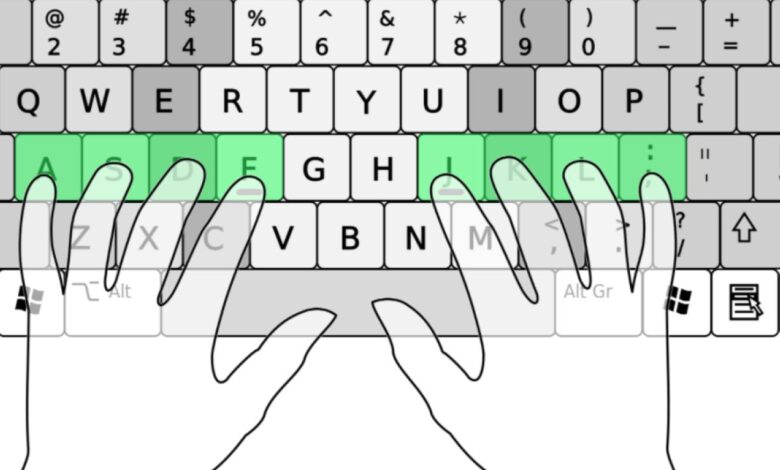
Those tiny bumps on the F and J keys are easy to overlook, but they serve an important purpose. On a keyboard, they help users find the starting position for their hands without looking down.
Known as homing bars or homing bumps, the ridges on F and J act as physical guides for the index fingers. They give typists a reliable reference point at the center of the home row, making it easier to return to the correct position after reaching for other keys.
A small detail with a practical function
The design is closely tied to touch typing, a method that depends on muscle memory rather than constant visual checking. Once the hands learn the layout, the bumps help reinforce that memory through touch alone.
This tactile cue is especially useful because the fingers do not need to search for the keyboard’s starting point every time. Instead, they can settle on the home row quickly and move on to other keys with less hesitation.
Why the feature feels so effective
Human fingertips are highly sensitive to texture, so even a subtle ridge can send clear feedback to the brain. That tactile response allows the user to map the keyboard more efficiently while maintaining a steady typing rhythm.
The result is a smoother workflow, particularly for people who spend long hours at a computer. With less need to check the keyboard visually, typing becomes more natural and less disruptive.
Why F and J were chosen
The bumps are linked to August Dvorak, the designer behind the Dvorak keyboard layout. He introduced the markers to help hands return to the row of letters used as the primary reference point for typing.
Even on modern keyboards, the same idea remains in place because F and J continue to serve as the main orientation keys. From those two letters, the rest of the keyboard becomes easier to navigate by feel alone.
| Keyboard Mark | Function | Typing Benefit |
|---|---|---|
| F key bump | Index-finger home reference | Helps locate the starting hand position |
| J key bump | Index-finger home reference | Makes it easier to return to the home row |
For many users, that simple physical cue is what keeps touch typing accurate and efficient. What looks like a minor keyboard detail is actually one of the features that helps people type without constantly looking at the keys.