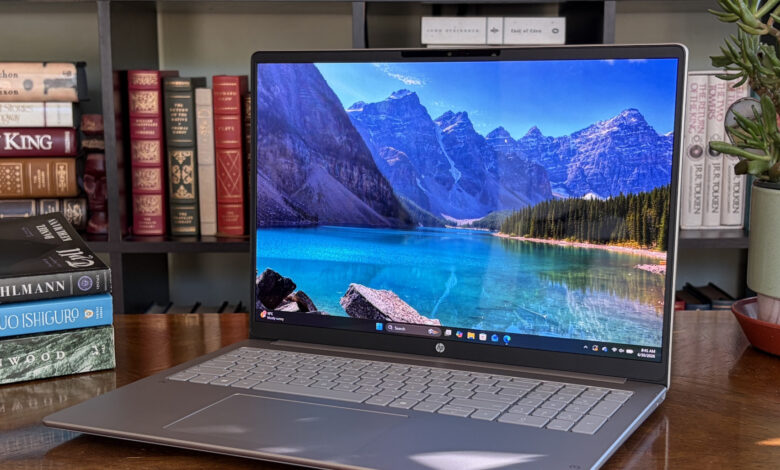
HP OmniBook 3 16-inch is one of those budget laptops that makes the most sense only when the price drops. Its strongest appeal comes from an unusually long battery life, a large display, and Snapdragon X performance that is solid enough for everyday use.
At full price, the equation changes quickly. The laptop can become far less compelling than similar models in the same class, which is why its value is closely tied to promotions.
A price gap that changes the recommendation
The starting price for HP OmniBook 3 16-inch is $699.99 before discounts, but it is often pushed into aggressive sale territory. That pattern matters more than usual because the laptop’s best argument is not raw prestige, but how much it offers when the sticker price falls.
During testing, a version with Snapdragon X X1-26, 16GB LPDDR5x RAM, a 512GB SSD, and a 2K IPS display was listed at $399 at Walmart. At that level, the machine turns into a far more convincing 16-inch buy.
| Configuration | Display | Memory / Storage | Price |
|---|---|---|---|
| Snapdragon X X1-26 model | 2K IPS | 16GB LPDDR5x / 512GB SSD | $399 at Walmart |
| Review unit | 2K OLED, non-touch | 32GB LPDDR5x / 1TB SSD | $1,729.99 regular, $1,259.99 promo |
The reviewed unit sat at the higher end of the lineup. It paired a 2K OLED screen with 32GB LPDDR5x memory and a 1TB SSD, and its promotional pricing still remained far above the lower-cost sale configuration.
Large laptop, but still easy to carry
In physical terms, the machine feels closer to a stretched 14-inch laptop than a bulky 16-inch system. Its 0.58-inch thickness and 3.65-pound weight keep it reasonably portable for daily use.
The chassis, however, does not feel as sturdy as its clean design suggests. There is noticeable flex in the body, and pressing on it produces an audible creak.
The lid is more rigid and offers better protection for the OLED panel. Overall, the design stays modern and tidy for this price class.
Ports and cooling stay practical for work
HP gives the OmniBook 3 a useful set of connections for productivity. The left side includes HDMI 2.1, one USB-A 5Gbps port, and two USB-C 3.2 Gen 2 ports rated at 10Gbps, while the right side adds another USB-A port and a 3.5mm audio jack.
DisplayPort 1.4 video support over USB-C also helps when connecting external monitors. Even so, the absence of USB4 means high-speed data transfer is still an area where the laptop could improve.
Thermals appear well managed as well. Air enters through a large intake underneath and exits through the rear, keeping hot exhaust away from the hands.
The OLED screen is the standout hardware choice
The review unit uses a 16-inch non-touch OLED panel with a 1920×1200 resolution. That display is the most appealing option in the lineup because of its strong color and contrast performance.
Measurements taken with a SpyderX Pro showed 100% sRGB, 92% AdobeRGB, and 99% DCI-P3 coverage. Those results are excellent for a budget-oriented laptop.
The weakness is brightness. The OLED panel is only slightly above 300 nits, and it still struggles in bright rooms even with an anti-glare coating.
| Display Metric | Result |
|---|---|
| Size | 16 inches |
| Resolution | 1920×1200 |
| Color Gamut | 100% sRGB, 92% AdobeRGB, 99% DCI-P3 |
| Brightness | Slightly above 300 nits |
Battery life is the main reason to buy it
This is where the OmniBook 3 16-inch stands out most clearly. With a 68Wh battery and Snapdragon X efficiency, the laptop can last through a full day of mixed use without needing a recharge.
In one usage scenario, YouTube playback that started in the afternoon was still running into the night with the battery not dropping below 70%. The same playback was then left running until the next morning.
Windows battery reporting showed roughly 38 hours, although that result was affected by streaming tests. A more conservative estimate falls in the 25 to 30 hour range.
| Battery Detail | Reported Result |
|---|---|
| Battery capacity | 68Wh |
| Windows battery report | About 38 hours |
| Conservative estimate | 25 to 30 hours |
Performance remains competitive for everyday users
Snapdragon X X1-26 is no longer the newest chip, since it now sits one generation behind the X2 hardware. Even so, its performance remains competitive for regular users.
On Geekbench 6, the chip went head-to-head with Intel Core Ultra 7 256V in both single-core and multi-core scores. The shift from AC power to battery barely changed the overall performance.
Cinebench results were even more surprising because Snapdragon X outpaced Core Ultra 7 256V and Ryzen 7 8840U. The M.2 PCIe 4.0 NVMe SSD was also quick, posting 7,073MB/s read and 5,705MB/s write in CrystalDiskMark.
| Performance Test | Result |
|---|---|
| Geekbench 6 | Competitive with Intel Core Ultra 7 256V |
| Cinebench | Ahead of Core Ultra 7 256V and Ryzen 7 8840U |
| CrystalDiskMark | 7,073MB/s read, 5,705MB/s write |
Keyboard, touchpad, and camera round out the package
The keyboard is better than average for a laptop at this price. Key travel feels good, the backlight is bright, and the numpad adds convenience for work.
The touchpad is not haptic, but its click feel is satisfying and tracking works well. The stereo speakers under the chassis are more ordinary, with neither great loudness nor especially full sound.
The 1080p camera is more impressive than the speakers. It produces clear images and adds an IR sensor for Windows Hello, along with a physical privacy shutter for extra security.