


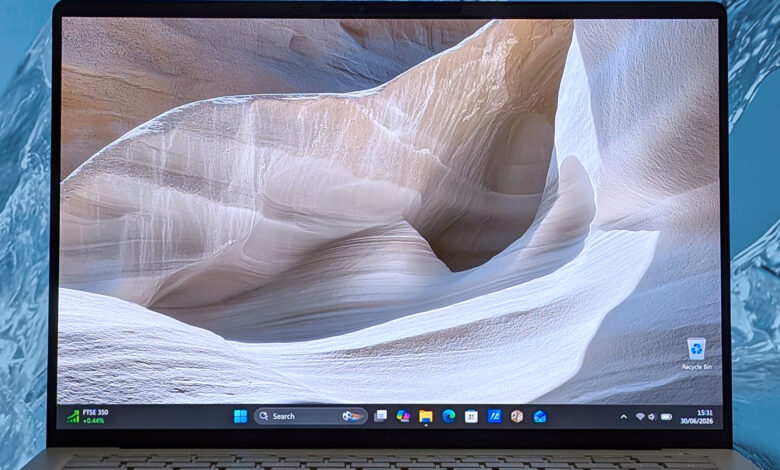
ASUS has given the Zenbook A14 a major internal upgrade that changes the appeal of this ultra-light Windows laptop. The 2026 model now comes with the Snapdragon X2 Elite, turning a familiar portable notebook into a much more capable machine for users who want mobility without giving up performance.
The new version keeps the same lightweight identity that made the Zenbook A14 stand out in the first place. At 2.18 lbs, or 0.99 kg, it remains one of the easiest premium laptops to carry, while the Ceraluminum body adds a sturdy feel and a more distinctive look than a standard silver finish.
OLED display and slim design remain the core appeal
ASUS continues to use a 14-inch OLED panel with a 16:10 aspect ratio, 1920 x 1200 resolution, and a 60Hz refresh rate. It is not a touchscreen, but the display still delivers strong visual quality, with measured peak brightness reaching 407 nits full-screen and a claimed 600 nits on part of the panel.
The design also keeps practical details in place for everyday use. The left side carries two USB4 Type-C ports, HDMI 2.1, and a 3.5 mm audio jack, while the right side includes a full-size USB-A 3.2 Gen 2 port.
| Zenbook A14 2026 key specs | Details |
|---|---|
| Weight | 2.18 lbs / 0.99 kg |
| Display | 14-inch OLED, 1920 x 1200, 60Hz |
| Memory | 32GB LPDDR5X-9523MT/s |
| Storage | 1TB M.2 NVMe PCIe 4.0 SSD |
| Battery | 70Wh |
Snapdragon X2 Elite pushes performance into a new tier
The biggest change is the move to Qualcomm’s Snapdragon X2 Elite X2E-88-100. Compared with the previous Snapdragon X generation, the improvement is clear, and benchmark results place the laptop in a stronger position against several well-known rivals.
In Geekbench 6, the Zenbook A14 reportedly goes past the Apple M5 in the MacBook Pro 14-inch. It also edges out the Lenovo Yoga Slim 7x with the same SoC, while Cinebench 2024 shows the generational uplift holding up consistently.
Performance is strong enough to challenge devices outside the usual thin-and-light class. The laptop is said to outperform Intel Panther Lake in the Surface Laptop 8 for Business and remain competitive with the ROG Flow Z13, a system better known for gaming-focused performance.
ASUS pairs the chip with integrated Qualcomm Adreno graphics and the 1TB SSD option, while Windows 11 26H1 for Qualcomm processors may come preinstalled depending on the time of purchase. The RAM configuration tops out at 32GB, which helps reinforce the laptop’s premium positioning.
Daily use stays practical, with a few Windows on ARM caveats
The keyboard is designed for comfortable daily typing, offering 1.3 mm of travel, and the glass mechanical touchpad keeps the control surface smooth. ASUS also includes MyASUS, though the preinstalled Windows 11 setup still contains Adobe and Dropbox pins in the Start menu that can be removed easily.
For on-device AI, the Snapdragon X2 Elite includes a Hexagon NPU rated up to 80 TOPS. That capability is most useful when software is designed to take advantage of it, because broader local AI support beyond Copilot+ features such as Click To Do and ASUS StoryCube remains limited.
Battery life and pricing position it as a premium mobility device
ASUS says battery life can exceed 33 hours in certain scenarios, but testing gives a more measured picture. In PCMark 10, the best result reached 23 hours and 38 minutes, while a Windows Battery Report after about a week of use estimated 17 hours on a full charge.
The battery capacity remains 70Wh, and charging is handled through a 100W USB-C adapter. Speakers are still a highlight for ASUS, although bass output does not match the larger Zenbook A16.
Pricing places the Zenbook A14 firmly in the premium category. ASUS lists the main configuration at $1,999.99, while Best Buy offers a 16GB RAM and 512GB SSD version for $1,349.99 and a 32GB RAM and 1TB SSD model for $1,799.99.
That mix of low weight, OLED visuals, and faster silicon makes the Zenbook A14 2026 a strong option for buyers who want a compact Windows laptop for demanding work. The main caution remains the familiar Windows on ARM compatibility issue, especially for users who still rely on older printer or scanner drivers.