


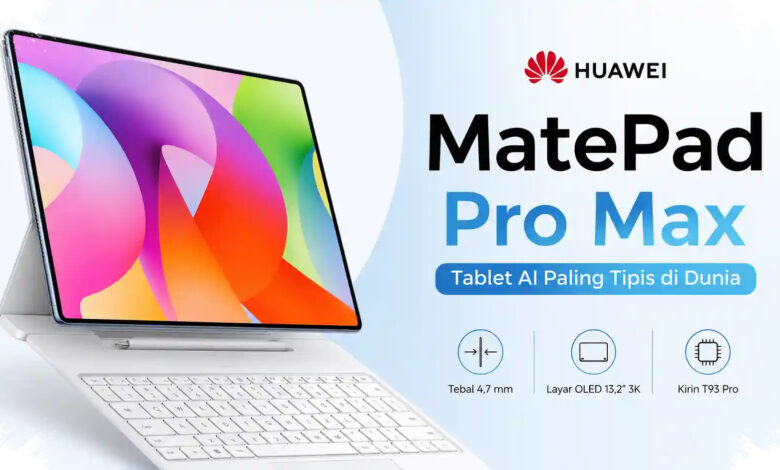
Huawei MatePad Pro Max is designed to bring a laptop-like work setup into a tablet form factor. Its combination of a 13.2-inch display, desktop-style office tools, external accessories, and AI features targets users who work across different locations.
The PaperMatte Edition measures 4.7 mm thick and weighs about 509 grams. Huawei uses a full-metal unibody construction and Cloud Falcon Architecture to retain rigidity in the slim body.
Large battery in a slim tablet
The tablet carries a 10,400 mAh battery with support for 66W Huawei SuperCharge. It also includes a six-speaker HUAWEI SOUND system for video conferences and entertainment.
| Category | Specification |
|---|---|
| Display | 13.2-inch Flexible OLED PaperMatte |
| Resolution | 3,000 x 2,000 pixels |
| Refresh rate | Up to 144 Hz |
| Battery | 10,400 mAh with 66W Huawei SuperCharge |
| Audio | HUAWEI SOUND six-speaker system |
The 13.2-inch Flexible OLED PaperMatte display has a 3,000 x 2,000-pixel resolution and a refresh rate of up to 144 Hz. Huawei lists peak brightness of up to 1,600 nits, a 2,000,000:1 contrast ratio, and a 94 percent screen-to-body ratio.
Its PaperMatte surface uses a nano-etching process intended to reduce reflections and glare in bright surroundings. The display is also designed to provide a paper-like feel when used with the Huawei M-Pencil Pro.
Work tools built around a wider screen
Huawei MatePad Pro Max includes PC-level WPS Office with a desktop-style interface. Users can edit Word documents, spreadsheets, presentations, and PDF files on the large display.
Live-Multitask allows up to three applications to remain open on one screen. This arrangement is intended for users who need to compare documents, review information, and prepare reports at the same time.
The device also provides AI-based document functions, including PDF Summarize, Generate Slides, Grammar Polish, and Smart Create. These tools reflect the increasing use of generative AI in professional workflows.
Findings from the Garuda AI Impact Summit 2026 state that 92 percent of knowledge workers in Indonesia have used generative AI to support daily activities. Huawei positions the tablet as an option for work patterns that are no longer always tied to a laptop.
Keyboard, mouse, and stylus support
The tablet is compatible with the Huawei Glide Keyboard, an external mouse, and the Huawei M-Pencil Pro. The accessory support is aimed at users who prefer physical typing, pointer control, handwriting, or digital sketching.
Huawei also includes GoPaint for drawing and Huawei Notes for note-taking. The intended audience includes illustrators, designers, content creators, and professionals who require a portable device for documents and creative materials.
With its oversized display and productivity-focused software, the tablet expands the choices available in the large Android tablet segment. Huawei’s approach centers on combining mobile hardware with a work environment that resembles a PC setup.