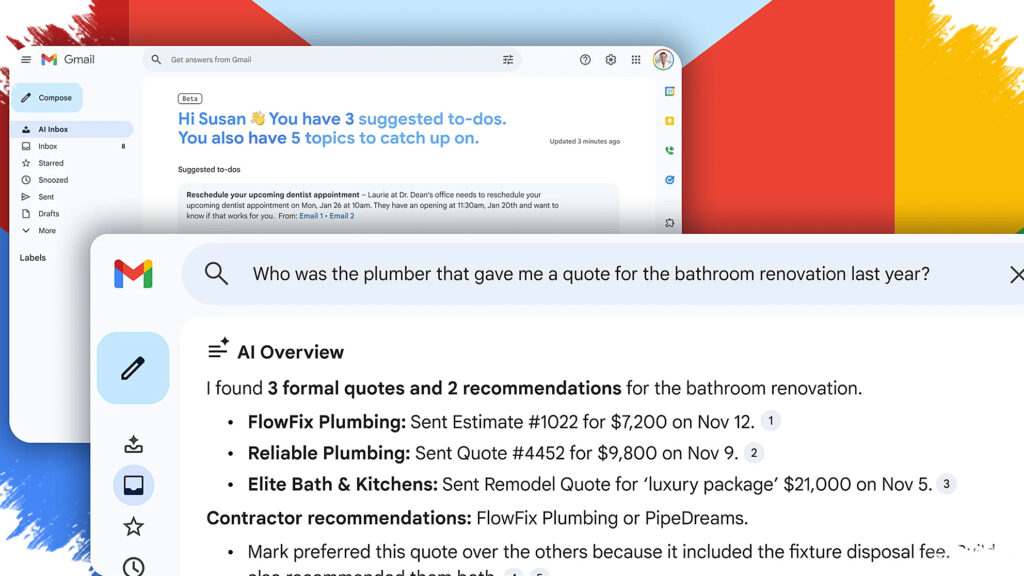
Google is changing how Gmail users look for old messages by adding AI Overviews to search. Instead of relying only on exact keywords, the search box can now respond to natural-language questions and have Gemini scan the inbox for a useful answer.
That shift makes Gmail feel less like a file cabinet and more like a conversation. Users can ask what they need in plain English, and the system tries to understand the intent behind the question before presenting a short summary of the most relevant emails.
Search in Gmail is becoming more natural
For years, Gmail searches have depended on specific terms. The method works, but it often forces users to try several word combinations before the right email appears.
With AI Overviews, Google is trying to reduce that trial-and-error process. A user can type a question the same way it might be asked aloud, and Gemini will look through stored inbox content to find information that matches the request.
Google says the feature is designed to understand context rather than simply match words. That matters when the goal is to recover a specific detail from an older conversation, not just to find an email containing a repeated phrase.
Examples show the practical use
Google has already given examples that show how the new search experience works in everyday use. One example is a question such as “Date of the next business review,” which prompts Gemini to search related emails and surface the available detail.
Other examples include looking for a performance improvement someone mentioned, a project milestone, the status of an invoice, recent comments on a UX deck, or travel details for New York. These cases suggest the feature is built for common work tasks rather than a narrow type of query.
For users facing large inboxes, that can save time. Instead of manually opening message after message to find a meeting decision, operational note, or administrative detail, Gmail can now try to summarize the answer first.
Source emails remain visible
The AI result is not the only thing shown. Gmail also displays the source emails behind the summary so users can open the original messages and check the context when needed.
That is important because AI-generated responses still need verification if the full details matter. By keeping the source visible, Gmail gives users a faster starting point without removing access to the underlying conversation.
This also creates a two-step workflow. First, the system filters the inbox and offers a concise answer, then users can move directly to the relevant email if they want to confirm the information.
Part of Google’s wider Gemini rollout
The move also shows how Google is expanding Gemini into core apps used every day. Gmail is one of the most important services in the company’s ecosystem, so adding AI Overviews there signals a deeper push toward AI-assisted productivity.
Google says AI Overviews is now mature enough to be used when people only need a quick answer. Bringing that capability into Gmail suggests the company sees inbox search as another place where AI can make routine tasks faster.
It also points to a broader focus beyond content generation. Google appears to be using AI to unlock information already stored in its services, making that data easier to reach when needed.
Who can use it
Google says the rollout starts now, with broader availability expected on or around 7 May according to the official update. Access is limited to certain paid plans, including Business Starter, Standard, and Plus; Enterprise Starter, Standard, and Plus; Google AI Pro and Ultra; Frontline Plus; and Google AI Pro for Education.
That restriction means the feature is still aimed at subscription users and productivity-focused accounts. For Workspace customers, conversational search in Gmail could become especially useful as inbox volume grows and older information needs to be found quickly without opening multiple threads one by one.