


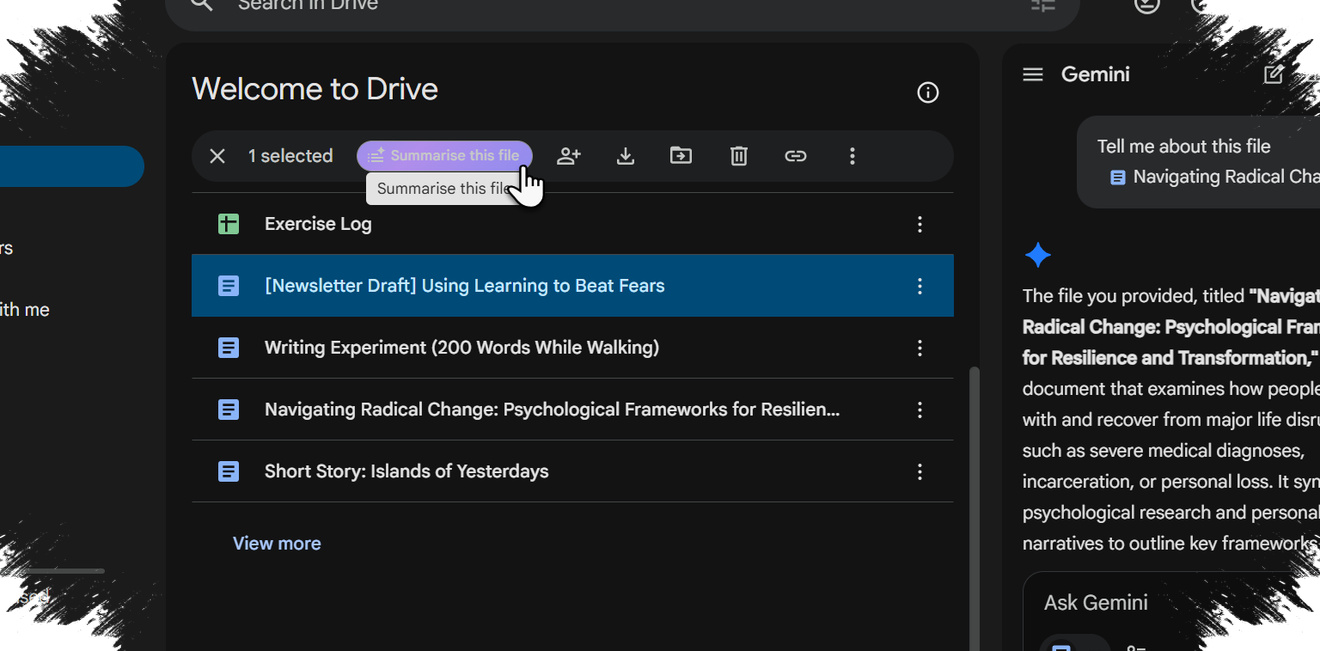
Google Drive is gaining a more intelligent way to surface information stored inside files, with Google now rolling out AI Overviews and Ask Gemini to help users get answers faster. Instead of opening document after document and scanning each one manually, users can now rely on Google Drive to extract relevant information directly from their own files.
The move changes the role of Drive in a practical way. What has long been viewed mainly as a storage space is being shaped into a search tool that can understand context, summarize content, and reduce the time needed to find a specific detail.
Two different AI tools for two different needs
AI Overviews and Ask Gemini do not serve the same purpose, even though both are built to make Drive searches more efficient. AI Overviews focuses on short, direct answers and appears inside the Google Drive search bar, where it is meant for brief and specific queries.
When a user types a targeted question, the feature does not simply return a list of matching files. Instead, it shows a summary drawn from the most relevant documents, which is useful when the answer needed is narrow and easy to isolate.
That approach fits everyday tasks where speed matters. If someone needs a date from a particular invoice, for example, AI Overviews can present the key detail without forcing a manual search through the file.
Ask Gemini is aimed at a different kind of task. Google designed it for more complex questions that may require a back-and-forth conversation and information gathered from several files.
Ask Gemini is built for deeper context
Unlike AI Overviews, Ask Gemini works best when the user needs to explore a topic in stages. Google says the feature is suited to situations where information must be connected across multiple documents rather than pulled from a single short query.
The tool also keeps conversation history, which allows users to revisit earlier exchanges instead of starting over each time. For work that involves many files, that can reduce repetition and make follow-up searches easier to manage.
Google has also added support for Drive projects through Ask Gemini. This collaborative feature brings important email and files together in one place, then gives Gemini access to that context so the conversation feels more natural and connected.
That means Ask Gemini is not limited to delivering quick answers. It is meant to help users understand project context, summarize related material, and explore links between documents and messages that belong to the same task.
Rollout covers 29 languages, but not all at once
Google says both AI Overviews and Ask Gemini in Google Drive will be available in 29 languages. The language support matches what is already available in the Gemini side panel, but the rollout is being handled in stages rather than all at once.
English is the first language to receive access, with other languages following later in the rollout. For Ask Gemini, the release begins in English and is expected to reach most eligible users in early to mid-May.
Google also says support for 28 additional languages starts arriving in early May and expands further through the end of the month. The same staged pattern applies to AI Overviews in Drive, beginning with English before the other 28 languages are added by the end of May.
Access remains limited to specific plans
Not every Google Drive user can try these features immediately. Google is restricting access to selected Workspace and AI plans, which means availability depends on account eligibility.
Ask Gemini and AI Overviews in Drive are available to Business Standard and Business Plus customers. Google also lists Enterprise Standard and Enterprise Plus subscriptions among the supported plans.
In addition, the Google AI Pro for Education add-on is included, along with Google AI Pro and Google AI Ultra. Because the rollout follows Workspace distribution patterns, availability can vary from one account to another even within the same plan.
That means users on the same subscription tier may not see AI Overviews or Ask Gemini at exactly the same time.
Google Drive is moving closer to an AI-assisted workspace
The introduction of these tools suggests a broader shift in how Google wants Drive to function. The focus is moving beyond file storage and toward faster access to answers hidden inside documents, emails, and project materials.
AI Overviews handles quick, focused searches, while Ask Gemini supports longer and more complex inquiries. Together, they make Google Drive behave less like a passive file cabinet and more like an active work assistant that can summarize content and help users reach the right information with less effort.