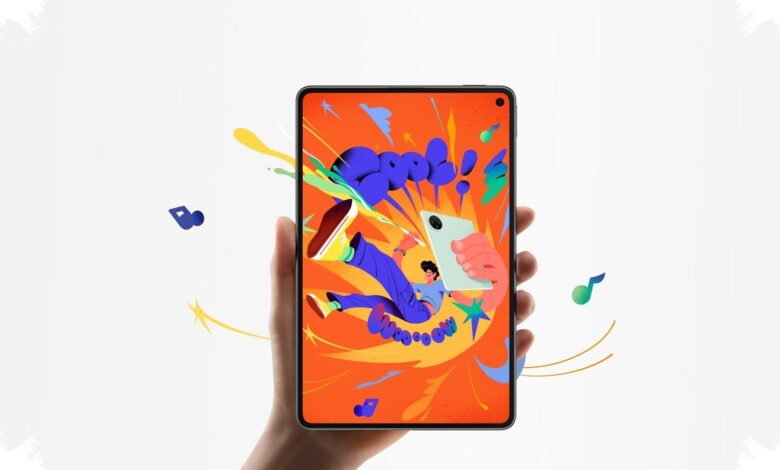
Huawei MatePad Mini stands out in a crowded tablet market for one simple reason: it is built to make reading feel comfortable for longer periods. The compact 8.8-inch device combines a thin body, a Flexible OLED PaperMatte display, and stylus support in a form that is easy to carry every day.
That approach gives the tablet a clear identity. Instead of chasing a larger canvas, Huawei focuses on portability, eye comfort, and quick note-taking, which makes the MatePad Mini more appealing for ebooks, documents, and casual entertainment.
PaperMatte display is the main attraction
The highlight of the MatePad Mini is its 8.8-inch Flexible OLED display with 2.5K resolution, a 120Hz refresh rate, 343 PPI density, and peak brightness of up to 1,800 nits. The PaperMatte surface adds a subtle texture that feels closer to paper than to a glossy panel.
That finish reduces reflections more effectively in bright indoor spaces such as offices or near windows. For reading, it helps the screen remain comfortable to view while easing eye strain during long sessions.
Huawei also adds Ebook mode and warmer color settings, which further support nighttime reading. Ebook files, PDFs, long articles, and digital comics all appear sharp on the panel.
| Main Specification | Detail |
|---|---|
| Display | 8.8-inch Flexible OLED PaperMatte |
| Resolution | 2.5K (2560 x 1600) |
| Refresh Rate | 120Hz |
| Brightness | Up to 1,800 nits |
| Weight | About 260 grams |
| Thickness | 5.2 mm |
Thin, light, and easy to slip into a bag
Huawei MatePad Mini measures 198.6 x 127.3 x 5.2 mm and weighs around 260 grams. The near-phone-like thickness makes it comfortable to hold with one hand for reading or browsing.
A metal unibody finish, very slim bezels, and a 92% screen-to-body ratio give the tablet a modern premium look. In daily use, the compact footprint also makes it easier to carry in a sling bag without taking much space.
Performance stays steady for daily use and gaming
Huawei equips the tablet with the Kirin 9010B chipset, 12 GB of RAM, and up to 256 GB of internal storage. In routine tasks, it handles browsing, video calls, streaming, and document editing smoothly.
The device also remains capable for games such as Mobile Legends, PUBG Mobile, and Genshin Impact. Mobile Legends runs stably at high frame rates, while PUBG Mobile is comfortable at medium graphics settings.
| Test Result | Score / Note |
|---|---|
| Antutu | 917,169 |
| Geekbench Single-Core | 1,292 |
| Geekbench Multi-Core | 3,455 |
| PCMark Work 3.1 | 13 hours 47 minutes |
Battery life and charging suit mobility
Despite its slim profile, the MatePad Mini includes a 6,400 mAh battery. In mixed use, it is able to last through a full day and uses power efficiently when the device is mainly used for ebook reading.
Huawei also includes 66W SuperCharge, which is said to refill the battery fully in just 50 minutes. That combination makes the tablet more practical for users who move between meetings, travel, and home use.
M-Pencil Pro and HarmonyOS expand the productivity angle
The retail package includes a premium case and the M-Pencil Pro stylus. The pen responds quickly, keeps latency low, and feels closer to writing on paper when paired with the PaperMatte surface.
Huawei Notes adds AI-based features such as handwriting cleanup, text conversion, and automatic note layout management. Palm rejection also works well, allowing the hand to rest on the screen while writing without triggering unwanted touches.
Huawei runs the tablet on HarmonyOS 5.1, which supports multitasking effectively. Users can open several apps at once, while the Super Device ecosystem helps with file transfer and synchronization across Huawei devices.
For everyday apps, AppGallery offers titles such as WPS Office PC, Capcut, and GoPaint. That makes the MatePad Mini suitable not only for content consumption, but also for light work and creative tasks.
Huawei MatePad Mini ultimately positions itself as a compact tablet with a very clear advantage: it makes reading easier and more comfortable. With its PaperMatte display, thin body, stable performance, and stylus support, it feels designed to serve as an all-day companion for both entertainment and productivity.