


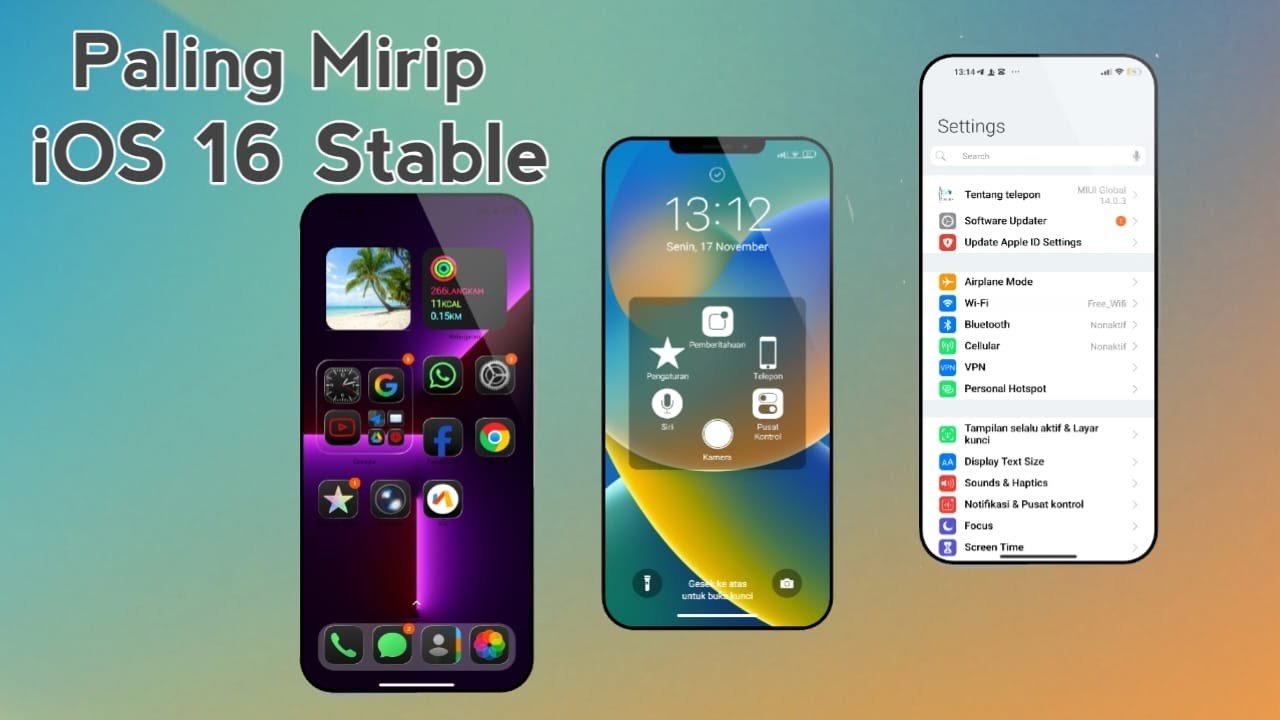
For Xiaomi users who admire the sleek iPhone interface, there is an excellent solution: the iPhone Celeng theme. This Indonesian-designed theme transforms your MIUI interface to closely mimic authentic iOS aesthetics, delivering a premium and stylish experience without switching devices.
The theme’s file size is lightweight at just 68.1 MB, making it easy to download from Xiaomi’s official theme store and install swiftly. It supports both light and dark modes natively, ensuring smooth transitions and visual comfort regardless of your preference.
Key Features of iPhone Celeng Theme
This theme uses liquid glass effects for app icons, replicating the glossy finish seen on iPhones. You can rearrange icons freely, giving your home screen a fresh and customizable feel. Widgets are genuine iOS widgets, allowing direct addition of weather and calendar tools for intuitive daily interactions.
The dockbar mimics iPhone style and offers customization options between transparent or solid backgrounds. This feature enhances fast app navigation according to users’ moods or visual preferences. Notifications and Control Center receive a full redesign, accessible by swiping from the top with a clean, minimal interface.
Messaging apps get a makeover too, with chat bubbles resembling iMessage. Camera and send buttons are integrated smoothly, making conversations more fun and familiar. The lock screen includes a large camera icon and flashlight shortcuts, enabling quick actions without unlocking the device.
System settings integrate seamlessly with the theme, allowing toggling between dark and light modes for consistent aesthetics. The phone app even displays the iOS 16 logo, adding to the authenticity. Fonts and animations can be customized widely to match iOS 16 dockbar style or classic looks, and the lock screen offers Face ID-inspired security features.
Installation and Customization Steps
Start by searching “iPhone Celeng” in Xiaomi’s theme store and download the file promptly. Then, open the Themes app on your Xiaomi phone and apply the theme globally or partially, followed by a device restart for the best results.
Adjust the dockbar style and save changes to see instant updates. For lock screen shortcuts like flashlight and camera, activate the respective toggles for convenient access. Widgets require manual setup from Xiaomi’s default apps and must be positioned carefully for a cohesive iOS-like home screen.
Dark mode is automatically applied with the theme; confirm activation in display settings for smooth color transitions. If you experience compatibility issues, updating to the latest MIUI version and rebooting often resolves minor glitches. Importing iOS-style fonts needs external downloads from trusted sources, to be applied through the theme settings.
Advantages and Limitations
The main advantage of iPhone Celeng is its striking visual similarity to iOS, providing a high-end look without purchasing an Apple device. It is cost-effective and light on storage, running smoothly even on low-end Xiaomi hardware without lag during navigation.
Local Indonesian design influences make this theme relatable and appealing to the Xiaomi community. However, the control volume interface remains that of MIUI without iOS customization. Lock screen animations are limited, and changing the lock screen wallpaper cannot be done via the theme—users must select wallpapers manually.
Wallpaper customization on the home screen is well-integrated, with enough variety for daily use. Some dockbar features might be restricted on older MIUI versions, but updating the system unlocks full functionality. Overall, this theme excels in home screen customization, offering deep personalization options for Xiaomi users wanting an authentic iPhone experience.
Comparison Table of iPhone Celeng and iOS Freedom Lite
- Icons: iPhone Celeng uses Liquid Glass; iOS Freedom Lite adopts Flat Design
- Widgets: iPhone Celeng supports genuine iOS widgets; iOS Freedom Lite offers custom MIUI widgets
- Dockbar: Adjustable in iPhone Celeng; fixed in iOS Freedom Lite
- Mode support: Dual mode (light and dark) for iPhone Celeng; light mode only for iOS Freedom Lite
- File size: 68 MB for iPhone Celeng; 50 MB for iOS Freedom Lite
iPhone Celeng stands out for users seeking an instant iOS look and feel on Xiaomi devices. Regular updates from the designer keep the theme current and enhance user satisfaction. Trying this theme offers a practical way to enjoy iPhone-style visuals combined with Xiaomi’s reliable hardware.