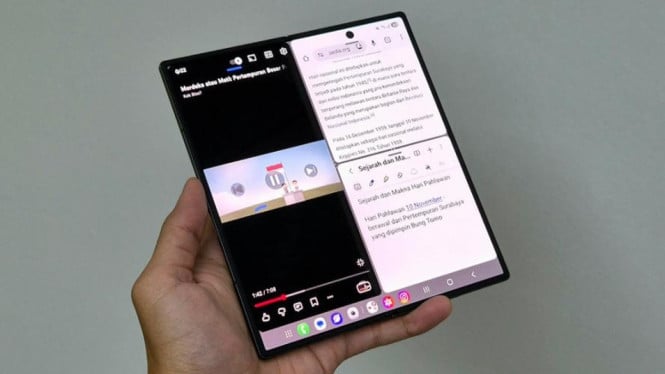
The Samsung Galaxy Z Fold7 redefines productivity for today’s heroes by offering a device tailored for multitasking and efficiency. With its expansive 8-inch main display and cutting-edge Snapdragon 8 Elite chipset, it empowers users to work, learn, and create with ease and speed in a digital world demanding adaptability.
Designed for those juggling multiple tasks, the Galaxy Z Fold7’s Multi Window Fold7 feature supports opening up to three apps simultaneously. Users can seamlessly arrange applications in split-screen or floating windows, allowing smooth transitions without interruptions during busy workflows.
Large Display Enhances Workflow
An 8.0-inch screen with a 90% screen-to-body ratio provides an immersive workspace resembling a portable tablet. The vibrant, sharp display maintains clarity in diverse lighting conditions, making extended use comfortable for professionals and students alike. This generous screen real estate ensures all active apps remain visually accessible and functional during multitasking.
Performance Built for Multitasking
Powered by the latest Snapdragon 8 Elite processor, optimized exclusively for the Galaxy Fold7, the device delivers robust performance even under prolonged use thanks to its advanced thermal management. Complemented by up to 16GB RAM and 1TB storage, it handles heavy-duty applications without lag, supporting a fluent user experience crucial for creatives, business users, and learners.
Samsung’s One UI software enhances this hardware by providing a fluid multitasking environment. This integration elevates Multi Window Fold7 beyond a simple feature into a comprehensive experience that increases productivity intelligently.
Activating Multi Window Fold7: Three Easy Methods
Samsung offers intuitive ways to engage the Multi Window function:
From the Taskbar
Open one app, hold another app in the taskbar, then drag it to any screen side for split or floating windows.Via Recent Apps
Open recent apps by swiping up, press and hold the second app, then move it to the desired split-screen position.- Using Two-Finger Gesture
Enable “Swipe for Split Screen” in settings, then swipe two fingers from the edge to initiate split-screen mode and add a third app if needed.
These options provide flexibility for various multitasking styles, ensuring effortless app management on the large foldable display.
Supporting Diverse Needs: Work, Study, and Entertainment
The Galaxy Z Fold7 supports a broad range of activities. Students can watch language learning videos, take notes, and use translation apps simultaneously. Creatives benefit by researching, writing, and referencing content without switching devices. For entertainment, the large screen offers a premium streaming experience while browsing or chatting, all at once.
Google Gemini Live Integration
One of the device’s standout features is Google Gemini Live, an AI assistant running in the background. It provides real-time answers, suggestions, and object identification, accessible by holding the power button and selecting the appropriate commands.
For example, when visiting a museum, users can ask Gemini about artifacts without leaving their current applications. This intelligent assistant enhances workflow by delivering information instantly, further strengthening the Galaxy Z Fold7’s role as a modern productivity tool.
Pricing and Availability
The Galaxy Z Fold7 is available in three configurations:
- 16GB RAM / 1TB storage at approximately $2,150
- 12GB RAM / 512GB storage at around $1,930
- 12GB RAM / 256GB storage at about $1,745
Colors include Blue Shadow, Silver Shadow, Jet Black, and an exclusive Mint finish available only on Samsung Indonesia’s official website.
Promotional offers until November 13, 2025, include up to $310 in benefits, six months of Google AI Pro access, 0% installment plans up to 24 months, and trade-in options starting at roughly $54 per month, making the high-end foldable more accessible to users aiming to maximize productivity.
Samsung Galaxy Z Fold7 exemplifies a device built for the evolving demands of modern life. By combining a large, vibrant screen, powerful hardware, innovative multitasking features, and intelligent AI support, it equips users to become productivity heroes who navigate complex routines efficiently and creatively in a digital era.