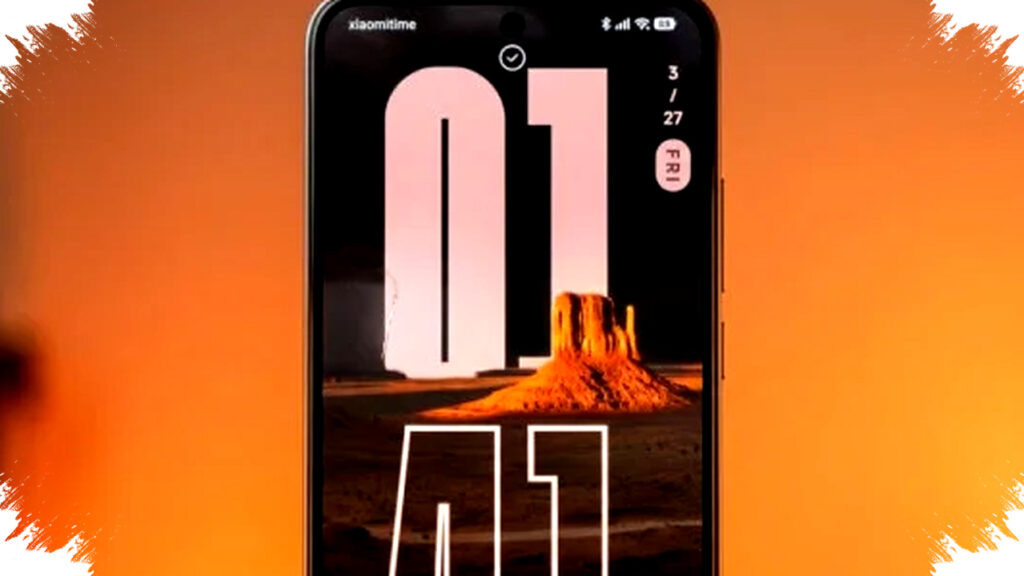
Xiaomi HyperOS is drawing attention because its Depth Effect wallpaper feature gives the lock screen a premium, layered look without requiring complicated setup. The effect places the clock and date behind the main subject of the image, so the display feels more dynamic and closer to a 3D composition.
This style has become popular on Xiaomi, REDMI, and POCO devices because it makes the lock screen look polished and modern. For users who want a luxurious visual upgrade, the right HyperOS wallpaper can change an ordinary phone screen into something far more refined.
What makes HyperOS Depth Effect wallpapers different
The feature works by using AI-based image analysis to separate the foreground subject from the background. That separation lets the system place widgets, especially the clock, behind the subject while keeping the image visually balanced.
Instead of a static lock screen, users get a sense of depth that adds contrast and visual motion. The result is subtle, but it can make a strong difference when the wallpaper has clear layers and a clean focal point.
Why the effect looks so premium
The appeal comes from the combination of simplicity and detail. A well-chosen wallpaper can make the interface look expensive because it mimics the visual style often seen in high-end design work.
These wallpapers also support a wide range of aesthetics, from calm natural scenes to dramatic futuristic compositions. That flexibility helps users match the lock screen with their personal style while keeping the interface readable.
Wallpaper categories that work best
Choosing the right image matters because not every wallpaper works well with depth separation. Xiaomi’s curated themes, as reflected in the reference article, focus on images with strong foreground and background contrast.
Nature and landscape scenes
Beach views, palm trees, mountains, and misty horizons usually work well because they create clear visual layers. These wallpapers tend to feel calm and elegant on the lock screen.Sci-fi and surreal visuals
Towers, giant structures, desert formations, and cyberpunk-style scenes give the screen a futuristic identity. They are ideal for users who want a bold and modern appearance.Minimalist black-and-white designs
Simple compositions with strong shapes or quiet scenery can look clean and sophisticated. This option is useful for users who prefer a professional look with low visual noise.- City and architecture themes
Tall buildings, bridges, and skyline shots often give the AI system enough depth cues to place the clock behind the subject. These wallpapers usually create a sharp and luxurious urban feel.
How the Depth Effect works in practice
The system is designed to detect the main subject in the image and keep important information visible. When the clock is placed behind a person, building, or object, the lock screen feels more immersive without becoming difficult to read.
This is why image quality is important. A high-resolution wallpaper with strong contrast gives the AI a better chance to map foreground and background properly.
Simple steps to activate the feature
The activation process is straightforward and does not require technical skill. Users only need a compatible device and a suitable wallpaper file.
- Open the lock screen and press and hold the screen.
- Select a high-resolution wallpaper from your gallery.
- Tap the Depth Effect icon, usually shown in the lower-right corner.
- Use pinch gestures to adjust the clock position and size.
- Save the layout once the placement looks balanced.
Users should make sure their device runs the latest HyperOS version so the personalization tools appear correctly. Compatibility can vary by model, but Xiaomi, REDMI, and POCO devices are among the main supported lines mentioned in the source.
Why wallpaper quality matters
The Depth Effect depends heavily on clean visual separation. Images that are too compressed or blurred may not produce a convincing 3D result because the AI cannot clearly identify the layers.
For best results, users should download original files or high-quality versions instead of heavily edited copies. Wallpapers with a clear subject in the foreground and a distinct background generally give the cleanest depth effect.
Tips for choosing a wallpaper that looks luxurious
A premium lock screen usually depends on balance, contrast, and restraint. Wallpapers with too many elements can make the screen feel crowded and reduce the impact of the depth layer.
- Choose images with one main subject.
- Avoid wallpapers with too much text or cluttered detail.
- Use darker backgrounds if you want the clock to stand out.
- Pick images with strong contrast between the subject and the scenery.
- Test the wallpaper on the lock screen before saving it permanently.
These simple choices can make the interface look more elegant and easier to read. They also help the Depth Effect feature perform better because the system can identify the separation more accurately.
Who will benefit most from this feature
Users who care about personalization will likely enjoy this feature the most. It is also a good fit for people who want their phone to look more premium without installing third-party lock screen apps.
The feature is practical for everyday use because it improves visual identity while keeping access to the clock and date clear. For many users, that combination of style and function is exactly what modern smartphone customization should offer.
A growing trend in Android personalization
Depth-style lock screens have become part of a wider trend in mobile design, where users want interfaces that feel more personal and visually sophisticated. HyperOS responds to that demand by adding smarter visual processing to a feature that already has mass appeal.
The result is a lock screen that can feel artistic, modern, and tailored to the user’s taste. With the right wallpaper, HyperOS turns a basic display into a more refined visual experience that stands out immediately on Xiaomi, REDMI, and POCO devices.