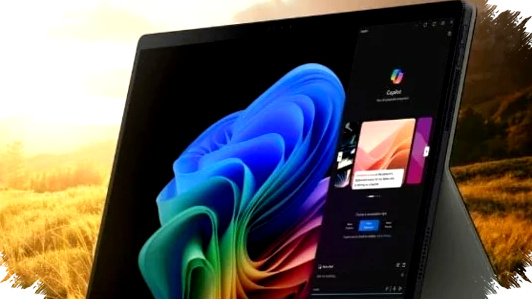
As 2026 moves deeper into the second quarter, Windows 2-in-1 tablets are drawing more attention from students, office users, and creators who want one device that can do more than browsing and note-taking. For thesis work, coding, light design, and even demanding editing tasks, the best models now combine laptop-level performance with tablet portability.
This shift matters because many buyers no longer want to choose between a thin tablet and a proper productivity machine. A detachable keyboard, a strong processor, fast storage, a sharp display, and reliable battery life now decide whether a tablet can truly support long writing sessions, video editing, or all-day mobile work.
Why Windows Tablets Matter More in 2026
Windows tablets stand out because they keep full desktop software compatibility. That makes them useful for students working on a skripsi, professionals handling Office files, or creators using apps like Photoshop and CapCut.
Unlike many consumer tablets, these devices can run heavier desktop workflows more naturally. They also support productivity features such as external displays, better file handling, and access to x86-based software that many users still need.
1. Advan Evo X Series: The Most Affordable Productivity Pick
Advan positions the Evo X series as a value-focused option for users who need decent performance without paying premium prices. The Evo X16 uses an Intel Core i3-1215U with a 2.5K display, while the Evo X13 runs on an Intel N150 with a 2K panel.
Both models come with 12GB LPDDR5 RAM and a 512GB SSD, which helps multitasking feel smoother during document work and browser-heavy sessions. The Evo X16 is priced at about $440, while the Evo X13 sits around $380, making them among the most accessible Windows 2-in-1 choices in this list.
For students, this combination is important because it keeps the device practical for thesis writing, online research, and presentation work. It may not be the fastest tablet here, but it offers a strong balance of price and usability.
2. Lenovo IdeaPad Duet 3i N200: Light, Compact, and Easy to Carry
The Lenovo IdeaPad Duet 3i N200 is built for mobility, with a weight of just 1.1 kg. Its 11.5-inch 2K display covers 97.5% of the DCI-P3 color gamut, which gives it a sharper and more accurate look for light creative work.
Lenovo pairs the tablet with an Intel N200 processor, 8GB of LPDDR5 RAM, and a 256GB SSD. It also ships with Windows 11 and original Office Home and Student 2021, which adds immediate value for users who want a ready-to-use productivity device.
At around $510, this model fits users who prioritize portability above raw speed. It works well for note-taking, writing, and everyday campus tasks, especially for those who spend much of the day moving between classes, libraries, and workspaces.
3. Lenovo IdeaPad Duet 5i: A Better Middle Ground for Serious Work
The Duet 5i steps up performance with an Intel Core i5-1335U, with an optional i7 configuration for users who need more power. Its 12.4-inch 2.5K LTPS screen also reaches 500 nits of brightness, which helps when working in bright indoor or outdoor environments.
Lenovo equips it with 16GB RAM and a 512GB Gen 4 SSD, a combination that feels much more suitable for large files, multitasking, and heavier productivity workloads. The presence of two USB-C ports with DisplayPort and Power Delivery support also makes it easier to connect accessories and monitors.
With a price of about $988, the Duet 5i sits in a higher bracket, but it offers a clear performance upgrade. It is a better choice for users who want one device for writing, media work, and occasional editing without moving into premium workstation pricing.
4. Asus ProArt PZ13: Creative-Focused and AI-Ready
Asus built the ProArt PZ13 for users who care about display quality and creator-friendly performance. It uses Snapdragon X Plus, an ARM-based chipset, and includes a Hexagon NPU rated at 45 TOPS for AI-related tasks.
The device features a 13.3-inch OLED 3K display with 100% DCI-P3 color coverage, which makes it the most color-focused option in the list. Asus also keeps the weight low at 0.85 kg and adds a large 70Wh battery for extended mobility.
Priced from about $1,453, the ProArt PZ13 targets creators and professionals rather than casual buyers. It suits users who want a thin tablet for visual work, content review, and long editing sessions with premium screen quality.
5. Asus ROG Flow Z13: The Powerhouse for Gaming and Heavy Editing
The ROG Flow Z13 remains the most extreme model here in raw performance. Asus pairs it with a Ryzen AI Max+ 395, up to 64GB of RAM, and Radeon 8060S graphics, which gives it far more muscle than a typical tablet.
It also uses a ROG Nebula display with a 180Hz refresh rate, making it attractive not only for gaming but also for smooth motion work and fast-paced creative tasks. That makes it one of the rare tablets that can handle AAA gaming and 4K video rendering with serious confidence.
At about $2,001, this is not a mainstream purchase. Still, for users who want a tablet that behaves more like a compact workstation, the Flow Z13 sits at the top of the performance ladder.
6. Lenovo ThinkPad X12 Detachable Gen 2: The Business Standard
The ThinkPad X12 Detachable Gen 2 is aimed at professionals who want security, durability, and long battery life. It carries Intel Core Ultra 7 silicon with AI NPU support, plus vPro Enterprise and a match-on-chip fingerprint reader.
Lenovo also designed it to meet MIL-STD 810H durability standards, which gives it a strong case for business travel and frequent commuting. Battery life reaches up to 17 hours, a figure that can make a meaningful difference during long workdays away from a charger.
With a price of about $2,007, the ThinkPad X12 is not a budget-oriented model. It is best suited for executives, consultants, and enterprise users who need trust, safety, and endurance in one device.
How to Choose the Right Windows Tablet in 2026
- Pick Advan Evo X if budget matters most and you need a solid thesis companion.
- Choose Lenovo Duet 3i if you value low weight and everyday portability.
- Go for Lenovo Duet 5i if you want a stronger all-rounder for multitasking.
- Select Asus ProArt PZ13 if display quality and creator features are priorities.
- Buy ROG Flow Z13 if you need elite performance for gaming or heavy editing.
- Take ThinkPad X12 Gen 2 if security, resilience, and battery life matter most.
The best Windows tablet in 2026 depends on whether your workload is academic, creative, or professional. If your main need is writing a skripsi and handling daily tasks, Advan and Lenovo’s lighter models already deliver enough power, while Asus ProArt, ROG Flow Z13, and ThinkPad X12 push into premium territory for users who demand much more.