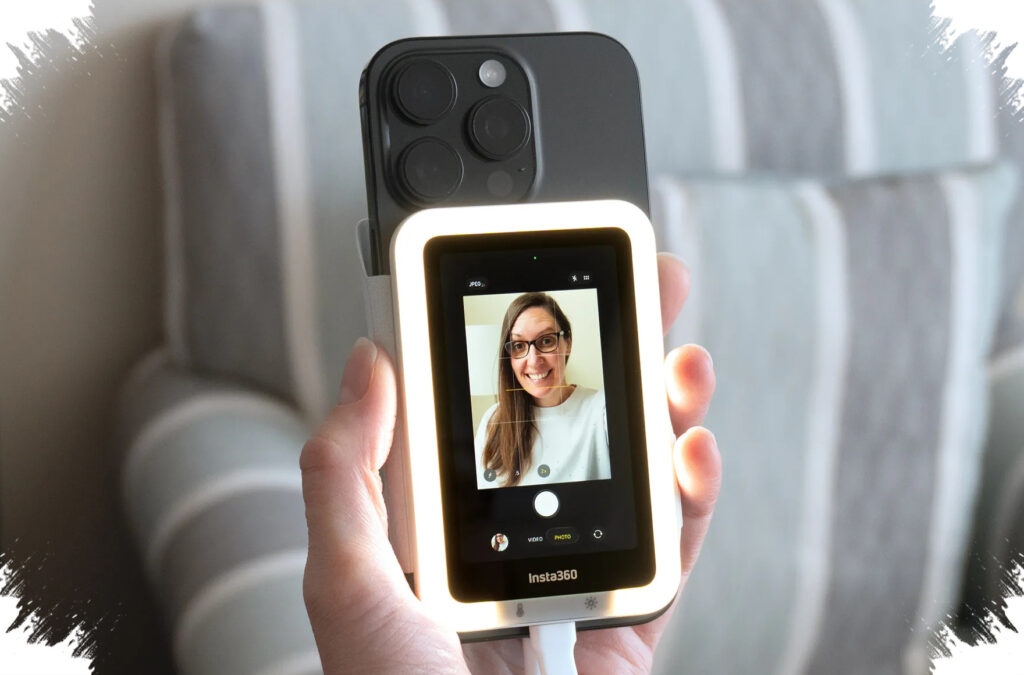
Insta360’s Snap Selfie Screen is built for creators who want to use the rear camera on a smartphone without the usual guesswork. The accessory adds a live preview screen to the back of the phone, so vloggers can frame themselves more accurately while still benefiting from the stronger image quality of the main camera.
That matters because smartphone front cameras still lag behind rear cameras in resolution, dynamic range, and low-light performance. For solo creators, the difference can be visible in sharper detail, cleaner color, and more reliable exposure, especially in fast-paced vlog setups.
Why the rear camera still wins
Many creators prefer the rear camera because it usually delivers better technical results than the selfie camera. The main sensor often captures more detail and handles challenging lighting more effectively, which matters for product reviews, beauty content, travel clips, and daily vlogs.
Snap Selfie Screen addresses the main problem that comes with rear-camera vlogging: the user cannot easily see the frame while recording. By placing a preview display on the back of the phone, the device helps creators keep eye level, composition, and facial position under control without asking someone else to monitor the shot.
A slim accessory designed for quick use
Insta360 keeps the accessory compact, with a thickness of just 6.8 mm. That slim profile helps the device sit closer to the phone body and reduces the bulk that often comes with external monitors or phone rigs.
Installation is also simple. The product supports MagSafe on compatible iPhones, while Android and non-MagSafe iPhone users can rely on a magnetic ring adapter attached to a case or phone body. A USB-C connection then carries the video signal directly, which keeps the preview responsive during recording.
How the setup works
- Attach the Snap Selfie Screen to the phone using MagSafe or the magnetic ring adapter.
- Connect the device through USB-C for direct video transmission.
- Use the 3.5-inch touchscreen to preview the rear camera in real time.
- Adjust framing, focus, and zoom before or during recording.
- Start and stop recording from the display without switching back to the phone screen.
This setup is especially useful for creators who record alone and need to confirm composition instantly. It also reduces the friction of moving between camera apps, front displays, and external tools during a shoot.
A 3.5-inch touchscreen that supports real-time framing
The Snap Selfie Screen uses a 3.5-inch touch display to show live preview from the rear camera. That size is large enough to help the user check facial placement, background balance, and headroom without turning the phone into a cluttered rig.
The touchscreen also adds direct controls for zoom, manual focus, and recording. Those functions reduce the need to repeatedly touch the phone itself, which can interrupt the flow of filming and lead to unstable footage.
Key features that matter to creators
The accessory focuses on practical functions rather than unnecessary extras. Its main advantages can be summarized as follows:
| Feature | Benefit |
|---|---|
| Live rear-camera preview | More accurate framing for solo shooting |
| USB-C wired connection | Lower latency and more stable signal |
| Touch controls | Faster access to zoom and focus |
| Instant record button | Easier start and stop during takes |
| Slim 6.8 mm design | Less bulk on the phone |
According to the reference data, USB-C latency can stay below 100 ms, while wireless solutions may reach 300–500 ms. That gap matters when timing, body movement, and facial expression need to stay in sync with the preview.
Two versions, two different user needs
Insta360 offers the Snap Selfie Screen in two variants. The standard model is priced at $79.99, while the Snap x AMIRO Edition costs $89.99.
The AMIRO version adds an RGB LED light above the screen with three color temperatures: warm, neutral, and cool. It also provides five brightness levels, which can help in dim indoor environments where the rear camera still needs a little extra light to keep the face visible.
Compatibility extends beyond iPhone
The accessory is not limited to Apple devices. It supports iPhones running iOS 14 and later, while Android devices need DisplayPort over USB-C or Alt Mode to output video properly.
Compatible models include several flagship lines such as Samsung Galaxy S, Note, and Z series, as well as Google Pixel 6 and newer devices. Still, support is not universal across midrange phones, so checking the official compatibility list remains important before buying.
Who gets the most value from it
Snap Selfie Screen is most relevant for solo vloggers, social media creators, mobile journalists, and remote workers who want a more polished look on camera. It also fits users who want to improve video quality without moving to larger and more expensive gear such as mirrorless cameras and external monitors.
The product reflects a growing trend in mobile content creation: using the best camera already built into the phone, then adding a small accessory to solve the framing problem. For creators who want rear-camera quality without a complicated setup, that combination is difficult to ignore.