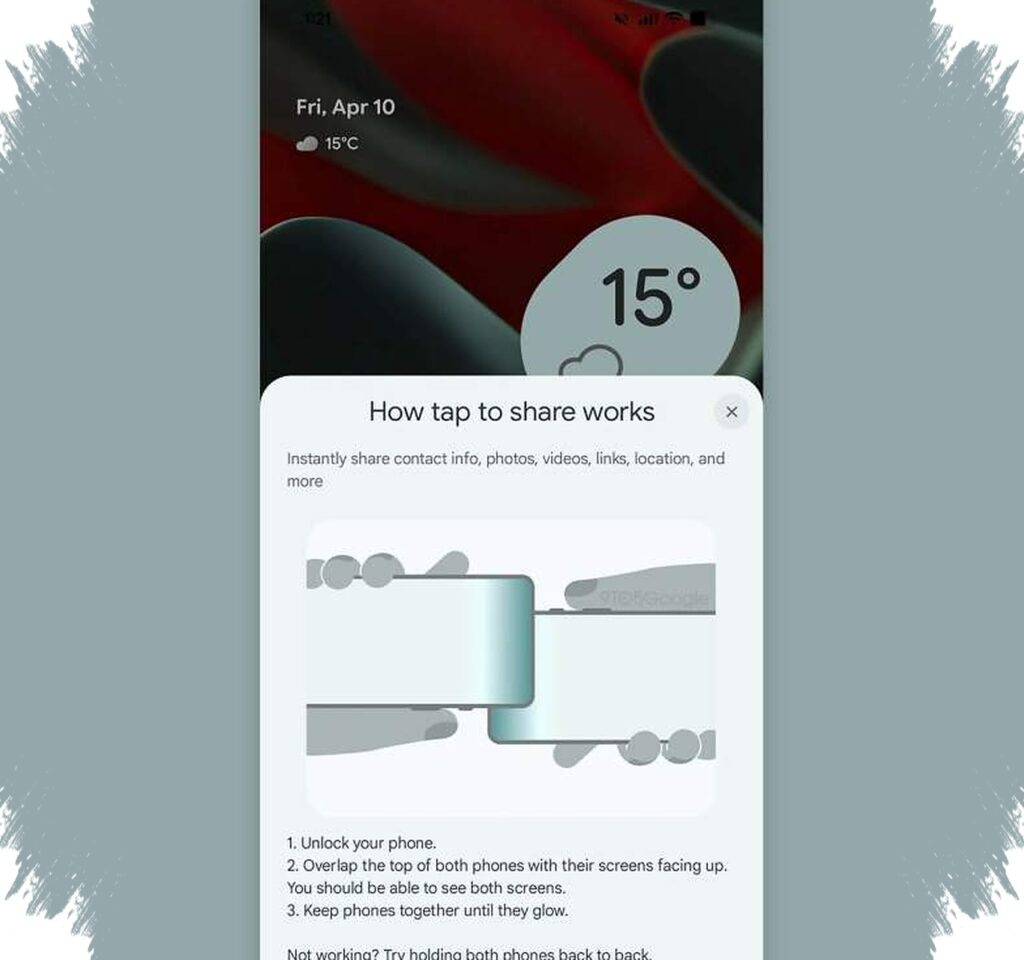
Google appears to be preparing a new Android feature called Tap to Share, and early signs suggest it could make everyday file and contact sharing much smoother. The feature is being designed to work in a way that feels close to Apple’s NameDrop, letting two devices connect simply by being brought near each other.
Evidence of the feature has been found in the latest Google Play Services build, and Android Authority reported that Tap to Share was successfully activated in Google Play Services v26.15.3. That means the feature is not just a rumor anymore, because parts of its interface and behavior are now visible in real testing.
A closer look at how Tap to Share works
Google seems to want the sharing process to be nearly effortless. A user opens the phone, places the top of two Android devices close together, and then selects what to send from a short menu.
The options reportedly include contacts, photos, videos, links, locations, and other data types. Both devices then need to stay close until a glowing visual cue appears, which acts as confirmation that the connection has been made and the transfer is underway.
Why Google is taking on NameDrop
Apple’s NameDrop became well known because it made contact sharing fast and simple. It uses NFC to start the connection, then continues the transfer through Bluetooth and Wi-Fi.
Google now appears to be following a similar path with Tap to Share. The goal is clear: reduce steps, avoid manual device searches, and remove the need to open separate apps or scan QR codes just to send something quickly.
This move also reflects a larger shift in the tech industry. Hardware speed still matters, but day-to-day convenience is becoming just as important for users who want fast, natural interactions.
What the early signs suggest for Android users
The feature was first spotted in earlier traces last November, and its appearance in Google Play Services v26.15.3 suggests the project has moved closer to a more mature stage. Reports also indicate that a similar feature has appeared in Samsung One UI 9, which raises the possibility that Tap to Share may reach beyond one brand and work across a wider Android ecosystem.
Here is a simple summary of the functions seen in the leaks so far:
- Share contacts quickly between nearby devices.
- Send media such as photos and videos.
- Transfer links, locations, and other data.
- Show a preview before anything is sent.
- Use physical proximity as the trigger for sharing.
That combination makes Tap to Share feel less like a hidden system tool and more like a practical daily feature. If Google pushes it widely, Android users could gain a faster way to exchange information without dealing with long menus or complicated pairing steps.
Privacy and control remain part of the design
One important part of the leaked experience is the preview screen before transfer begins. That step gives users a chance to verify what is being shared, which adds a layer of control before anything leaves the device.
This matters because quick-sharing features are often used in short, spontaneous moments. By adding a clear confirmation step, Google seems to be balancing speed with safety, instead of making sharing so instant that users lose oversight.
The design also suggests Google wants Tap to Share to feel natural rather than technical. Instead of forcing users to think about settings, Bluetooth menus, or device lists, the action is reduced to a familiar motion: unlock, place the phones close together, confirm, and send.
A possible new standard for Android sharing
If Tap to Share launches in a stable version, it could become one of Android’s most useful everyday features. It would help users share a contact during a meeting, send a photo after an event, or move a link from one device to another with far less friction.
Google has not announced an official release date yet, but the fact that the feature can already be activated in Play Services strongly suggests that development is progressing. With Samsung also showing signs of similar support, Android may soon get a more seamless sharing experience that feels modern, fast, and much closer to the simplicity users have long associated with NameDrop.