Samsung’s Pro Keyboard for the Galaxy Tab S11 Ultra is being treated less like a simple add-on and more like a serious productivity tool. SammyGuru describes it as one of Samsung’s most complete tablet keyboards in practical use, largely because it makes the tablet feel steadier and more laptop-like in everyday work.
A steadier way to work on a tablet
The strongest appeal comes from how secure the Galaxy Tab S11 Ultra feels when placed on a lap. Many tablet keyboard setups shift or wobble when the screen is touched or when typing speeds up, but this one is said to avoid that distracting movement.
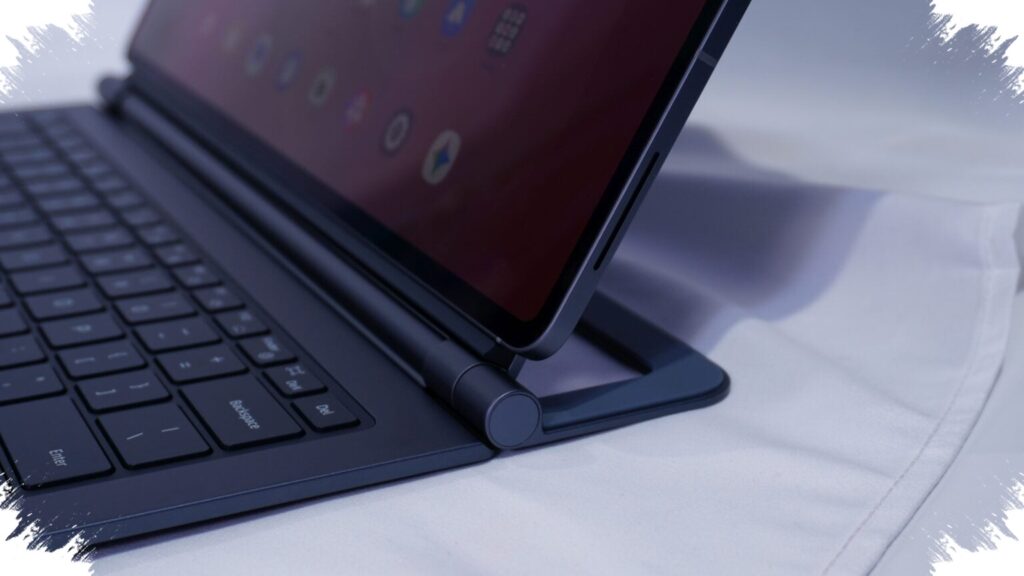
That stability comes from the combination of the hinge and kickstand, which help anchor the tablet more firmly. SammyGuru says Samsung has come close to the feel of a premium laptop, not just in appearance but also in physical confidence during use.
The same sense of control carries over to desk use. Even though the full setup is heavier, the way the weight is distributed and supported makes the Galaxy Tab S11 Ultra feel more dependable for work.
Thin design without feeling flimsy
The Pro Keyboard keeps a slim profile, but it does not come across as fragile. Its design direction is said to align with other Samsung devices that pursue thinness without giving up core capability, including the Galaxy S25 Edge and Galaxy Z Fold 7.
In daily use, that thin build still feels solid enough for intensive typing and flexible mobile work. It also marks a noticeable step forward from the previous Book Cover Keyboard models for the Galaxy Tab S8 Ultra, S9 Ultra, and S10 Ultra, which were seen as less premium in materials and connection tightness.
Strong connection, with S Pen still working normally
Another standout point is how firmly the keyboard attaches to the tablet. SammyGuru says the connection is very strong, and the easiest way to detach it is to hold the kickstand and pull the Tab S11 Ultra toward the user.
Trying to remove it another way requires more force, which underlines Samsung’s focus on a secure fit. Strong magnets can sometimes raise concerns about stylus behavior, but in this case the S Pen is reported to work normally.
That matters because a powerful magnetic attachment often prompts questions about digital pen compatibility. Here, Samsung appears to have kept the connection tight without interfering with everyday stylus use.
Typing feel aimed at premium laptop territory
The typing experience is described as more serious than what is usually expected from a tablet keyboard. Its look and feel are said to bring to mind premium laptops, with visual comparisons to the Razer Blade and a key feel that is close to, though not identical with, the ASUS Zephyrus.
The keys do not require heavy pressure, yet they do not feel soft or vague either. That balance gives the keyboard enough feedback for long typing sessions, while the exposed rear section does not seem to raise major durability concerns.
Backlight and touchpad software remain the weak spots
Not everything is equally polished. The most obvious criticism goes to the backlight, which is considered truly useful mainly in very dark rooms.
In brighter environments, the difference between the lights off and full brightness is said to be barely noticeable. Because the key legends are white and the illumination is also white, visibility can actually get worse in some situations, making the backlight something better left off unless the room is dark.
Important indicators such as Caps Lock remain easy to see in bright conditions, and the FN key is also clearly visible. The touchpad software is another area that still leaves room for improvement, although SammyGuru still views the overall package as a major step forward for Samsung.
The Pro Keyboard for the Galaxy Tab S11 Ultra is currently listed at $379, which is $20 below its regular price.