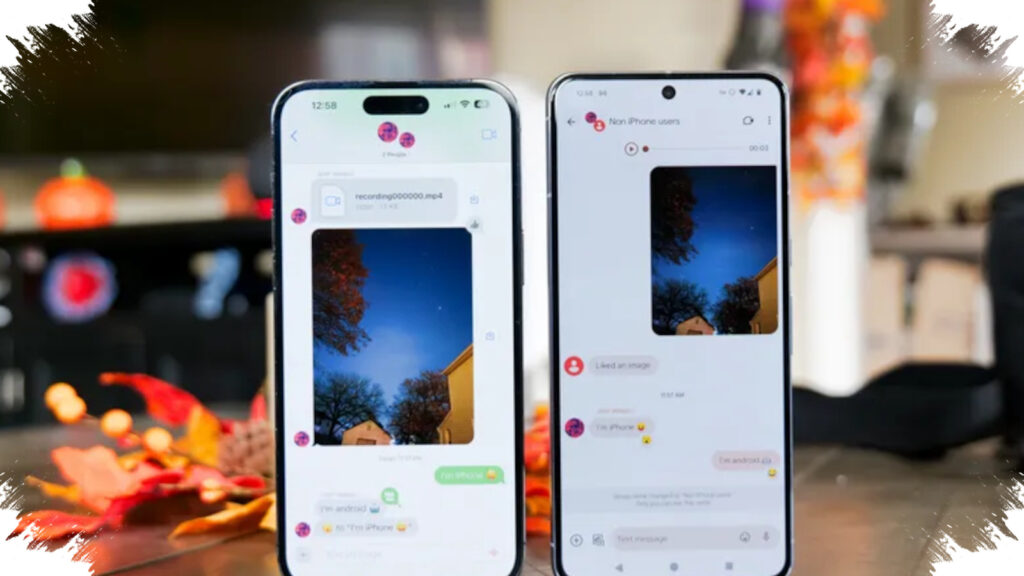
Apple’s latest iPhone software update is drawing attention for one reason above all others: it makes RCS messaging between iPhone and Android devices more secure. With iOS 26.5, those cross-platform chats now benefit from end-to-end encryption inside the Messages app.
That change gives the update more weight than a typical minor release. Alongside security improvements, iOS 26.5 also brings system refinements and new features, making it worth a closer look for iPhone users who want to know whether their device is included.
RCS messaging gets a major security boost
The headline addition in iOS 26.5 is end-to-end encryption for RCS conversations. That means messages exchanged between iPhone and Android users are protected more strongly than before.
At the same time, the experience keeps familiar RCS features intact. Users can still send high-resolution photos, see read receipts, and use typing indicators, but now with a stronger privacy layer in place.
For many users, this pushes RCS on iPhone closer to the privacy expectations people associate with iMessage. It is a notable step for everyday communication, especially for people who regularly switch between Apple and Android contacts.
Maps and personalization also get updates
Messages is not the only area that changes. Apple Maps now includes a new section called Suggested Places, which surfaces location recommendations based on recent searches and nearby trends.
Apple says the section is also expected to become a place for relevant ads starting this summer. That points to a broader shift in how Apple may use Maps as both a utility and a service platform.
iOS 26.5 also adds a new dynamic wallpaper called Pride Luminance. The wallpaper features spectrum color effects and animation, and it also comes in another version for the Lock Screen.
Other improvements are part of the package
Beyond the visible additions, Apple has included several smaller updates in iOS 26.5. These include support for region-specific features in the European Union, easier accessory pairing, improved notification behavior, and multiple bug fixes.
The update is also described as carrying a recommended security patch for compatible devices. That makes it relevant not only for users interested in new features, but also for those who prioritize device protection and stability.
Check whether your iPhone is supported
Apple keeps iOS 26.5 available for the same iPhone lineup supported by iOS 26 overall. In practice, that means iPhone 11 and newer models can install the update.
The supported list includes all iPhone 17 models, all iPhone 16 models, all iPhone 15 models, all iPhone 14 models, all iPhone 13 models, all iPhone 12 models, and all iPhone 11 models. iPhone SE owners are covered too, but only for the 2nd and 3rd generations.
Older devices are no longer part of the update cycle. That includes iPhone XS, iPhone XS Max, iPhone XR, and anything earlier.
There is one more detail to keep in mind for compatible users. Some Apple Intelligence features are limited to specific models, such as iPhone 15 Pro and later devices.
How to install the update
Checking for iOS 26.5 takes only a few steps. Users need to open Settings, tap General, then go to Software Update, and choose Download and Install once the update appears.
Apple recommends using Wi-Fi for the download. The battery should also be at least 50 percent, or the phone should be connected to a charger.
The update file may be several GB in size depending on the device. For that reason, a stable connection and a ready battery can make the installation process smoother and safer.