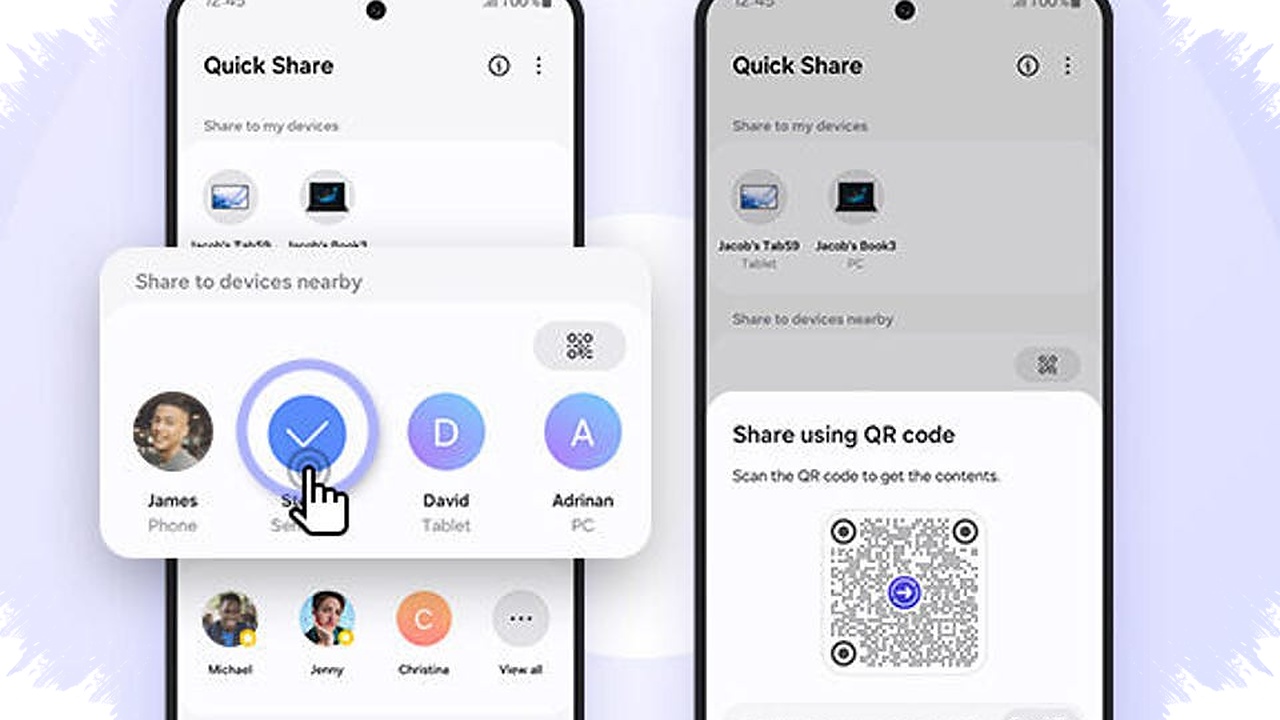
For Samsung users looking for an AirDrop-like experience, the answer is Quick Share. Apple keeps AirDrop inside its own ecosystem, but Samsung offers a similar wireless file-sharing feature that works fast, keeps image quality intact, and now reaches beyond just Galaxy devices.
Quick Share has become the closest alternative for anyone who wants to send photos, videos, documents, or other large files without using chat apps that compress quality. It is especially useful for users who often move content between phones, tablets, and laptops in a way that feels direct and immediate.
What Quick Share does on Samsung phones


Quick Share is Samsung’s built-in wireless sharing feature for Galaxy devices. It uses Bluetooth Low Energy to detect nearby devices and Wi-Fi Direct to send the actual file, which helps the transfer finish quickly while keeping the original quality.
That setup makes a difference when sending large media files. Instead of relying on messaging apps that reduce clarity, Quick Share allows photos and videos to stay sharp, and it can handle large transfers more efficiently than standard Bluetooth.
Samsung’s sharing system has also expanded through cooperation with Google. That change made Quick Share more relevant across the Android ecosystem, not just inside Samsung’s own device lineup.
Why Quick Share is often compared with AirDrop
AirDrop is widely known for its smooth file transfer between Apple devices. Samsung does not use the AirDrop name, but Quick Share delivers a similar everyday function for Galaxy users who want speed and convenience.
The main advantage is that it removes many of the friction points found in conventional sharing methods. Users do not need to upload files to a chat app first, wait for compression, or send items through email attachments that are slower and less practical for large media.
Key advantages of Quick Share
No compression
Files arrive in their original resolution, so photos do not lose detail and videos do not become blurry.Fast transfers
Because it relies on Wi-Fi Direct, Quick Share can move large files much faster than Bluetooth alone.Multiple recipients
Samsung’s sharing tool can send files to several people at once, which is useful during meetings, trips, or group hangouts.- Works beyond Samsung in some cases
With options such as Share via Link or QR code, files can also be accessed by non-Samsung recipients, including iPhone users or laptop owners.
These features make Quick Share practical for both casual and professional use. It is not just a convenience feature, but also a time-saving tool for people who share many files every day.
Samsung phones that support Quick Share
Most recent Samsung Galaxy phones already support Quick Share, so users usually do not need a premium flagship model to access it. The feature is broadly available across newer Galaxy lineups, which helps make secure and fast file sharing part of the standard Samsung experience.
| Feature | Quick Share on Samsung |
|---|---|
| File quality | Original quality preserved |
| Transfer method | Bluetooth Low Energy + Wi-Fi Direct |
| Speed | Faster than standard Bluetooth |
| Recipient options | Galaxy devices and, in some cases, other platforms |
| Best use case | Photos, videos, documents, and large files |
For users switching from iPhone or comparing Android options, this makes Samsung feel much closer to the seamless sharing experience many people associate with AirDrop.
How to use Quick Share on a Samsung phone
Using Quick Share is generally simple, and the steps are designed to work quickly in everyday situations. The device must be nearby, and both sender and receiver should have sharing settings enabled.
- Open the file or photo that needs to be shared.
- Tap the Share icon and choose Quick Share.
- Let the phone search for nearby devices.
- Select the intended recipient from the list.
- Wait for the transfer to finish on both devices.
If the intended recipient is not a nearby Galaxy user, Samsung’s link or QR-based sharing options can help extend access. This approach makes it possible to share content with more people, even when they are not using the same phone brand.
Why Samsung users should pay attention to Quick Share
Quick Share solves a common problem for mobile users who want fast sharing without reducing file quality. It also fits the way people now work, travel, and communicate, where photos, videos, and documents often need to move instantly from one device to another.
The feature’s growing compatibility across Android makes it more useful than a simple brand-specific tool. For Samsung users who have been asking for an AirDrop-like function, Quick Share is the clearest answer available on Galaxy phones.