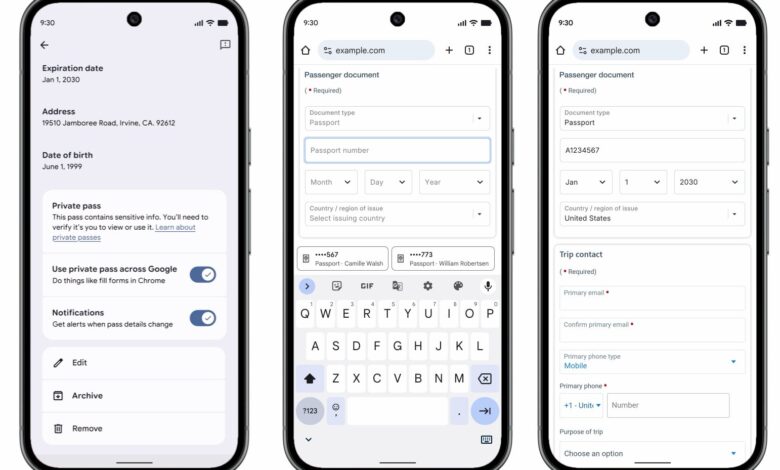
Chrome on mobile is taking a more ambitious step beyond basic autofill. The browser is now being expanded to handle travel and vehicle details that users often need but rarely want to type again on a small screen.
For many people, the biggest gain is speed. Information such as flight details, passport data, driver’s license numbers, and vehicle identifiers can now be pulled into web forms more easily when they are already stored in Google Wallet.
Chrome and Google Wallet are being tied together more closely
Google is deepening the connection between Chrome and Google Wallet so stored information can move more smoothly into online forms. That includes data linked to travel, identity, and vehicles, which are often needed in situations where precision matters and typing mistakes are easy to make.
The change means Chrome can use saved Wallet data to help complete fields such as Known Traveler Number, passport details, and driver’s license numbers. It also extends to vehicle information, including license plate numbers and VIN.
The new autofill scope reaches mobile and desktop
The updated autofill behavior is available in Chrome mobile on Android and iOS, while some related integration is also reaching Chrome desktop. That wider rollout makes the experience more consistent across devices rather than limiting the improvement to phones alone.
Google has also designed the connection as a two-way system. If the data already exists in Wallet, Chrome can use it to fill out a form, and if a user enters the information in Chrome for the first time, it can be saved back to Wallet.
| Type of Data | Examples Mentioned |
|---|---|
| Vehicle | License plate number, VIN |
| Travel | Flight details, Known Traveler Number |
| Identity and Access | Passport details, driver’s license number |
Why the update matters for everyday users
The practical value is clear for anyone who has had to retype the same sensitive information on a phone. Fields tied to travel and vehicles are easy to mistype, especially when users are rushing through a form on a small display.
By letting Chrome draw from Wallet, Google is trying to make those tasks faster and less frustrating without removing the need for user control. The result is a more useful autofill system for people who regularly move between booking sites, travel forms, and vehicle-related services.
Privacy control remains with the user
Google says users still decide how much information is stored in Wallet and which kinds of data are allowed to remain there. That point matters because some of the supported fields involve highly personal details.
In practice, the update is meant to reduce repetitive typing while keeping data management in the user’s hands. For Chrome users on Android and iPhone, it is a notable expansion of what autofill can do when paired with Google Wallet.