


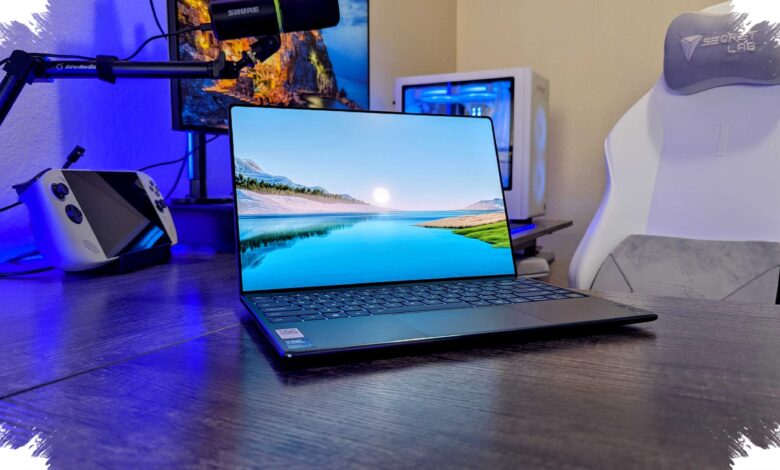
Geekom’s GeekBook X14 Pro is trying to solve a problem that thin-and-light laptops often create: how to stay truly portable without settling for a weak screen or limited performance. At just 1.0 kg and 5.8 mm thick, it targets users who want MacBook Air-class mobility in a Windows machine.
That balance matters most for creative professionals and daily productivity users, because the X14 Pro is not built as a basic travel laptop. It comes with Intel Core Ultra options, 32GB of RAM, and a 1TB SSD, giving it far more headroom than many machines in its size class.
Two processors, one very capable base
The lineup starts with the Intel Core Ultra 5 125H, a 14-core chip that reaches up to 4.5 GHz. The higher-end model steps up to the Core Ultra 9 185H, adding two more cores and a peak speed of 5.1 GHz.
Both versions keep the same core memory and storage configuration, with 32GB RAM and a 1TB PCIe Gen4 SSD. The tested unit used the Core Ultra 9 185H, Intel Arc graphics, 32GB LPDDR5x RAM, and a 1TB M.2 NVMe 4.0 drive.
| Model | Processor | Key Specs |
|---|---|---|
| GeekBook X14 Pro | Core Ultra 5 125H | 14 cores, up to 4.5 GHz, 32GB RAM, 1TB SSD |
| GeekBook X14 Pro | Core Ultra 9 185H | 16 cores, up to 5.1 GHz, 32GB RAM, 1TB SSD |
Connectivity is also unusually generous for such a slim system. The laptop includes two USB4 Type-C 40Gbps ports with Power Delivery, one HDMI port, and a 3.5 mm audio jack.
Geekom also ships a USB-C dongle that adds another USB-C port, two extra USB-A ports, another HDMI output, and RJ45 Ethernet. That accessory makes the machine easier to use as a desktop replacement without immediately reaching for a hub.
The OLED panel is the real standout
Thin laptops often compromise on display quality, but the X14 Pro takes the opposite approach with a 14-inch OLED panel. It offers a 2880 x 1800 resolution, a 120Hz refresh rate, 450 nits of peak brightness, and full DCI-P3 coverage.
Measured color performance backs up the panel’s positioning. DCI-P3 coverage reached 100%, AdobeRGB hit 95%, and color accuracy was rated very high with a Delta-E of 0.48.
The screen also showed strong uniformity, both at 100% brightness and at a reduced 67% setting. Luminance uniformity was described as excellent across multiple brightness levels.
One technical issue was noted on the review unit, however: keyboard brightness controls did not respond properly during testing. The on-screen slider moved, but the actual brightness level did not change in that test.
Performance is strong enough for creative work
Benchmarks put the Core Ultra 9 model in solid territory for a machine this thin. It posted a Geekbench CPU score of 12,297 and a Cinebench 2024 result of 618, while the 1TB SSD reached read speeds of up to 7,004MB/s.
Those numbers translated well into real editing work. Large RAW photo files in Photoshop remained responsive, even when filters were applied and projects involved double-digit layers.
Heavier tasks were handled with confidence too. A 1.4GB stitched panorama TIFF with an 852-megapixel resolution was expanded vertically by about 500 pixels using Generative Expand in 27.5 seconds.
That result was faster than the Lenovo Yoga Slim 7 Aura in the same test, which took 45 seconds. For users who care about edit speed, that gap is difficult to ignore.
Thin, quiet, and surprisingly practical
The X14 Pro does not appear to pay for its performance with excessive heat or distracting fan noise. It is described as staying relatively cool and quiet even under sustained load.
Battery capacity is also substantial for the chassis, at 72Wh. Geekom says the laptop can last up to 16 hours, and the included 65W gallium nitride charger is claimed to reach 80% in about one hour.
The design follows a CNC-machined magnesium alloy unibody construction and looks strongly inspired by the MacBook Air. The frame feels rigid with very little flex, although the extremely thin display itself naturally feels more delicate.
Input remains good, but not perfect
The backlit keyboard offers adjustable lighting and remains comfortable enough for fast typing. Key travel is limited by the slim body, but the typing experience still lands on the practical side.
The trackpad is large, smooth, and responsive, yet only the right third can be clicked. That limitation makes drag-and-drop tasks less convenient, especially in workflows like drawing or erasing in Photoshop.
Audio is acceptable rather than exceptional. Bass is limited by the compact speaker space, though the sound does not become harsh, and the 3.5 mm jack remains available for better audio output.
At $1,199 for the Core Ultra 9 version, the GeekBook X14 Pro undercuts the base 13-inch MacBook Air by $100 while offering twice the RAM and twice the storage. Geekom also includes the port-expanding dongle at no extra cost, which adds another practical advantage for buyers who expect to work across multiple peripherals.